Clients struggling to share access to their
accounts? Get the access you need in minutes with a free trial of Leadsie.
14 day unlimited free trial
Extend until you onboard a client
No credit card required
Keep access to clients if you cancel


With easy one-link access requests for 13+ platforms your campaigns can go live in minutes, not days. Start free today.
Approved by Meta, Google & Tiktok
Keep access to clients' accounts if you cancel
Secure & 100% GDPR compliant


Losing access to an Instagram account is frustrating for anyone, but for businesses, the consequences are usually bigger than just not being able to log in.
A locked account can mean missed customer messages, interrupted campaigns, lost access to content, and confusion over who actually controls the brand’s profile.
In many cases, the issue is not just a forgotten password. Business Instagram accounts are often tied to multiple people, devices, email addresses, and Meta assets, which makes recovery more complicated than it is for a personal profile.
In this guide, you’ll learn:
✔️ The most common reasons businesses lose access
✔️ How to recover your Instagram account based on your situation
✔️ And how to prevent it from happening again
Before trying to recover your account, it helps to understand what may have caused the issue, especially if your Instagram account has been managed by multiple people over time.
Here are the most common reasons:
The good news is that, depending on your situation, there are several ways to regain control of your account.
Below are the most effective ways based on different scenarios:
If you’re locked out but can still access (or regain access) to the email address or phone number linked to the account, this is usually the easiest situation to fix.
This could happen because the account is still connected to:
In these cases, the first step is to check whether you can recover access to that email or phone number (for example, by reactivating the inbox or contacting the person who owns it).
If you can, you should reset your password directly:
If you don’t receive the reset email, check your spam folder or request a new one - these links expire quickly, so older ones may no longer work.
💡 Tip: If your account is linked to Facebook, you may see an option to “Reset using Facebook.” This is common if the account is connected to a Facebook business Page. However, if the Facebook account belongs to a former employee or agency, you’ll need access to that profile for this option to work.
🔗 If you’re also having trouble accessing your Facebook Page or Meta business account, here’s a step-by-step guide on how to regain access to your Facebook Business Page.
If you no longer have access to the email address or phone number linked to the Instagram account, recovery becomes more difficult.
This is one of the most common situations for businesses, especially when the account is tied to:
The challenge here is that Instagram relies on these details to send login links and verify your identity. Without them, you’re essentially locked out of the usual recovery process.
Here’s what you can do:
Before going through Instagram, your best move is to try and recover access to the original email account or phone number.
Most email providers allow you to recover access if you:
Look for options like “Forgot password?” or “Trouble signing in?” and follow the recovery steps. You’ll usually be asked to verify your identity using things like:
❗ Keep in mind: Instagram itself can’t help you recover your email account. If you no longer have access to the email or phone number (and your account isn’t linked to Facebook) your recovery options are limited.
Sometimes, the account is still logged in on a device (even if you can’t log in elsewhere).
If that’s the case, don’t wait, update your details right away.
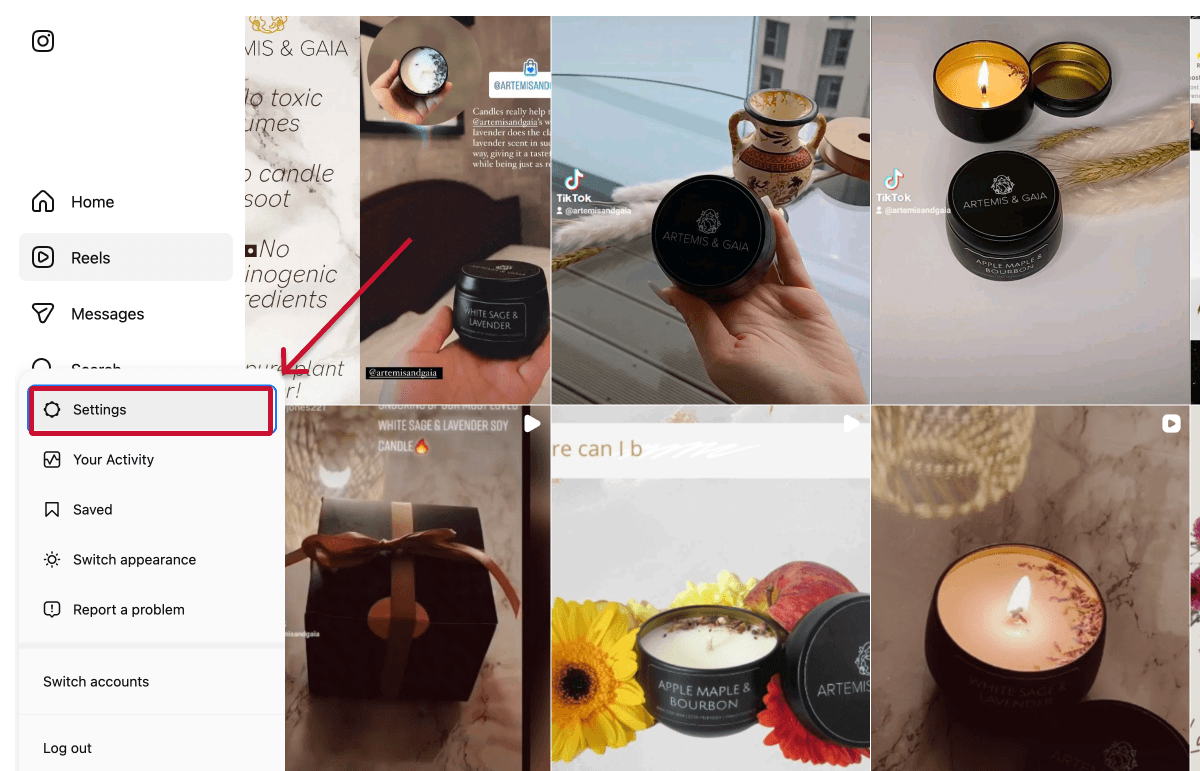
You can update your account details through Meta's Accounts Center:
1. In your Instagram account, head to “Settings.”
2. Click “See more in Accounts Center,” then go to “Profiles and personal details.”
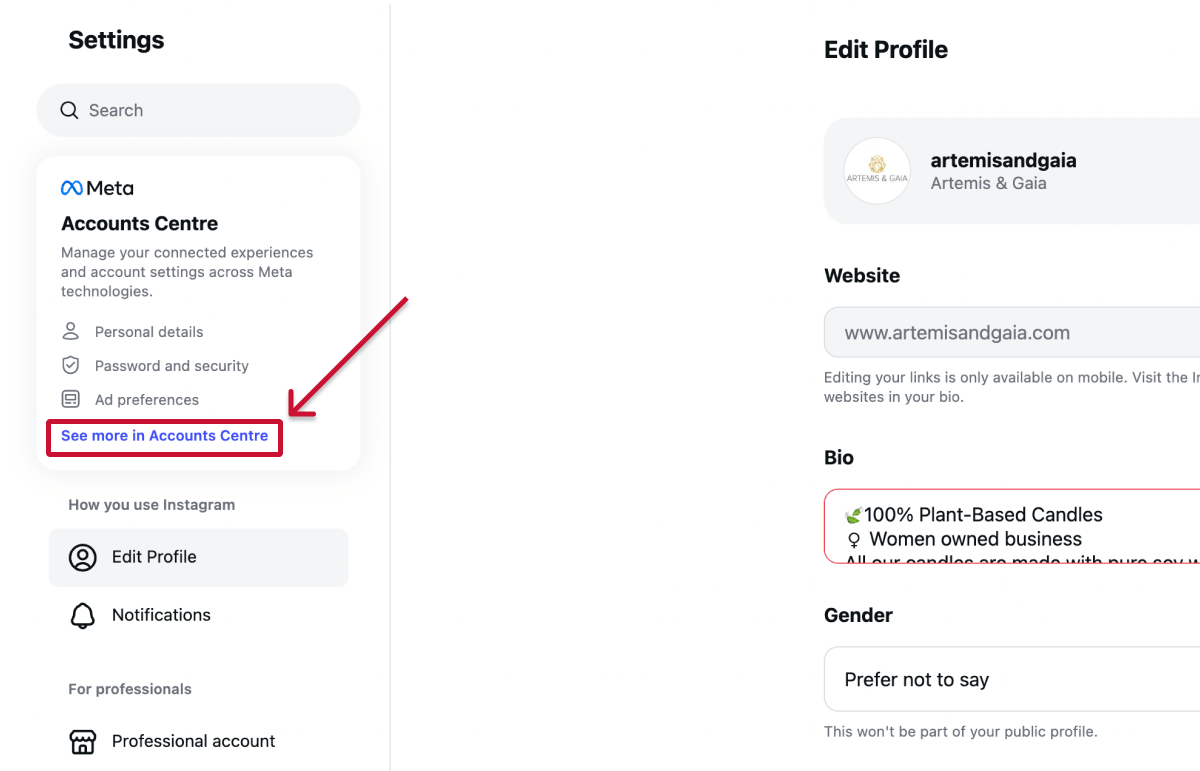
3. Update your email address or phone number.
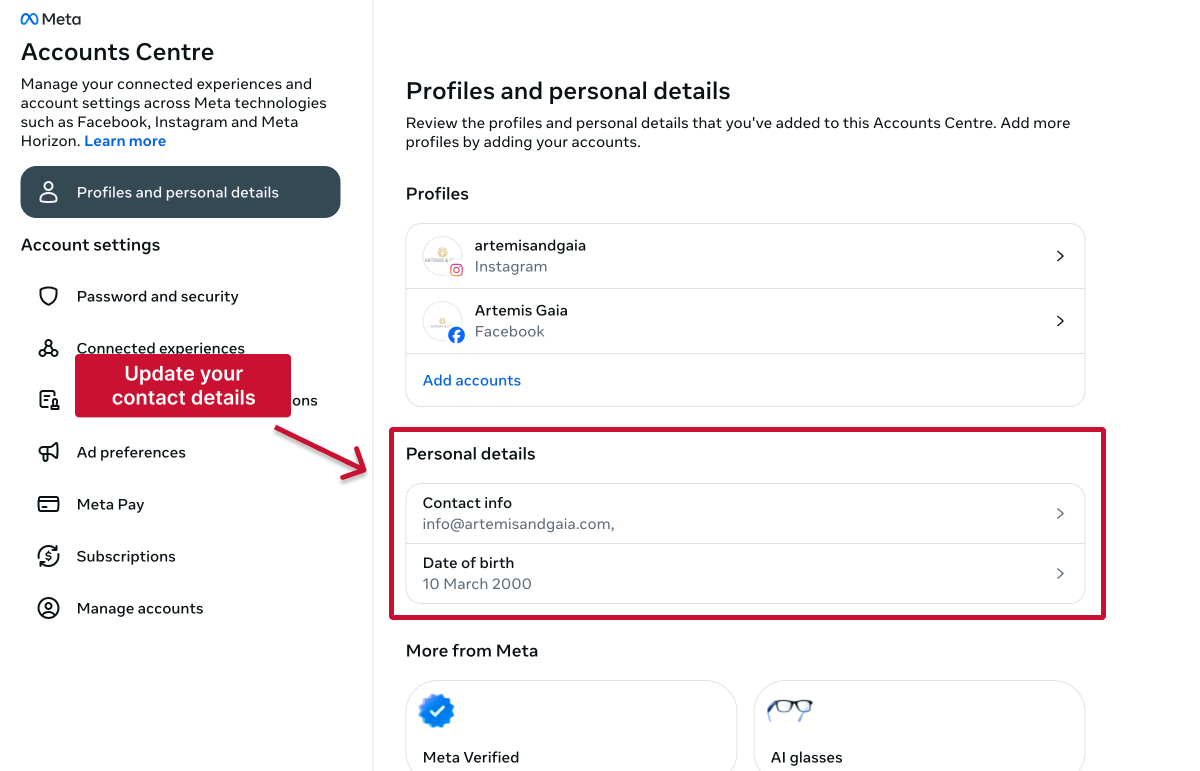
Instagram will usually send confirmation emails to both the old and new email addresses, so make sure you still have access to at least one of them.
If someone else has taken control of your account, timing matters!
In most cases, attackers will change the email address and password first, which blocks you from using standard reset methods. The goal here is to regain control quickly before access is fully locked down.
Here’s what you can do:
If your email address was changed, Instagram may send a message from security@mail.instagram.com with an option to secure your account and reverse the change.
If you still have access to the original email, this is often the fastest way to recover your account, so it’s worth checking your inbox (and spam folder) right away.
If you can’t log in, go to the login screen and click “Forgotten password?” to request a login link or security code.
This may still work if:
If the usual methods don’t work, you can go through Instagram’s account recovery process and submit a request for support.
You’ll typically be asked to verify your identity by:
This step is designed to prove you’re the rightful owner of the account.
Sometimes you’re still logged in on a device, even if login isn’t working elsewhere.
If that’s the case, act quickly:
This can stop the attacker from regaining access.
If your account is connected to a Business Portfolio or Facebook Page, it’s also important to review who still has access and remove any unfamiliar users.
👉 See the section below on how to identify who has access.
If you see any unfamiliar or unauthorized users and you have admin access, remove them immediately to secure your account.
❗Tip: If you can’t remove the user, temporarily switch your professional Instagram account back to a personal account. This can disconnect certain business-level access and help remove unwanted connections.
Just keep in mind:
Sometimes, Instagram will block access and ask you to confirm your identity before letting you log in again.
This usually happens when something about your login or account activity looks unusual. For businesses, this can be triggered by things like:
In these cases, Instagram may ask you to upload ID, complete a video selfie, or confirm account details. The process is automated, so it can feel serious, but it usually works if your details match what was originally used.
If you’re going through this, try to:
If your first attempt doesn’t work, you can usually try again. Many businesses regain access on a second attempt with more accurate information.
If your account is connected to Facebook Page or a Business Portfolio, it’s also worth trying recovery through those channels or directly contacting Meta support.
If your account has been disabled, you’ll usually see a message when trying to log in.
This confirms you’re dealing with a policy or review issue; typically related to Instagram’s Community Standards.
When this happens, your account is no longer visible to others, and standard recovery methods like password resets or login links won’t work.
Instead, you’ll need to follow the on-screen steps to request a review and submit an appeal.
👉 If your appeal is denied or you see a message saying the decision can’t be reviewed, it can feel like a dead end but it’s not always final.
In some cases, businesses are able to regain access by trying again later, submitting a new request with more accurate details, or using alternative support routes (like Meta support if the account is connected to ads or a Business Portfolio).
That said, recovery in these situations isn’t guaranteed and can vary depending on the reason the account was disabled.
👉 If your account was permanently deleted (rather than temporarily disabled), it can’t be recovered. You may be able to create a new account using the same email address, but not always the same username.
If someone outside your business still controls the account, recovery is all about regaining ownership or access.
There are two common scenarios:
For example, the account may have been created using an employee’s or agency’s email, with login details never shared, or with two-factor authentication linked to their device.
Here, your options are limited to either regaining access to the original email or phone number, or working with the person who set up the account to either share the login details, reset access, or transfer control to your business.
A Business Portfolio allows multiple people to access an Instagram account with different permission levels. The key factor here is who owns that portfolio.
Sometimes it belongs to your business. Other times, it may belong to a former agency or another external partner.
If your business doesn’t have full control, you won’t be able to:
👉 If you still have some level of access, your first step is to identify who has full control of the account. Find out how here.
In most cases, you’ll need them to grant you access or transfer control of the account. If you’re unsure how to request access properly, you can follow this step-by-step guide.
👉 If you don’t have access at all, you may need to request full control of the Business Portfolio through Meta support. This is a more formal process and typically requires you to verify ownership.
To submit a request, you’ll need to provide:
You can learn more about this process here.
If you’re unsure who controls your account, your first step is to identify who actually has access and where that access is coming from.
This isn’t always straightforward. Access can come from:
If your account is connected to a Business Portfolio, you can start by checking permissions in Meta Business Suite.
Here’s how to find it:
1. Navigate to "Settings" in Business Suite.
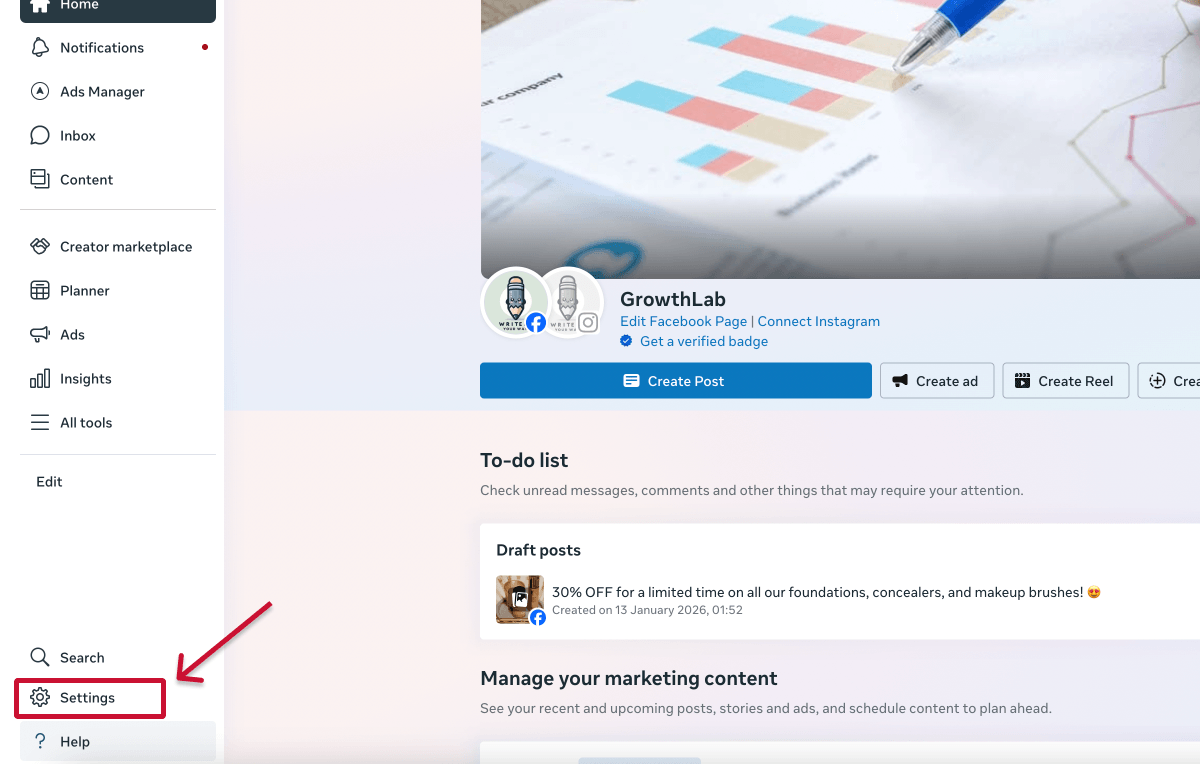
2. Open the People section under the Users tab.

Here, you’ll see who has access to the Business Portfolio and what level of control they have.
It’s also worth checking the Partners section, as agencies or external businesses may have been granted access through their own portfolios.
If you can identify who has access, whether they’re part of your team or an external partner, reaching out to them directly is usually the fastest way to regain access.
If your Instagram account is linked to a Facebook Page, it’s worth checking who has access there through the Page settings.
Here’s how to find it:
1. Switch into your Facebook Page (use the profile switcher in the top right corner).

2. Click your Page profile picture, then go to Settings & privacy > Settings.

3. In the left menu, open Page setup > Page access.
.png)
Here, you’ll see who has access to the Page and what level of control they have.
Depending on their permissions, people with Page access may still be able to manage parts of your Instagram account, such as posting content or handling messages, even if they don’t have direct login access.
❗ This doesn’t guarantee they’re the ones with full control or login details, but it can help you identify who is actively managing the account or where access might be coming from.
If your account isn’t connected to a Business Portfolio or Facebook Page, and you don’t have login access, Instagram doesn’t provide a clear way to see who controls it.
In many cases, figuring out who controls an Instagram account will leave you:
❌ Clients not knowing who originally set up the account
❌ Previous agencies still having access after a poor handover
❌ Multiple team members (account managers, media buyers, etc.) needing to confirm details internally
❌ Access spread across different assets (Facebook Page, Business Portfolio, ad account)
Trying to resolve this manually is time-consuming, especially when you’re handling multiple clients at once.
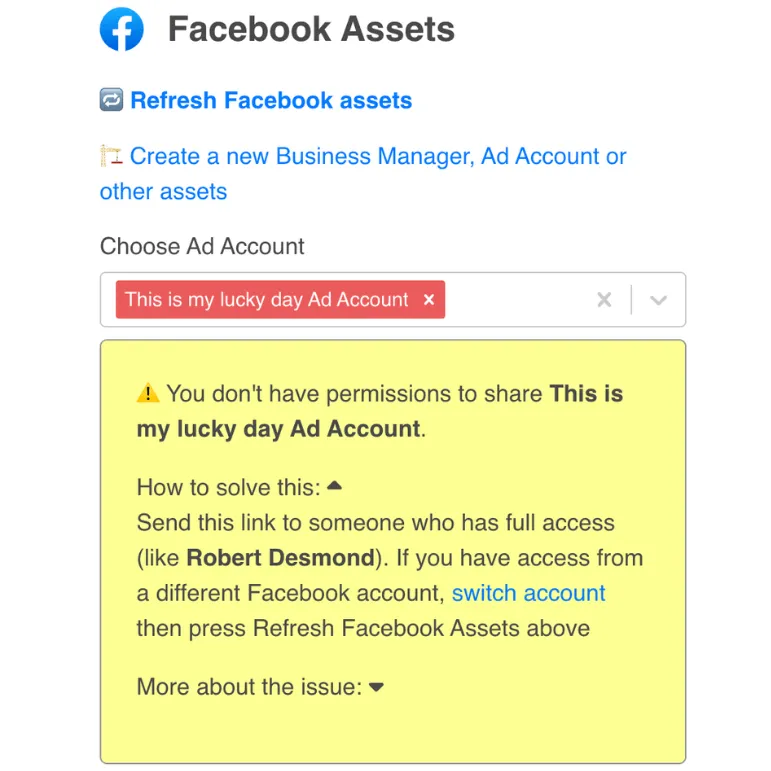
Instead of repeating the same checks and chasing different people every time, tools like Leadsie’s Access Detective🕵️ are designed to make this process scalable.
All you have to do is send a secure access request link to your client, and Access Detective will instantly show who has access, what’s blocking it, and who they need to contact.
Once you’ve regained access, it’s worth taking a few steps to make sure you don’t end up in the same situation again.
A few simple changes to how you handle logins, permissions, and ownership can make a big difference and help you keep full control of your account going forward.
One of the most common reasons businesses lose access is that the account is tied to a personal email address; often belonging to a founder, employee, or agency.
A better approach is to use a shared business inbox (like marketing@ or team@) that more than one trusted person can access. This way, the account isn’t dependent on a single individual.
This makes it much easier to recover the account, manage access across your team, and avoid disruption if someone leaves or stops working with you.
💡 Tip: If your account is currently linked to a personal email, update it as soon as you regain access.
Sharing login details across your team might feel like the easiest option, but it often leads to confusion around ownership and makes it harder to manage access later on.
A better approach is to manage access through a Business Portfolio. This means adding your Instagram account as an asset, then assigning roles and permissions to the right people.
Once set up, you can:
This becomes especially important if you’re working with agencies, freelancers, or multiple team members managing your account.
🔎 Bonus: For larger teams, relying on individual Facebook profiles can still create risks. Some businesses are moving toward managed Meta accounts, which separate personal and business access and give companies more control over access.
Even with the right setup, access issues can still happen if everything depends on a single person.
This is one of the most common failure points for businesses, especially when one employee, founder, or agency ends up being the only person with full access.
Problems usually arise when:
If that person becomes unavailable, access is very difficult to recover.
To avoid this, make sure access is shared responsibly across your team. At a minimum:
✔️ Ensure more than one trusted person has full access
✔️ Store recovery details (like backup codes) in a secure, shared password manager or internal system
✔️ Use shared authentication methods where possible
Access tends to build up over time, especially if you’ve worked with multiple employees, agencies, or freelancers.
And this is exactly how businesses end up with former team members or external partners still connected to their accounts.
To avoid this, make it a habit to review access regularly. Every few months, take a few minutes to:
This helps reduce the risk of unauthorized access, confusion around ownership, and potential security issues down the line.
If you lose access to your account, it’s common to come across people or services claiming they can recover it for you for a fee.
In most cases, these are scams.
Businesses in this situation are often under pressure to regain access quickly, which makes these offers seem tempting. But there are no legitimate third-party services that can restore access outside of Instagram’s official recovery process.
As a general rule, be cautious of:
❗ Important: Instagram does not charge for account recovery, and it won’t ask you to work through third parties to regain access.
Many access issues start with how access is granted in the first place; often through shared logins, emails, or informal handovers.
A more reliable approach is to use a secure client onboarding tool.
For example, tools like Leadsie let agencies send a secure access request link to a client, who can grant access to their Instagram account in a few clicks, without sharing login details or navigating Meta’s interface manually.
This reduces the chances of:
Hiring a marketing agency, freelancer, or consultant? Giving them access to your marketing accounts shouldn't require endless emails, confusing permission settings, or sharing login credentials (too risky).
If your agency sent you a long PDF and asked you to navigate Meta Business settings and 5 other social platforms to grant them access, send them over to leadsie.com to automate this part of client onboarding for you.
With Leadsie, you can securely share access to Meta, Google, LinkedIn, TikTok, Shopify, and 14+ other marketing platforms via a secure link in just a few clicks.
✅ Approve only the permissions your agency actually needs
✅ No need to share passwords or sensitive login information
✅ Get campaigns, ads, and marketing projects started faster
✅ Keep account access secure with 100% GDPR and CCPA-compliant workflows
💬 "I never want to do onboarding without Leadsie!" - Alyssa, Meta Ads Manager
🎁 Start your free 14-day trial today —no credit card required.
P.S. It's risk-free, and you get to keep your account connections after the trial ends. 🙌

Nina is an SEO content specialist with expertise in B2B SaaS. She helps businesses increase organic traffic with strategic, high-quality content. Outside of work, you’ll find her sailing somewhere in the Mediterranean.


Clients struggling to share access to their
accounts? Get the access you need in minutes with a free trial of Leadsie.
Approved by Meta, Google & Tiktok
Keep access to accounts if you cancel
Secure & 100% GDPR compliant
Delete your onboarding PDF. Cancel the video call. Just send one link, and get hassle-free access to 13+ platforms in minutes. Start free today.
Approved by Meta, Google & Tiktok
Keep access to clients' accounts if you cancel
Secure & 100% GDPR compliant
Yes, in some cases. Changing the password removes login access, but it doesn’t automatically remove Business Portfolio or Facebook Page access. You’ll need to review permissions in Meta and remove any users or partners who should no longer have access.
Typically, you’ll need to provide documentation such as business registration details, domain ownership, or proof that the account represents your brand. Meta may also ask for ID verification and a signed attestation when reviewing ownership requests.
The safest approach is to grant access through Meta Business Portfolio or a specialized client onboarding tool like Leadsie, rather than sharing login details. This keeps ownership tied to your business and allows you to control or remove access at any time.
Yes. If the account is connected to a Business Portfolio, multiple users can have full control depending on their permissions. This is useful for teams, but it also means it’s important to regularly review who has that level of access.
Instagram doesn’t show a full list of active users, but you can review login activity and devices in your security settings. This can help you spot unfamiliar access, though it won’t always show who has permission through Meta.
Questions unanswered? Check out our help center or get in touch 🤠
© Leadsie Ltd 2024