Clients struggling to share access to their
Google Ads
accounts? Get the access you need in minutes with a free trial of Leadsie.
14 day unlimited free trial
Extend until you onboard a client
No credit card required
Keep access to clients if you cancel


With easy one-link access requests for 13+ platforms your campaigns can go live in minutes, not days. Start free today.
Approved by Meta, Google & Tiktok
Keep access to clients' accounts if you cancel
Secure & 100% GDPR compliant


Few things are more frustrating than logging into Google Ads and seeing the dreaded “Account Suspended” banner. 🚫
In 2025 alone, Google suspended 24.9 million advertiser accounts.
But part of what makes suspensions so stressful is that the reason is often vague. Many advertisers end up spending weeks, sometimes months, trying to figure out what actually triggered the suspension, going through multiple appeals and support conversations along the way.
The good news is that many suspensions can be resolved, but rushing into an appeal or creating a new account too quickly can often make things worse.
If your Google Ads account gets suspended, don’t panic and don’t immediately create a new account. That’s one of the fastest ways to make the situation worse.
Instead:
✔️ Read the suspension notice carefully and identify the policy category
✔️ Check for warning emails, ad disapprovals, or missed verification requests
✔️ Audit your website for trust issues, missing policies, broken pages, or inconsistent business information
✔️ Review billing details, payment methods, and any recent account changes
✔️ Check who has access to the account and remove any suspicious or inactive users
✔️ Fix the likely root cause before submitting an appeal
✔️ Keep your appeal short, factual, and focused on the corrective actions you took
✔️ Avoid submitting repeated appeals without new fixes or information
✔️ Do not create another Google Ads account for the same suspended business or domain
Google Ads accounts usually get suspended when Google detects policy violations, suspicious behavior, billing issues, or trust signals that make the account appear risky to users or the ad ecosystem.
Sometimes the issue is obvious. Other times, suspensions are triggered by automated systems detecting patterns that look suspicious, even if the business itself is legitimate.
Here are the most common reasons Google Ads accounts get suspended:
What Google means: Your ads or website don’t provide clear, honest, or complete information.
What this looks like in real life:
A lot of suspensions here aren’t about obvious scams. In many cases, Google simply doesn’t see enough trust signals to confidently verify that the business is legitimate. Even real businesses can get flagged if their website is deemed incomplete, vague, or unclear.
What Google means: You’re trying to bypass its review systems or policies.
Common triggers:
This is one of the most serious suspension categories because Google sees it as an attempt to work around enforcement systems.
Even unintentional behavior like having multiple accounts linked to the same business can trigger this. Google looks at patterns, not just intent.
Sometimes the issue isn’t your ads, it’s your payments.
Common causes:
Billing-related suspensions are often triggered by trust or fraud-prevention systems rather than policy violations in your ads themselves.
🔎 Note: Payment verification requests are sometimes sent through Google Payments emails (payments-noreply@google.com), so it’s worth checking your inbox carefully before assuming the suspension is ad-related.
Your landing page is just as important as your ad copy in Google’s review process.
Common problems:
Even small inconsistencies, like your business name being formatted differently across your website, domain registration, and billing, can trigger trust issues.
Some products, services, and types of content are either prohibited entirely or heavily restricted on Google Ads.
Examples include:
There are also restricted industries (like finance, healthcare, crypto, and gambling) that require extra compliance or certification.
🔎 Note: You don’t necessarily need to be doing something illegal to trigger a suspension. Just operating in a sensitive category without proper disclosures or setup can be enough for Google to flag the account.
Google increasingly requires advertisers to verify their identity.
Common triggers:
Verification issues are one of the more common causes of unexpected suspensions, especially for smaller businesses managing accounts themselves.
In many cases, advertisers simply miss the verification email or don’t realize that incomplete or inconsistent information across their website, billing details, and legal business records can create problems during the review process.
If Google suspects your account has been compromised, it may suspend it to protect you.
Triggers include:
This type of suspension is often temporary but still requires action from the account owner.
To diagnose a Google Ads suspension, you need to identify the specific trigger behind the policy category shown in your account.
You’ve probably seen a message like “misrepresentation” or “circumventing systems,” but these are broad categories, not exact explanations.
Here’s how to narrow down the actual trigger before appealing:
Go back to your suspension message inside Google Ads - check both your email and the in-account notification.
You’ll usually see:
These labels are broad and often don’t tell you what specifically caused the issue.
Before a full suspension, Google often sends warnings.
Look for:
Many suspensions happen because something was missed or ignored, especially verification deadlines or repeated disapprovals.
This is partly because Google often uses automated review systems and intentionally provides broad policy categories rather than revealing the exact trigger.
Ask yourself:
Suspensions are often triggered shortly after a change. If you can pinpoint what changed, you’re already much closer to identifying the root cause.
Now connect the label you received to actual triggers:
Check:
Check:
Check:
Check:
Remember: Google is evaluating trust, not just compliance.
When reviewing your site, Google is essentially asking: “Would a user feel confident engaging with this business?”
Check the fundamentals:
Even small inconsistencies, like your business name being formatted differently across platforms, can raise trust flags and contribute to a suspension.
Google Ads looks at account-level signals too, especially when it comes to security and ownership. If something appears off, it can raise flags.
Check:
Keeping user access controlled and transparent helps reinforce that your account is legitimate and secure.
Shared logins instead of individual access? If you’re unsure how permissions should be set up, here’s a guide on giving and requesting Google Ads account access.
❗ Important: If you believe your account has been compromised or accessed without permission, report it through Google’s compromised account form as soon as possible.
Google Ads suspensions often come from a combination of smaller issues, not a single obvious violation.
For example:
Individually, these might not trigger a suspension. But together, they can signal risk, and that’s often what leads to your account being flagged.
Once you’ve identified the likely cause, take the time to fully fix it before appealing.
Before you appeal, you should be able to answer:
If you can’t answer those clearly yet, it’s worth spending more time here.
To appeal a suspended Google Ads account, you’ll need to fix the likely issues first, then submit an appeal through the suspension notice.
Your appeal should show that:
✔️ You understand the suspension
✔️ You took corrective action
✔️ Your account now complies with Google’s policies
Many appeals are initially reviewed through automated systems, which is why vague, emotional, or incomplete appeals often fail.
In most cases, you’ll find the appeal link directly in the suspension email or inside your Google Ads dashboard notification
Google will usually guide you to the appropriate appeal form based on the suspension type.
Note: If advertiser verification is required, complete that first. Some advertisers can’t move forward with appeals until verification is successfully completed.
A strong appeal should explain:
✅ What suspension category you received
✅ What likely caused it
✅ What changes you made
✅ Why the account now complies with Google’s policies
Avoid:
❌ Angry or emotional language
❌ Submitting appeals before fixing the issue
❌ Guessing without evidence
❌ Creating a new account to bypass the suspension
Depending on the suspension type, it can help to mention:
If relevant, you can also reference supporting evidence like updated policies, corrected business information, or resolved payment issues.
💡 Tip: Google is more likely to respond well to appeals that show concrete corrective action rather than general promises to comply.
In some billing-related suspensions, Google Ads may also require you to verify your payment method before your appeal can even be reviewed.
You don’t need to copy this word-for-word, but a good appeal usually follows this structure:
For example:
“After reviewing our account and website, we identified issues related to [X]. We have since updated [specific changes], completed verification requirements, and reviewed our account for compliance with Google Ads policies. We believe the issue has now been resolved and request a reconsideration of the suspension.”
Once your appeal is submitted, patience matters.
Google doesn’t publish a strict limit but repeatedly appealing without fixing issues can reduce your chances of successful review. In some cases, Google may even temporarily stop processing appeals if it detects repeated or excessive submissions.
Review times vary depending on:
Some appeals are resolved within a few days, while others can take significantly longer.
While you wait, keep an eye on both your account and email inbox in case Google requests additional information or documentation.
A rejected appeal doesn’t always mean your account is permanently unrecoverable. However, it usually means Google Ads still sees unresolved risk signals somewhere in your account, website, billing setup, linked accounts, or business practices.
If your appeal is rejected:
❗ Note: Submitting another appeal without making meaningful fixes usually won’t improve your chances of reinstatement.
Once your account is reinstated (or even if you’re setting up a new compliant account in the future) prevention becomes just as important as recovery.
Here are the best practices worth keeping in place long-term.
Over time, it’s common for old employees, freelancers, agencies, or temporary collaborators to still have access to your account long after they need it. That creates unnecessary risk, especially if someone makes unauthorized changes, uses shared logins, or connects the account to other manager accounts you don’t recognize.
To remove unwanted users from Google Ads:
It’s also worth reviewing each person’s access level. Not everyone needs admin permissions. Where possible, give users the lowest level of access they need to do their job.
💡 Tip: If you’re a marketing agency managing multiple client accounts, reviewing and managing access manually can quickly become messy, especially when onboarding new clients or offboarding old ones.
A client onboarding tool like Leadsie is particularly helpful here.
Instead of chasing clients through long email threads or trying to figure out who still has access, Leadsie gives agencies a simpler way to request, manage, and review access to 14+ client platforms, including Google Ads, using one secure access link.
Clients can approve access in under five minutes, while agencies get a centralized view of connected accounts, making it easier to review who has access, stay organized across multiple clients, and offboard accounts cleanly when a relationship ends.
Google Ads accounts are frequent targets for phishing attempts and fake support scams.
A few good habits can help protect your account:
If something feels suspicious, verify it directly through your Google Ads account instead of relying on the message itself.
Before launching anything new, take a step back and review it critically.
Ask yourself:
This becomes even more important in sensitive industries like supplements, finance, healthcare, crypto, or weight loss.
For businesses in higher-risk industries, having documentation ready can make future reviews and appeals much easier.
That can include:
This is especially useful if you sell branded products, operate as a reseller, or advertise in regulated industries.
Trademark-related suspensions are more common than many advertisers realize.
If you sell or promote branded products:
Even legitimate businesses can get flagged if Google believes the experience resembles counterfeit activity or impersonation.
Google’s automated recommendations and AI-generated suggestions can be useful starting points, but they shouldn’t be published without review.
Automatically generated:
…can sometimes create mismatched intent, misleading phrasing, or policy-sensitive claims without you realizing it.
Human review still matters.
Potentially, yes. Google Ads does evaluate linked accounts and account relationships during suspension and policy reviews, which means repeated policy violations or multiple suspended client accounts connected to the same MCC account could potentially raise additional risk signals.
That said, Google does not publicly explain exactly how MCC-level enforcement works, and there’s no official statement saying that a single suspended client account will automatically cause an MCC suspension.
To reduce risk:
Whether you manage ad campaigns, social media, or analytics, getting clients’ accounts set up shouldn’t slow you down.
With Leadsie, you can request and receive access to all your clients’ accounts using just one secure link. 🔒
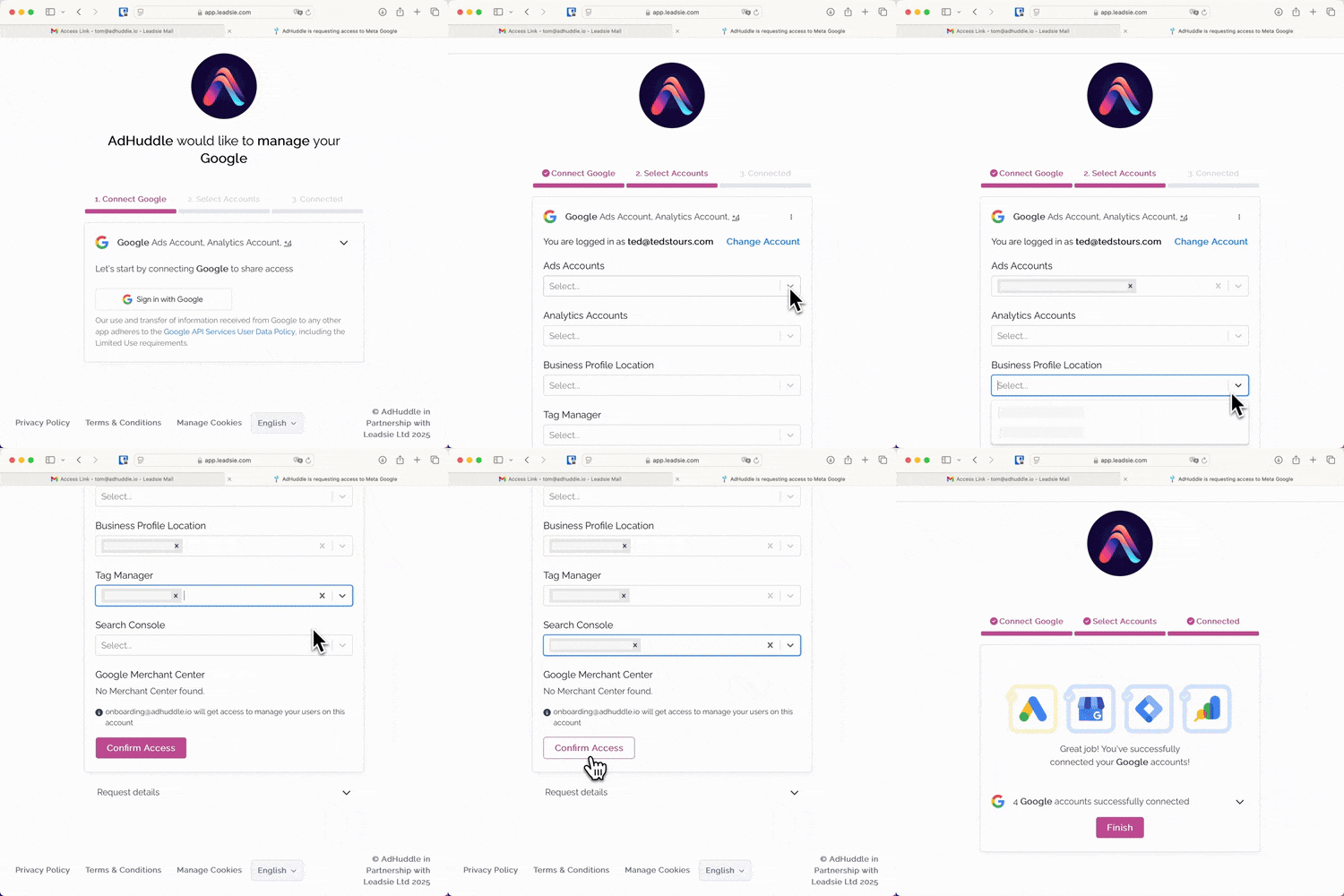
Leadsie is a client onboarding software that simplifies requesting and giving access to marketing assets, social media, and ad accounts with one secure link. Get access to your clients’ or influencers’ Facebook, Instagram, Google, TikTok, Shopify, LinkedIn, and other accounts without sharing passwords.
Leadsie handles the most time-consuming aspect of onboarding clients: managing access and adding users. It keeps permission management secure and organized as your agency scales.
✅ Minimize frustrating chaser emails and calls for access
✅ Reduces your agency's turnaround time by over 50%
✅ Scales with your agency as you grow beyond onboarding 5-10 new clients a week
✅ Makes it possible to get access to 23+ social, marketing, and analytics platforms at once
✅ Start billable work and billing cycles for your new clients without delays
🎁 Try a free 14-day trial on us—no credit card needed!
P.S. It's risk-free, and you get to keep your account connections after the trial ends. 🙌
💬 "I never want to do onboarding without Leadsie!" - Alyssa, Meta Ads Manager
🎁 Start your free 14-day trial today —no credit card required.
P.S. It's risk-free, and you get to keep your account connections after the trial ends. 🙌

Nina is an SEO content specialist with expertise in B2B SaaS. She helps businesses increase organic traffic with strategic, high-quality content. Outside of work, you’ll find her sailing somewhere in the Mediterranean.


Clients struggling to share access to their
Google Ads
accounts? Get the access you need in minutes with a free trial of Leadsie.
Approved by Meta, Google & Tiktok
Keep access to accounts if you cancel
Secure & 100% GDPR compliant
Delete your onboarding PDF. Cancel the video call. Just send one link, and get hassle-free access to 13+ platforms in minutes. Start free today.
Approved by Meta, Google & Tiktok
Keep access to clients' accounts if you cancel
Secure & 100% GDPR compliant
When a Google Ads account is suspended, your ads stop running immediately and you can no longer launch new campaigns. The account becomes mostly read-only, although you can still access reports and submit an appeal.
Some linked accounts may also be reviewed, and the suspension usually remains in place unless your appeal is successful.
Sometimes, yes, but only if the original issues were properly resolved.
If Google still sees the same trust or policy problems tied to the domain, any new account connected to it may also get suspended.
There’s no fixed timeline. Some appeals are resolved within a few days, while others can take several weeks or longer depending on the type of suspension and whether related accounts are also involved.
Repeatedly submitting appeals without adding new fixes or information can also slow the review process down.
Yes. In most cases, suspended Google Ads accounts become read-only rather than completely inaccessible.
However, it may eventually become inaccessible after an extended period, so it’s a good idea to export important data early.
It depends on the complexity of the suspension.
Some issues, like verification problems or obvious website fixes, can often be resolved internally.
More complex suspensions, especially things like “circumventing systems” or linked-account issues, may require deeper investigation and experience with Google Ads policies.
Just be cautious of services promising “guaranteed reinstatement.” No third party can guarantee that Google will reverse a suspension.
Possibly.
Google may review accounts connected through:
In some cases, related accounts may also be suspended during the review process until the original issue is resolved
Questions unanswered? Check out our help center or get in touch 🤠
© Leadsie Ltd 2024