Clients struggling to share access to their
accounts? Get the access you need in minutes with a free trial of Leadsie.
14 day unlimited free trial
Extend until you onboard a client
No credit card required
Keep access to clients if you cancel


With easy one-link access requests for 13+ platforms your campaigns can go live in minutes, not days. Start free today.
Approved by Meta, Google & Tiktok
Keep access to clients' accounts if you cancel
Secure & 100% GDPR compliant



83% of marketers say sponsored influencer content generates more conversions than brand content, yet many agencies struggle to scale it through paid media.
Boosting posts offers limited control over targeting and optimization, while brand-run ads rarely match the authenticity of organic influencer content.
Partnership ads solve this by letting agencies run ads directly from a creator’s handle on Instagram and Facebook. But the permissions, setup, and optimization process can be confusing without a clear workflow.
In this guide, we’ll go over how you can create and run partnership ads for influencer campaigns step by step. 👇
Agencies and brands can create partnership ads in Meta Ads Manager. There are two main ways to set them up - jump straight to the method you need:
Partnership ads (formerly called branded content ads) are a type of Meta ad that allows brands to run paid campaigns using a creator’s account. They are Meta’s current solution for influencer allowlisting (also known as whitelisting).
Instead of appearing only from a brand’s account, the ad can show the creator’s handle, or both the creator and brand together, in the ad header.
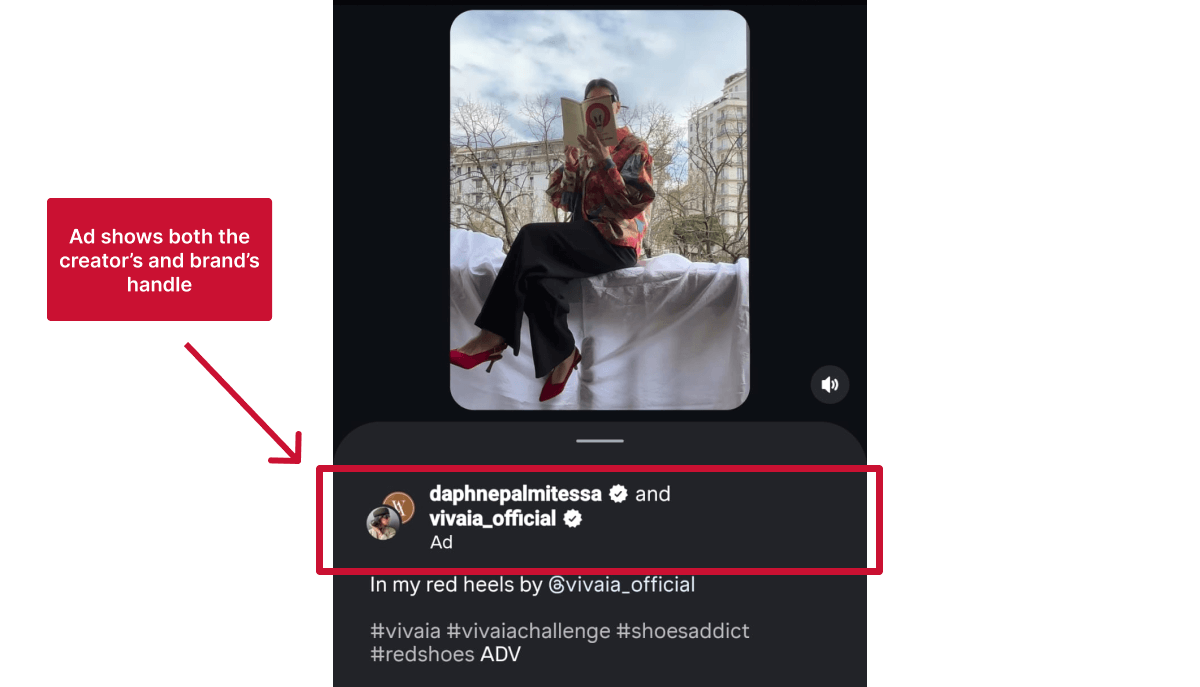
Meta uses signals from both the brand and the creator accounts to deliver and optimize the ad. This combined data helps improve targeting, ranking, and overall performance compared to ads run from a brand account alone.
Before partnership ads, advertisers had to rely on Meta’s branded content tools to promote influencer posts.
This worked, but it came with limitations:
❌ Permissions had to be managed manually (brands had to request access to each post individually, with creators approving every request)
❌ Campaigns depended heavily on boosting existing posts (harder to test new creatives or scale campaigns without asking the creator to post again)
❌ Scaling across multiple creators required constant back-and-forth (working with multiple creators meant coordinating approvals and access for each one individually)
Partnership ads are a more flexible and scalable evolution of that system. They allow you to:
✅ Run ads from a creator’s handle without posting to their feed (dark posting)
✅ Use both existing influencer content and new ad creatives
✅ Manage everything directly in Ads Manager without constant back-and-forth
One of the biggest advantages of partnership ads is how Meta uses signals from both the creator and the brand to deliver ads.
This is often referred to as signal stacking.
Instead of relying only on your brand’s ad account data, Meta can also use:
In simple terms: your ads benefit from the creator’s credibility and your targeting.
Partnership ads also give you flexibility in how the ad appears in the feed.
You can choose between:
Creator-only ads often feel more native and can drive higher engagement, while dual identity can reinforce brand recognition, especially in retargeting campaigns.
For example, a skincare brand working with a beauty influencer can run ads that appear directly from the influencer’s Instagram account.
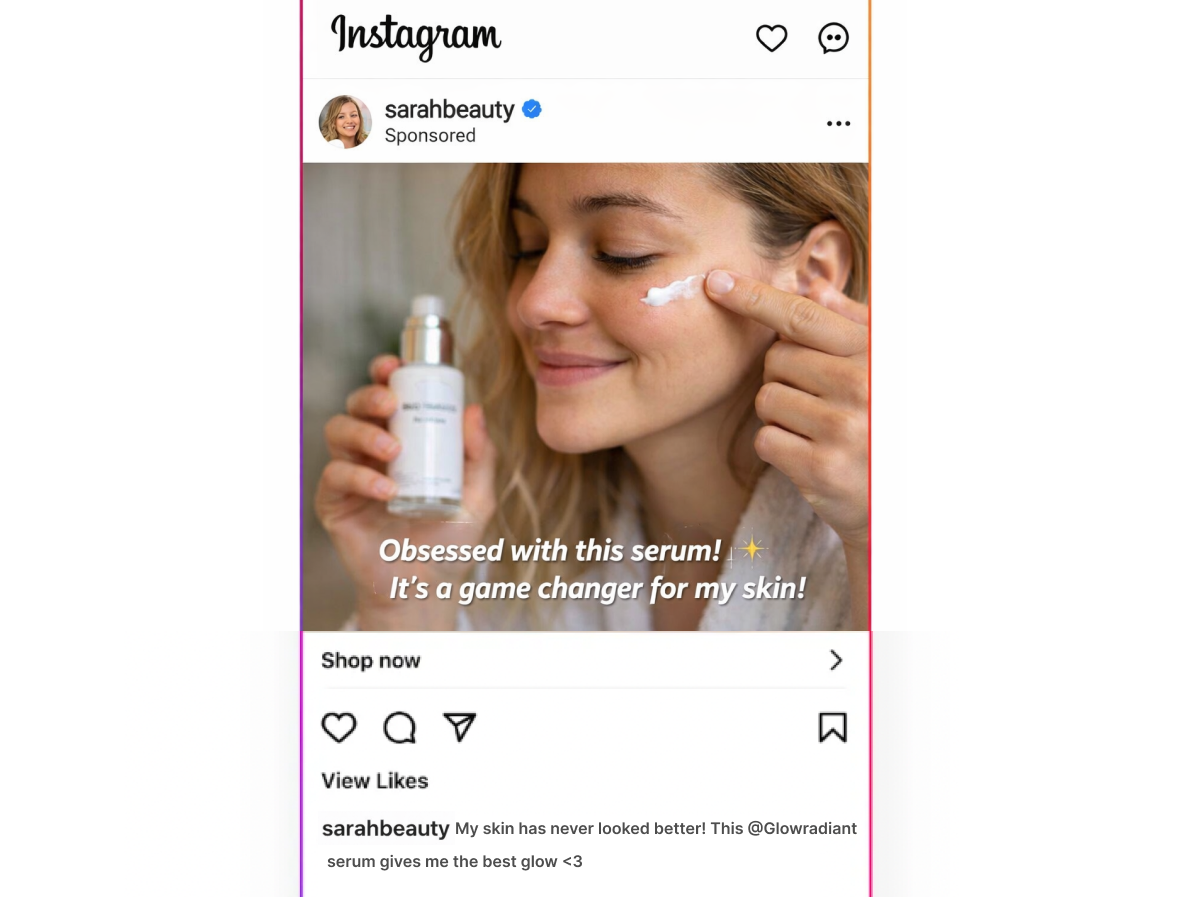
To users, the ad looks like a creator recommendation rather than a traditional brand ad, which often leads to stronger engagement and conversion rates.
Boosted posts are ads created from existing posts published on a brand’s or creator’s Instagram account or Facebook Page. Boosting is the simplest way to increase the reach of that post to a wider audience.
Boosted posts are created directly from the post interface or Meta Business Suite and offer limited targeting, placement, and optimization options compared to Ads Manager campaigns.
Partnership ads are created in Ads Manager and give agencies full control over targeting and optimization. They can use an existing creator post or new brand-supplied creative, but the ad still runs from the creator’s handle (or both creator and brand). To run partnership ads, the creator must grant permission.
Here’s a quick overview:
Use boosted influencer posts when:
Use partnership ads when:
🔗 Related article: How to Request Access to a Facebook Ad Account
For agencies managing influencer marketing at scale, partnership ads bring a few important advantages:
✔️ Achieve stronger engagement than brand-only ads
Meta reports partnership ads deliver 13% higher click-through rates and 19% lower CPA compared to standard ads, while influencer content used in ads can generate up to 4x higher CTR than brand creative.
The result? Better campaign metrics, stronger case studies, and clearer performance justification to clients.
✔️ Scale and reuse high-performing influencer content
Agencies can amplify top-performing creator posts without requiring repeated influencer publishing. This extends the lifespan and ROI of each collaboration while keeping campaigns consistent and scalable.
✔️ Centralize reporting and optimization in Ads Manager
Partnership ads live inside Ads Manager, allowing agencies to manage budgets, placements, A/B testing, and reporting alongside other paid campaigns.
This makes influencer marketing measurable and accountable, especially when clients expect performance data beyond vanity metrics.
To run partnership ads, you need permission from the creator whose handle will appear in the ad.
In most cases, these permissions are now requested through Meta’s Partnership Ads Hub, which centralizes access in one place.
There are two types of partnership ad permissions: content-level and account-level.
Content-level permissions allow brands and agencies to promote individual posts, stories, or reels as partnership ads. Creators can typically grant access by enabling boosting on a branded content post or sharing a partnership ad code.
This option is best when:
Because access is limited to selected posts, creators retain tight control over which content can be used in ads.
Account-level permissions allow brands and agencies to create partnership ads from a creator’s handle without requesting permission for each post.
This option is best when:
Account-level permissions reduce the need for repeated approvals and make influencer campaigns easier to scale and optimize.
If you need a step-by-step walkthrough of how to request partnership ad permissions, check out our guide on how to allowlist an influencer for Meta ads.
✅ Want easier access to influencer accounts?
Leadsie is a client onboarding tool that lets creators approve ad access via a single secure link, eliminating the need to navigate Meta’s permission settings or deal with repeated back-and-forth during setup.
Learn more about using Leadsie for influencer whitelisting.
To run partnership ads on Instagram and Facebook, both the brand (advertiser) and the creator must meet Meta’s eligibility requirements:
✔️ Brands must use eligible business accounts
Partnership ads can only run from Facebook Pages, professional-mode profiles, or Instagram professional accounts connected to an ad account.
If the brand can run Meta ads, it’s usually eligible.
🔗 Related article: How to Create and a Facebook business Page
✔️ Creators must have professional accounts with an active presence
Creators appearing in partnership ads need Instagram professional accounts or Facebook Pages and an authentic, established presence.
Most active influencers already qualify.
🔗 Related article: How to Change Your Instagram Personal Profile to a Business Account
✔️ Content must follow Meta policies
Posts used in partnership ads must comply with Meta’s Community Standards, branded content rules, and intellectual property policies.
Non-compliant content can’t be promoted, even if the accounts are eligible.
✔️ Creator permission is required
Agencies need content-level or account-level partnership ad permissions from the creator to run ads from their identity.
Without this approval, partnership ads can’t be created.
⚠️ Note: Partnership ads are currently not supported on Threads.
Partnership ads are created in Meta Ads Manager and follow the standard campaign setup process, with an additional step to add the creator identity.
The workflow differs slightly depending on whether you’re running a one-off campaign or working with creators on an ongoing basis, but we’ll show you both ways.
📝 Before you begin, make sure:
Now, let’s walk through the setup process:
Step 1. Go to Ads Manager and click “Create.”

Step 2. Choose the objective that matches your campaign goal.
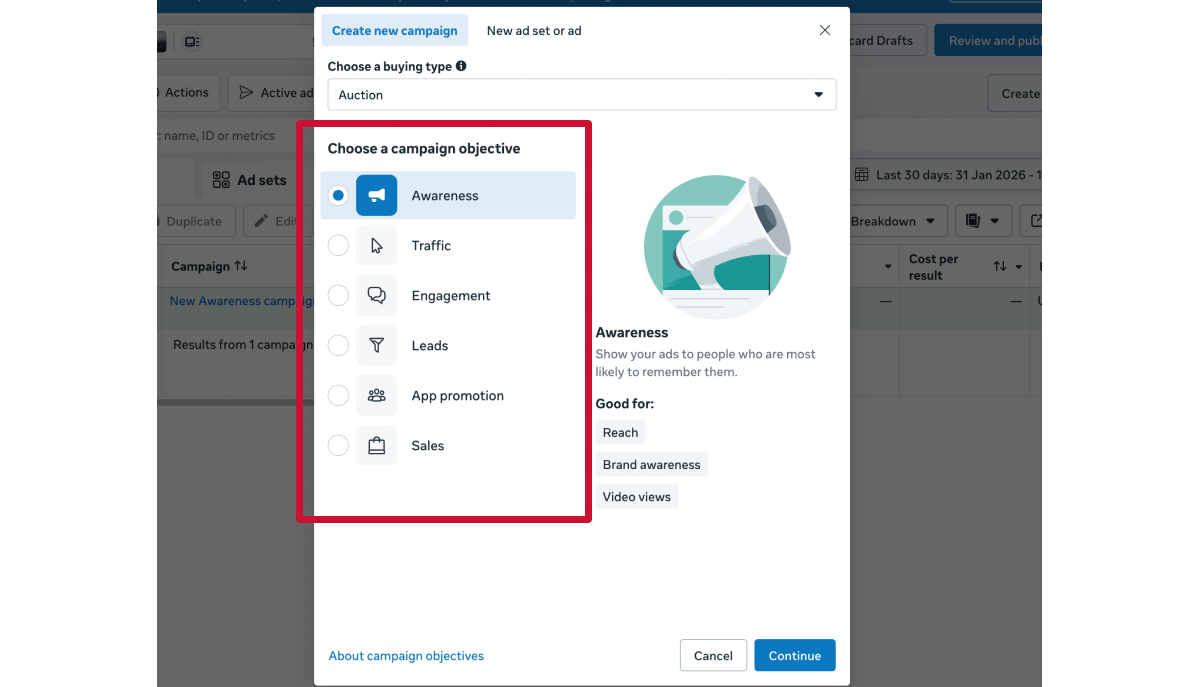
💡Tip: If you’re amplifying creator content that already performs well organically, “Engagement” or “Sales” objectives typically align best with partnership ads.
Step 3. Continue setting up your ad as you would with a standard Meta ad.
🔎 Note: You may notice Meta Advantage+ settings turned on by default when setting up your campaign.
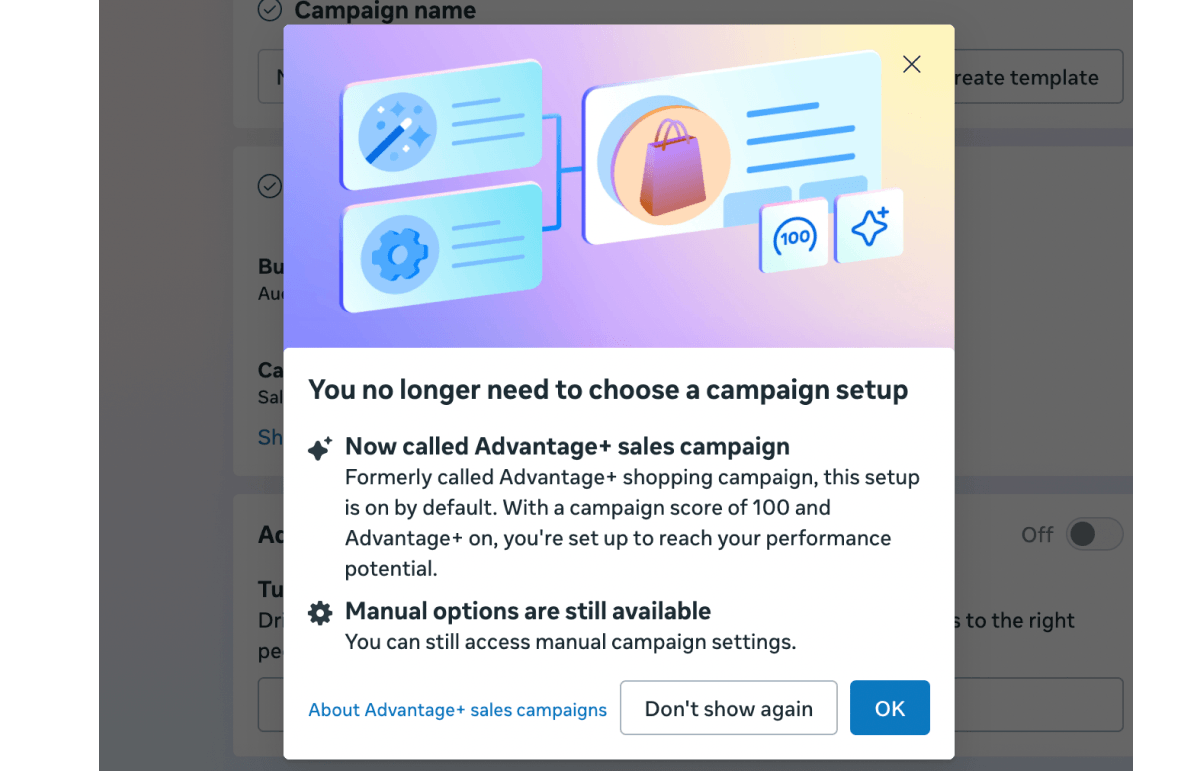
Advantage+ is a collection of AI-powered products that automatically adjust things like your audience targeting, placements, and budget to improve performance. It does so by looking at how people interact with your ads (like clicks, conversions, and engagement) and then shifting delivery toward what’s performing best.
It’s now built into many campaign types by default (like Sales, Leads, and App campaigns), so in most cases, it’s already working in the background when you set up your ads.
For example, Advantage+ campaign budget automatically distributes spend across ad sets based on performance.
If you're running e-commerce campaigns, you can enable Advantage+ catalogue ads at the campaign level. This helps you pair your creator content with products people are more likely to buy, based on their interests and behaviour.
After selecting your campaign objective (typically Sales), you’ll see the option to set up Advantage+ catalogue ads.
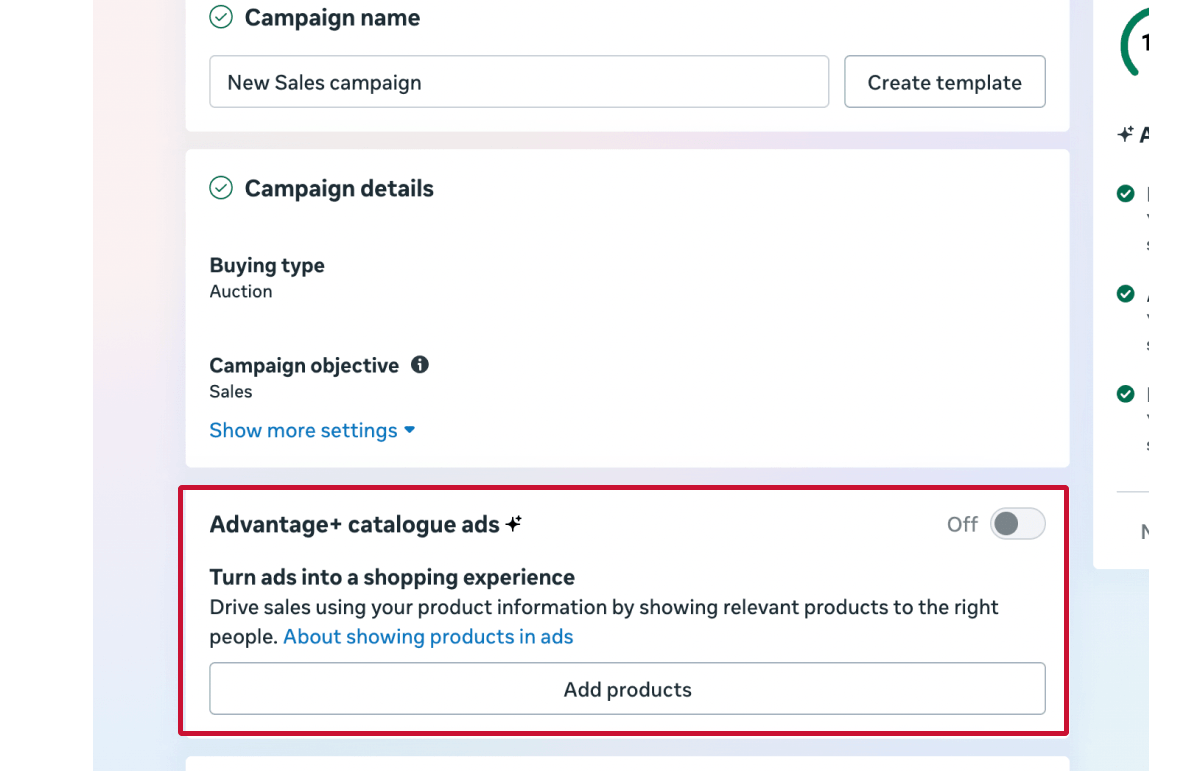
Click “Add products,” then select your product catalogue if you already have one set up in Commerce Manager. If not, you’ll also have the option to create a new catalogue.
Meta will now recommend relevant products from your catalogue alongside your ads.
🔗 New to Meta catalogues? Follow our step-by-step guide on how to create and set up a Meta catalogue.
Step 4. Choose your campaign delivery settings, including budget, schedule, audience targeting, and placements.
You may also see suggestions applied to some of these settings based on your campaign setup.
Step 5. Turn on the Partnership ad toggle.
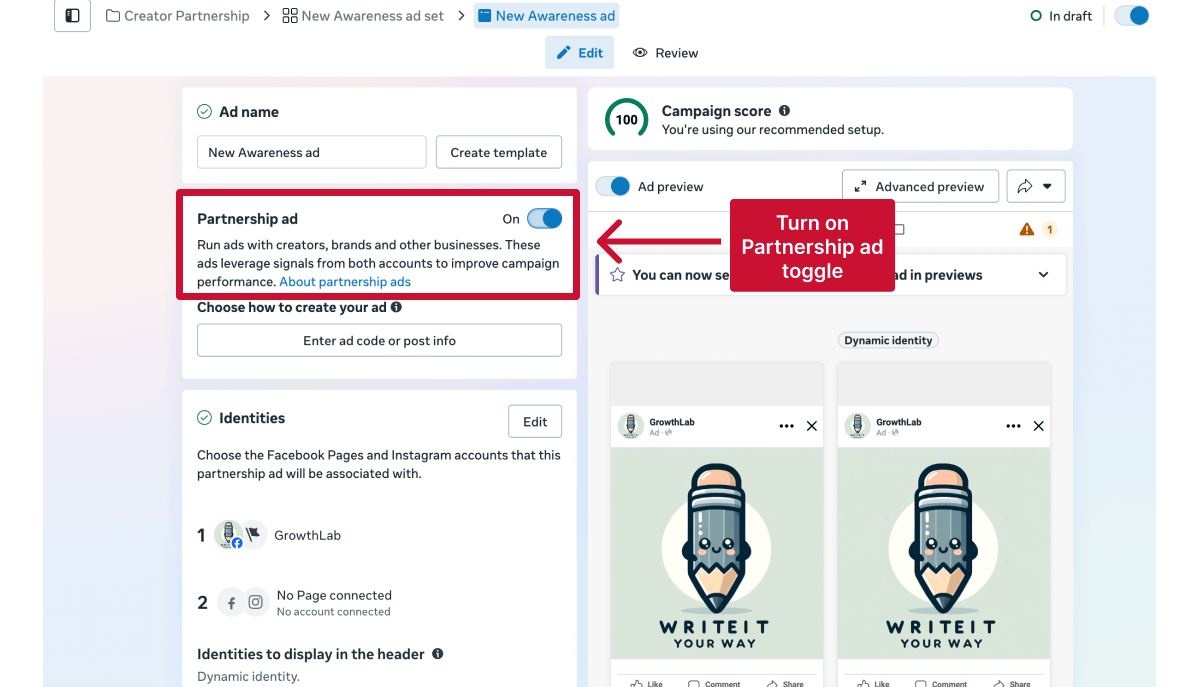
Then choose how you want to create a partnership ad:
This method is best when you have content-level permissions and you’re promoting a specific existing creator post.
After enabling the Partnership ad toggle:
1. Click “Enter ad code or post info.”
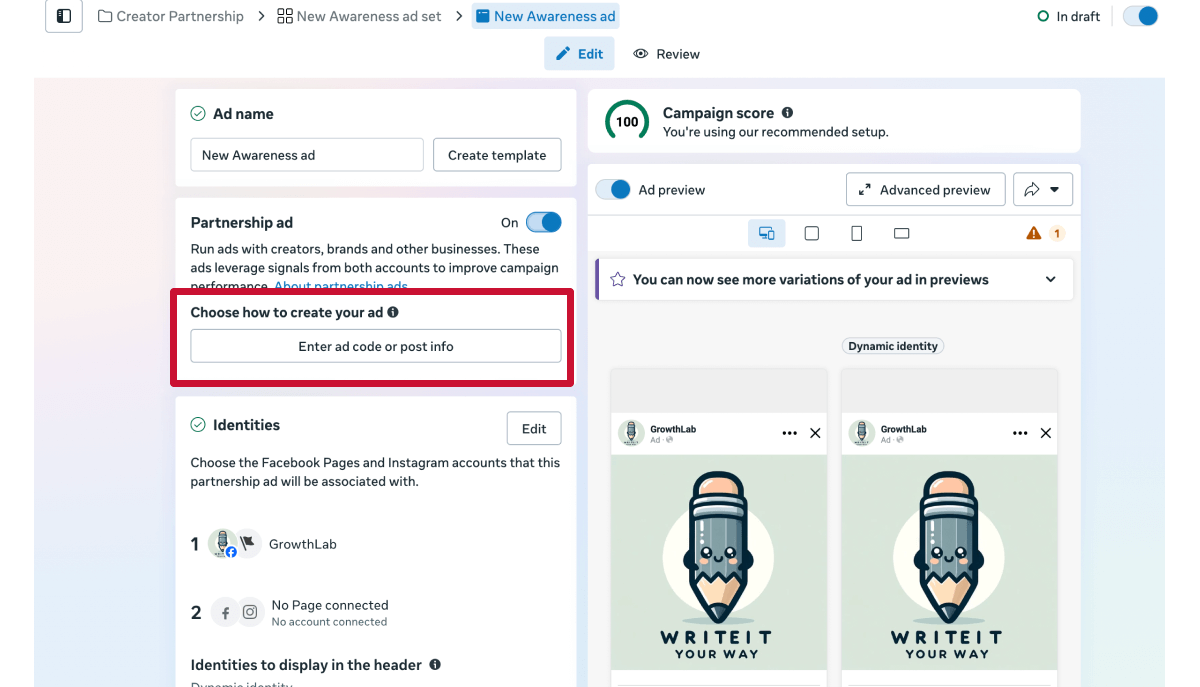
2. Paste the creator’s ad code, post ID, or post URL.
The ad code is created by the creator and shared with you. If they’re unsure how to generate it, you can send them Meta’s instructions here.
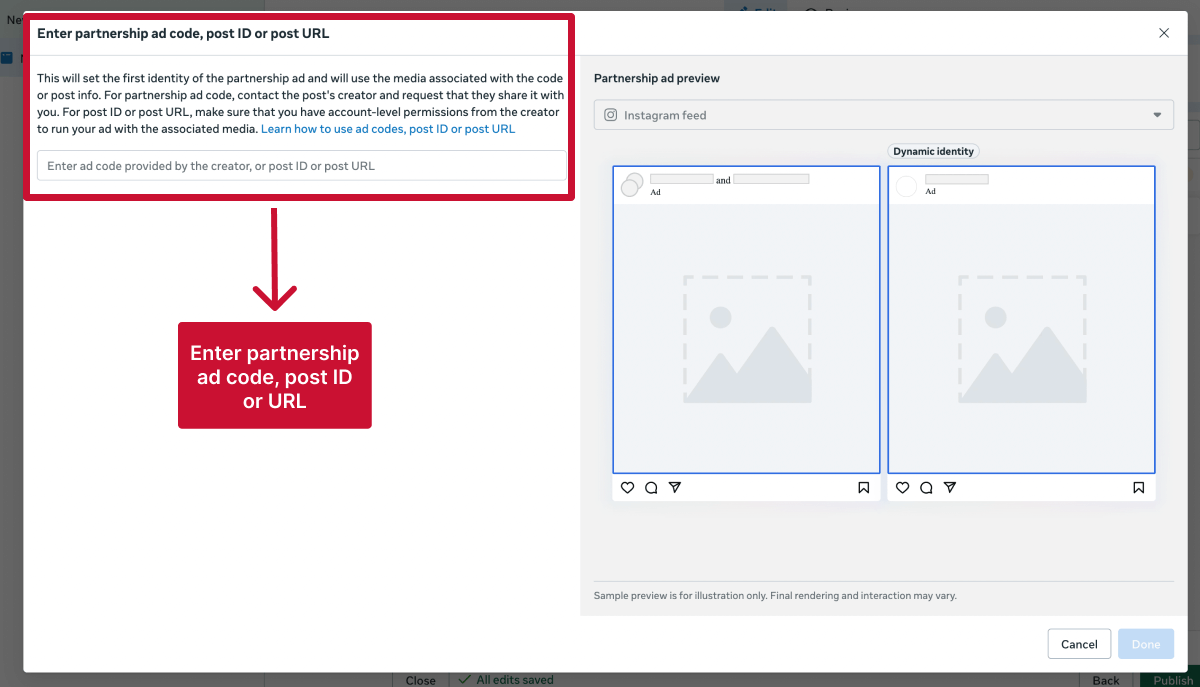
Ads Manager will then automatically load the creator identity and associated media. They will appear as the primary identity because they authored the original content.
3. Select the second identity (usually the brand) to appear in the ad header and click “Done.”
This method is best if you have account-level permissions and want to create or select content that runs under the creator’s profile.
After enabling the Partnership ad toggle:
1. Under Identities, add the creator as the second identity.
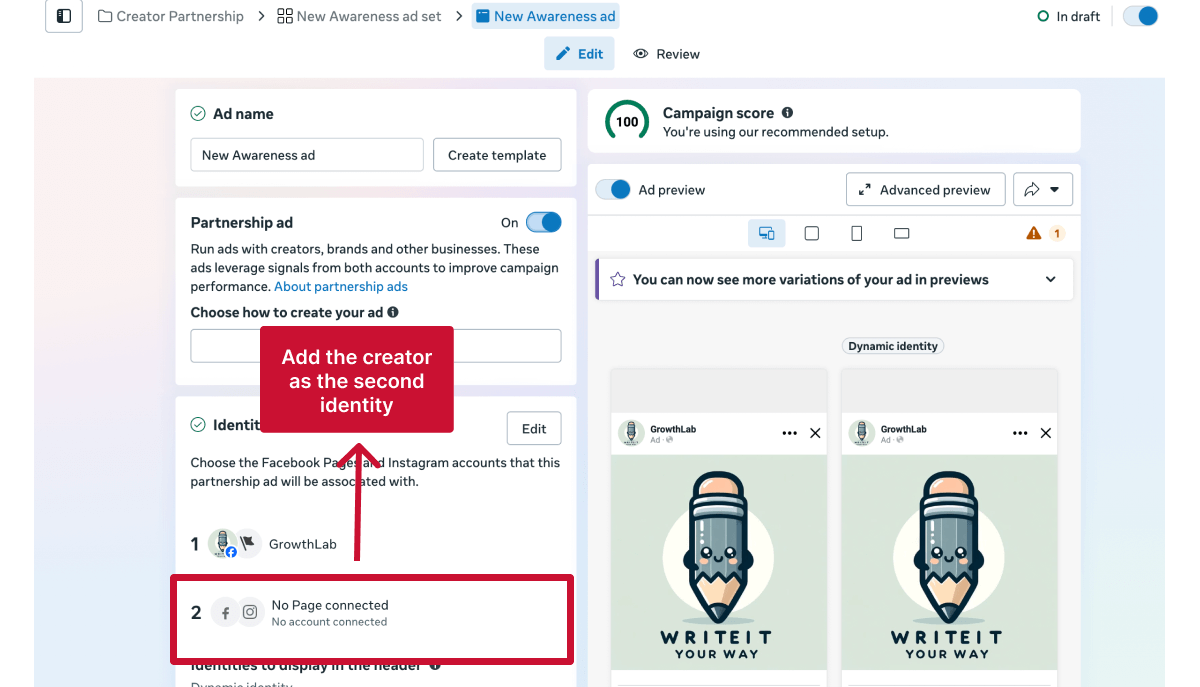
The brand will be automatically set as the first identity, but you can switch the order if needed.
Under Ad setup, select “Use existing post.”

Then, click “Select post” and choose the creator content to promote.
👉 If you can’t find the post, ensure the creator identity is selected or use the identity filter.
Under Ad setup, select “Create ad.”
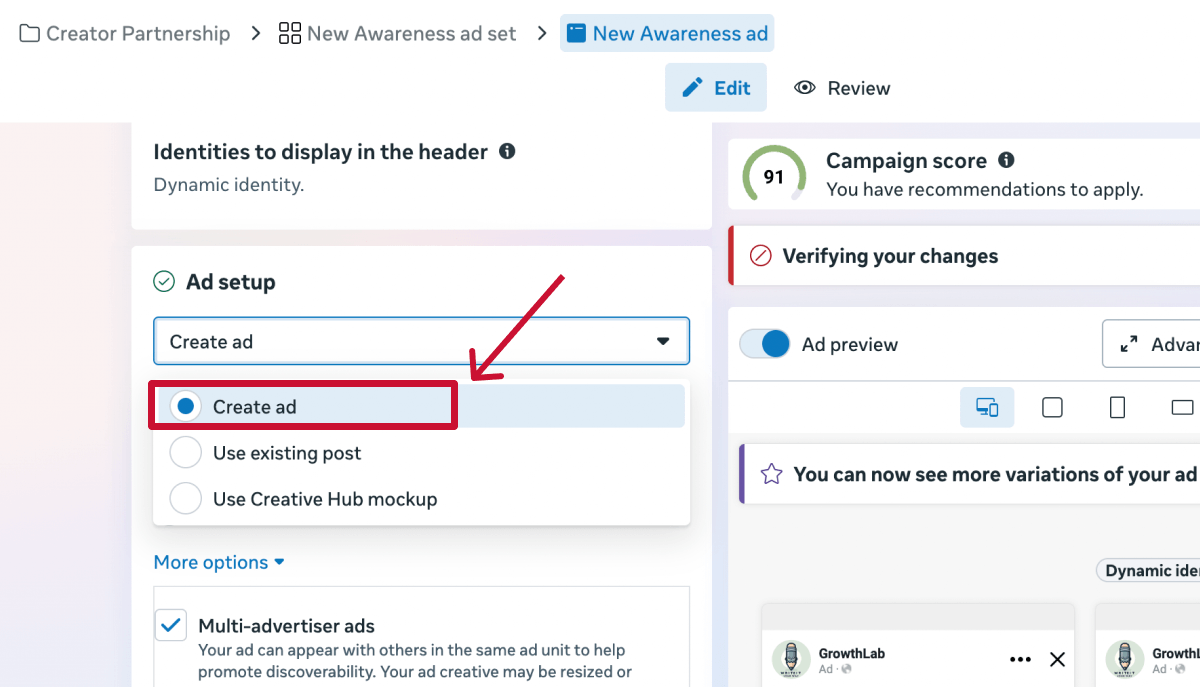
This allows you to run ads from the creator identity even if the content wasn’t originally posted organically.
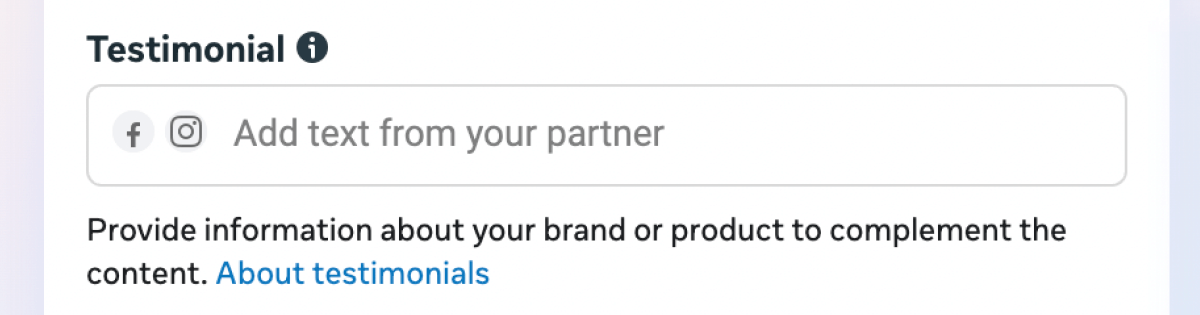
This appears as a pinned comment on the ad, making it feel more authentic and adding social proof.
Step 6. Complete the remaining setup, including tracking and any other required settings, just like you would with any Meta ad. Then click “Publish.”
Meta will review the partnership ad before it goes live. Once approved, the ad will appear from the selected creator or creator + brand identity.
Once your partnership ad is live, you can track performance in Meta Ads Manager just like any other campaign.
Here are some tips:
You can view standard ad metrics for partnership ads directly in Ads Manager, including:
These metrics reflect how the partnership ad performs as paid media, regardless of whether the ad appears from the brand or creator identity.
👉 Note: Partnership ads don’t provide additional creator-side data in Ads Manager, only the paid ad performance.
Creators and advertisers see different performance data for the same partnership ad.
For example, a creator can see organic reach and engagement on their original post, while the agency sees paid impressions and conversions from the ad.
👉 Note: Agencies can’t access full creator analytics unless the creator shares them separately.
From a performance perspective, partnership ads should be evaluated the same way as other paid social campaigns, but with creative context in mind.
Common agency KPIs include:
Because partnership ads use creator identity, engagement and CTR are often higher than brand-only ads, so benchmarks may differ from standard brand campaigns.
If you run multiple creators, Ads Manager allows you to compare results across partnership ads to identify:
Agencies typically increase budget on creators with the strongest CPA or ROAS and refresh or pause underperforming partnerships.
Partnership ads combine influencer content with paid media optimization, so your results depend on both the creator’s content and how your campaign is set up.
These best practices will help your agency get the most out of creator-led ads on Instagram and Facebook:
Start by amplifying influencer posts that already perform well organically. High engagement, saves, shares, or positive comments usually indicate content that resonates with audiences and will translate effectively into paid ads.
When creator content has already proven its appeal, partnership ads can scale that performance to broader or more targeted audiences without losing authenticity.
Partnership ads allow brands to feature creator testimonials as pinned or highlighted comments on the partner’s handle. This appears directly under the ad and reinforces the creator’s endorsement while the brand runs the campaign.
Testimonials can increase credibility by showing the creator actively supporting the product within the ad experience.
❗ Note: Testimonials are currently supported in Instagram Feed and Reels placements only.
💡 Setup tip: If you want the testimonial to appear from the creator while the ad runs from the brand, create the partnership ad without an ad code so the brand is the primary identity and the creator appears as the testimonial.
Ads that show primarily from the creator often feel more natural and like a genuine recommendation, compared to co-branded headers. Using a creator-only identity keeps the ad consistent with organic influencer content, which can help improve engagement and trust.
You can also use dynamic identity optimization, which allows Meta to automatically decide whether to show the ad from the creator alone or from both the creator and your brand, based on what’s likely to perform best.
💡 Tip: Creator-only identity often performs best for prospecting, while creator+brand can work well for retargeting or lower-funnel campaigns.
Influencer creative can fatigue faster than brand creative because audiences repeatedly see the same face and message. Over time, engagement and CTR often decline as audiences become familiar with the content.
Refreshing partnership ads with new creator posts, variations, or updated messaging helps maintain performance and prevents ad fatigue in always-on campaigns.
Partnership ads depend on active creator permissions. If a creator revokes access or their authorization expires, your ads may stop running or switch off the creator identity, disrupting performance mid-campaign.
That’s why your agency should regularly check permissions and make sure access stays active for the full campaign duration, especially for always-on influencer programs.
Just as importantly, when a collaboration ends, you should remove whitelisting access properly to avoid any unwanted permissions lingering.
💡 Tip: Tools like Leadsie help agencies manage creator permissions at scale. Instead of chasing access manually, you can request, maintain,and revoke permissions in one place, making it easier to keep campaigns running smoothly across multiple creators.
Every day spent waiting for account access is a day you're not launching campaigns, delivering results, or generating revenue.
Leadsie is a client onboarding software that helps agencies request and receive access to client marketing, advertising, and social media accounts with one secure link. Instead of managing endless emails, permission requests, and troubleshooting sessions, you send a link to your client, they approve the permissions you've requested, and you get access in minutes, not days.
Clients can grant access to Meta, Google, LinkedIn, TikTok, Shopify, and 14+ other marketing platforms without sharing passwords.
✅ Request, manage, and remove client access from one place
✅ Replace hours of emails, admin work, and onboarding calls
✅ Scale client onboarding without adding operational overhead
✅ Reduce your agency's turnaround time by over 50%
✅ Start billable work and billing cycles sooner
✅ Create a professional onboarding experience that helps retain clients
✅ Keep access secure with 100% GDPR and CCPA-compliant workflows
💬 "I never want to do onboarding without Leadsie!" - Alyssa, Meta Ads Manager
🎁 Start your free 14-day trial today —no credit card required.
P.S. It's risk-free, and you get to keep your account connections after the trial ends. 🙌

Nina is an SEO content specialist with expertise in B2B SaaS. She helps businesses increase organic traffic with strategic, high-quality content. Outside of work, you’ll find her sailing somewhere in the Mediterranean.


Clients struggling to share access to their
accounts? Get the access you need in minutes with a free trial of Leadsie.
Approved by Meta, Google & Tiktok
Keep access to accounts if you cancel
Secure & 100% GDPR compliant
Delete your onboarding PDF. Cancel the video call. Just send one link, and get hassle-free access to 13+ platforms in minutes. Start free today.
Approved by Meta, Google & Tiktok
Keep access to clients' accounts if you cancel
Secure & 100% GDPR compliant
No. Running a partnership ad does not reduce the organic reach of the creator’s original post. Paid impressions and organic impressions are tracked separately. However, high-paid exposure can increase profile visits or engagement on the creator’s account.
No. Creators do not need Ads Manager access to participate in partnership ads. They only need to grant the appropriate permissions (content-level or account-level). The brand or agency manages the campaign setup and optimization.
You can edit certain elements (like budget or targeting) at the campaign or ad set level. However, changing the creative or identity may require creating a new ad, depending on the setup. Always confirm permissions are still active before duplicating.
Two common mistakes:
Partnership ads work best when strong creator content meets proper paid optimization.
Questions unanswered? Check out our help center or get in touch 🤠