Clients struggling to share access to their
accounts? Get the access you need in minutes with a free trial of Leadsie.
14 day unlimited free trial
Extend until you onboard a client
No credit card required
Keep access to clients if you cancel


With easy one-link access requests for 13+ platforms your campaigns can go live in minutes, not days. Start free today.
Approved by Meta, Google & Tiktok
Keep access to clients' accounts if you cancel
Secure & 100% GDPR compliant


As a marketing agency, you can request access to a client’s Instagram account without asking for their username or password. You can either send a Partner access request through Meta Business Portfolio or use a client onboarding tool like Leadsie to get access with a single link.
Alternatively, you can ask the business or Instagram account owner to give your agency access from their side. In this guide, we’ll explain both ways agencies can request Instagram access, what you’ll need from the client, and how to get the correct permissions securely.
🔗 Related article: How to Add Someone or Give Admin Access to Your Instagram Account
Prefer a video? 👇
Instagram has a built-in Shared Access feature which lets an account owner invite an individual user. The account owner must send the invitation, so an agency cannot request this access itself.
Partner access in Meta Business Suite connects the client’s account to an agency’s Meta Business Portfolio.
For marketing agencies, Partner access is the better option because access can be assigned and managed across the agency’s team, rather than being tied to one individually invited Instagram user.
If you’re a freelancer, agency, or social media manager, you can request access to a client’s Instagram account directly through Meta Business Portfolio instead of asking for their password.
This method sends the client a Partner access request that they can approve from their own Meta settings.
📝 Before you get started, make sure:
Go to your Meta Business Portfolio settings or go to https://business.facebook.com/latest/settings.
Under the Users menu, select “Partners,” then click Add > Ask a partner to assign you their assets.

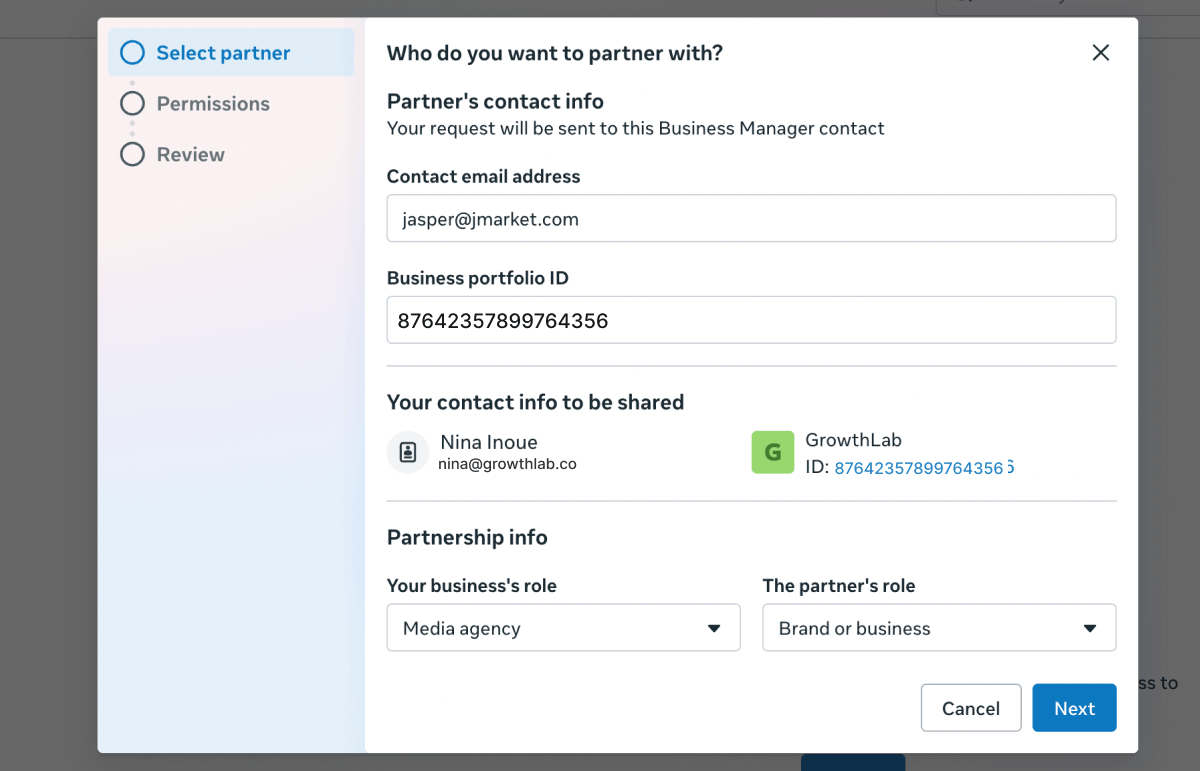
Enter the contact details of the person or business you’re requesting access from.
You’ll also need their Meta Business Portfolio ID (found under Business Portfolio Info in Meta Business Portfolio Settings).
🔗 Here’s how to find a Meta Business ID.
Next, select the relationship type that best describes both parties:
Select “Instagram accounts” and choose the permissions you want access to.
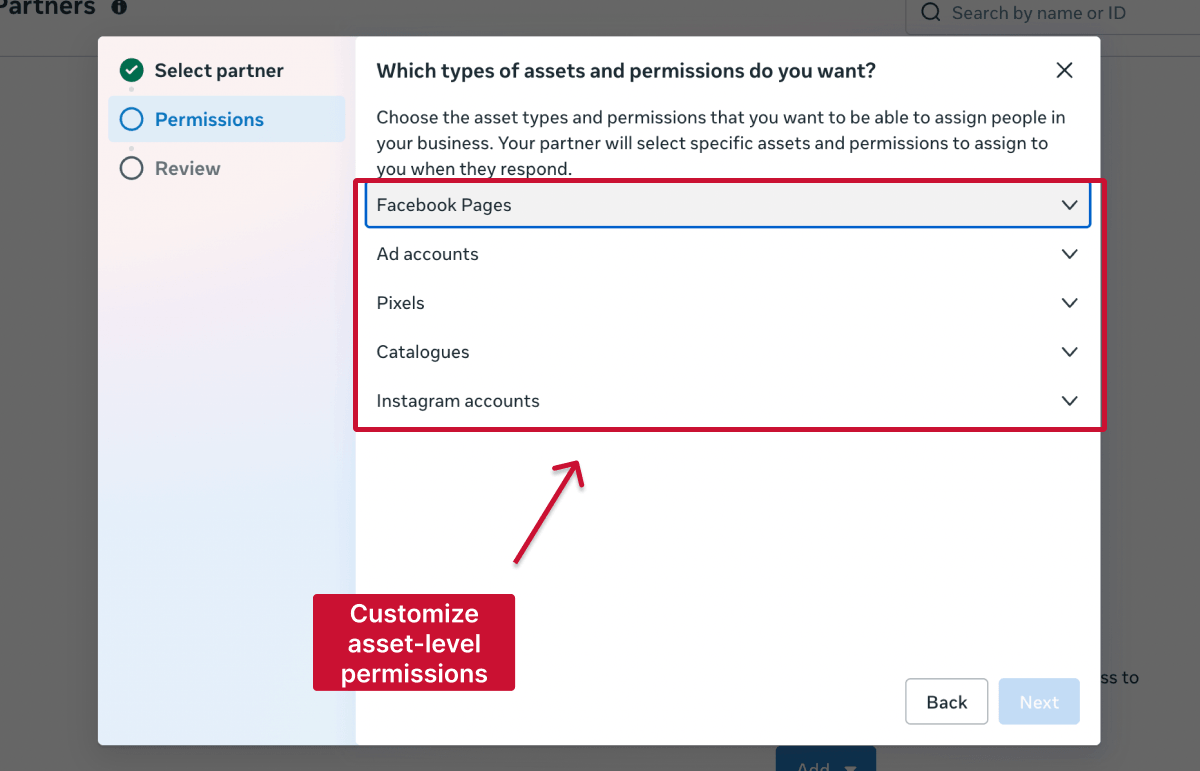
With Partial access, request only the permissions your agency needs:
Full access includes all permissions, payment methods and the ability to manage account access.
Review your request, optionally add a message for the client, then click “Send Request.”
Your client will receive an approval notification by email and inside Meta Business Suite. Once they approve the request, the Instagram account will appear inside your Meta Business Portfolio.
In your Meta Business Portfolio, head to Users > Partners and select the client. Click the options button beside Assign assets, then select "Remove from business portfolio."
Meta doesn’t clarify this in its official documentation or removal message, but in our testing, this ended the Partner relationship in both directions. Your agency loses access to the client’s shared assets and is also automatically removed from the client’s Business Portfolio.
💡 Tip: Before removing the client, make sure you’ve exported any reports or campaign data required for the handover.
Leadsie is a client onboarding tool that automates the Instagram partner access request process with a single shareable link.
Instead of manually connecting Meta Business Portfolios, finding Business IDs, and assigning permissions, agencies can generate one Leadsie link and send it directly to the client.
The client clicks the link, approves access, and Leadsie automatically assigns the agency to the correct Instagram assets inside Meta Business Portfolio. No password sharing is required, and agencies can start managing the account immediately.

Agencies using Leadsie reported cutting onboarding turnaround time by over 50%, according to a DashClicks case study.
Leadsie is commonly used by:
Access can be also be revoked instantly from the Leadsie dashboard, making it easier to offboard clients when projects end.
🔗 Bonus: If you manage several clients’ Instagram profiles, check out our guide on best practices for managing multiple Instagram Business Accounts.
If the Instagram account doesn’t appear or the request isn’t received, check that:
Still sending onboarding emails, sharing PDFs, or jumping on calls just to get access to a client's accounts?
With Leadsie, one secure link handles the entire process. Clients can grant access to Meta, Google, LinkedIn, TikTok, Shopify, and 14+ marketing, advertising, and social media accounts without sharing passwords.
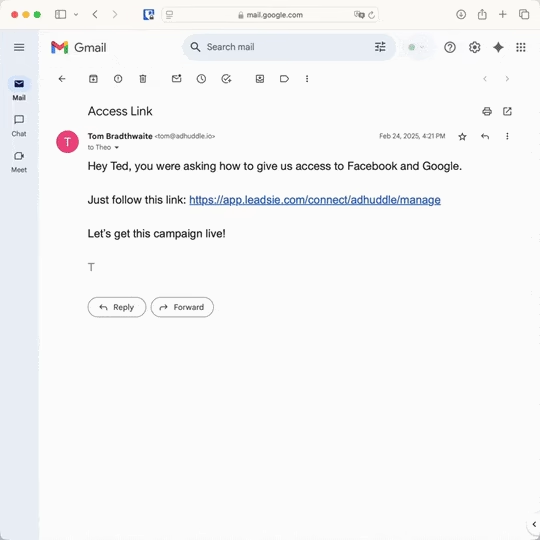
✅ Get access to client accounts in minutes, not days
✅ Replace hours of emails, admin work, and onboarding calls
✅ Scale client onboarding without adding operational overhead
✅ Reduce your agency's turnaround time by over 50%
✅ Start billable work and billing cycles sooner
✅ Create a professional onboarding experience that helps retain clients
✅ Keep access secure with 100% GDPR and CCPA-compliant workflows
💬 "I never want to do onboarding without Leadsie!" - Alyssa, Meta Ads Manager
🎁 Start your free 14-day trial today —no credit card required.
P.S. It's risk-free, and you get to keep your account connections after the trial ends. 🙌

Ekta Swarnkar is a freelance B2B writer for SaaS and marketing brands. She's helped various companies to grow their visibility, authority, and revenue with long-form, actionable content.


Clients struggling to share access to their
accounts? Get the access you need in minutes with a free trial of Leadsie.
Approved by Meta, Google & Tiktok
Keep access to accounts if you cancel
Secure & 100% GDPR compliant
Delete your onboarding PDF. Cancel the video call. Just send one link, and get hassle-free access to 13+ platforms in minutes. Start free today.
Approved by Meta, Google & Tiktok
Keep access to clients' accounts if you cancel
Secure & 100% GDPR compliant
The client must create a Business Portfolio and add their Instagram account to it before they can approve a Partner access request.
Meta Partner access requires the Instagram account to be a professional Business or Creator account connected to a Business Portfolio. For a personal account, the owner must convert it to a professional account or use Instagram Shared Access if available.
No. The client retains ownership of the Instagram account and grants the agency specific permissions. The agency cannot take ownership simply by receiving Partner access.
The agency cannot grant itself additional permissions. The client must update the Instagram asset permissions assigned to the agency through their own Meta Business Portfolio.
Yes. A client can give multiple partners access and assign different permissions based on what each agency manages. Clients should regularly review their Partners list and remove access when a working relationship ends.
Questions unanswered? Check out our help center or get in touch 🤠