Clients struggling to share access to their
TikTok Ads
accounts? Get the access you need in minutes with a free trial of Leadsie.
14 day unlimited free trial
Extend until you onboard a client
No credit card required
Keep access to clients if you cancel


With easy one-link access requests for 13+ platforms your campaigns can go live in minutes, not days. Start free today.
Approved by Meta, Google & Tiktok
Keep access to clients' accounts if you cancel
Secure & 100% GDPR compliant


Brands and agencies can allowlist TikTok creator content for Spark Ads either by using a Spark Ads authorization code for a specific post or by linking a TikTok account to an advertiser account through TikTok Business Center for ongoing access.
TikTok Spark Ads have become a major part of influencer and UGC campaigns, with TikTok reporting up to 142% higher engagement rates and 43% higher conversion rates compared to non-Spark Ads.
But before agencies can scale creator content through Spark Ads, they first need access.
In this guide, we’ll break down exactly how influencer allowlisting for Spark Ads works and the two main ways agencies can get access to creator content.
If you already know which TikTok Spark Ads access method you need, feel free to jump directly to the relevant section below.
Method 1: Get access to specific TikTok posts — creators generate a code for a specific TikTok post that agencies can use in TikTok Ads Manager.
Method 2: Get ongoing Spark Ads access — creators or brands connect their TikTok account to an agency’s advertiser account for ongoing Spark Ads access and campaign management.
Influencer allowlisting (also called whitelisting or creator authorization) on TikTok is when a creator gives a brand or marketing agency permission to use their TikTok content and identity in paid ads through Spark Ads.
This lets marketers run ads using:
There are two main ways agencies can get access to creator content for Spark Ads:
TikTok Spark Ads are a native ad format that allows brands and agencies to promote posts from creators' TikTok accounts instead of using standalone ad creatives.
For example, brands can use influencer posts to run ads through the creator’s TikTok account rather than a separate brand ad account.
Unlike regular TikTok ads, Spark Ads stay connected to the original post during promotion, allowing users to naturally like, comment, share, follow the creator, visit their profile, and interact with existing engagement.
And because Spark Ads use real TikTok posts and identities, they often feel more native within the For You feed than standard ads.
Marketing agencies and brands often use TikTok Spark Ads to turn influencer or UGC content into paid campaigns without losing the authenticity of the original post.
Aesthetics brand One Doc X Hair Doc reported an 88% reduction in CPA after using Spark Ads with creator-led content as part of a full-funnel TikTok campaign. The brand used multiple creators and Spark Ads to scale authentic before-and-after style content while reaching new audiences more efficiently.
Spark Ads are especially useful for:
This makes creator campaigns feel more trustworthy and engaging than traditional branded ads.
When a creator authorizes their TikTok content for use in Spark Ads, marketers can promote that content using the creator’s TikTok identity through TikTok Ads Manager.
Depending on the setup, this access can happen through:
The level of access depends on the method used, but in both cases, creators are granting advertising permissions - not sharing their TikTok login credentials or transferring ownership of their account.
Once access is approved, brands and agencies can:
✅ Promote authorized TikTok posts as ads
✅ Use the creator’s TikTok identity in Spark Ads campaigns
✅ Access approved creator content inside TikTok Ads Manager
✅ Add call-to-action buttons to ads
✅ Send traffic to landing pages, product pages, or apps
✅ Target specific audiences through TikTok Ads Manager
✅ Track campaign performance and engagement metrics
✅ Scale influencer or UGC content through paid promotion
Spark Ads-only authorization does not give marketers full control of the creator’s TikTok account. Unless the creator separately grants broader account-management permissions, marketers cannot:
❌ Log in to the creator’s TikTok account
❌ Change profile settings
❌ Access private messages
❌ Publish or manage unrelated organic content
❌ View sensitive account information
There are also some creative limitations. For example:
❌ Captions cannot be edited after a post is authorized for Spark Ads
❌ Posts that violate TikTok’s policies, have been banned or do not meet Spark Ads eligibility requirements cannot be used
❌ Authorization is time-limited and can be removed by the creator. Marketers should ensure authorization remains valid for the intended campaign period
With this method, creators generate a Spark Ads authorization code for a specific TikTok post and share it with the agency. The agency can then use that post in paid campaigns through TikTok Ads Manager.
This only gives advertisers access to the specific post that the creator authorizes, so it’s best for:
If the creator is unsure how to generate a Spark Ads authorization code, they can follow these steps:
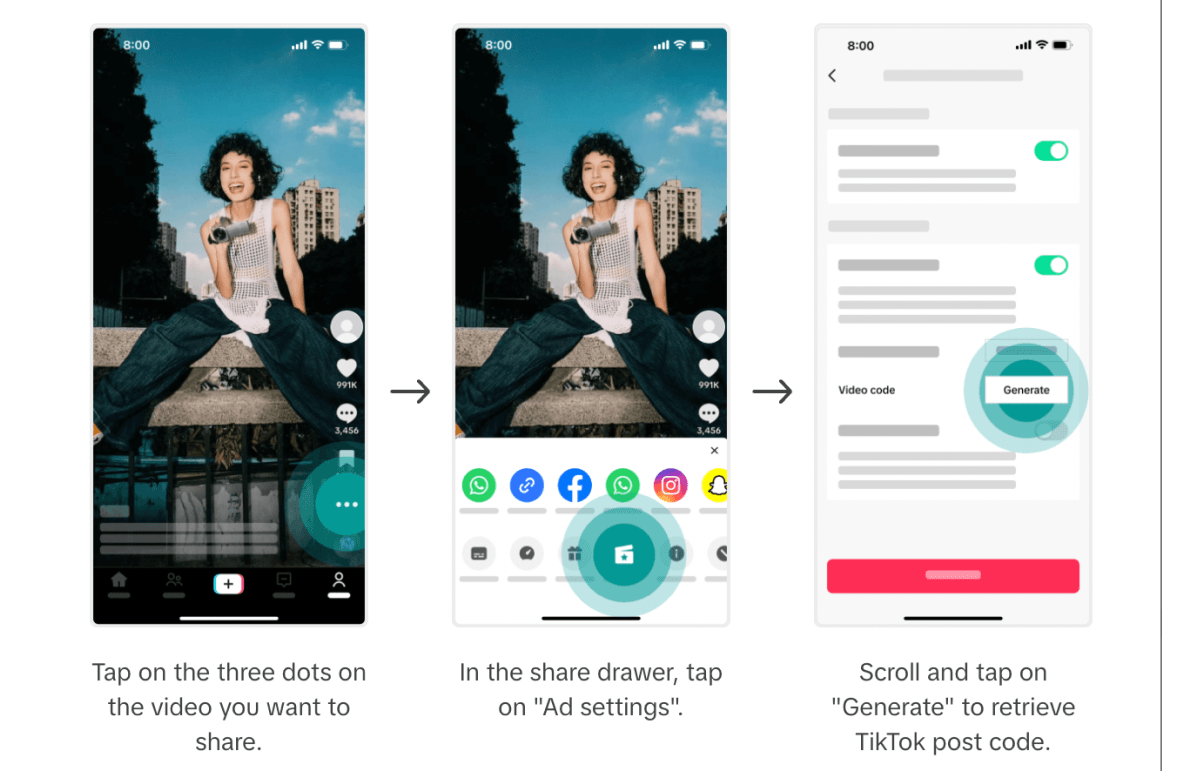
This code is what the agency will use to add the creator’s post to TikTok Ads Manager.
💡 Agency tip: Ask creators to choose an authorization duration that covers the full campaign timeline, including setup, review, testing, and any possible extensions.
For example, if a campaign is scheduled to run for 30 days, a 30-day authorization may not be enough because the code could expire before testing or optimization is complete. In that case, requesting 60 or 365 days may be safer.
Once the creator sends the code, the agency can add the post to TikTok Ads Manager.
To do this:
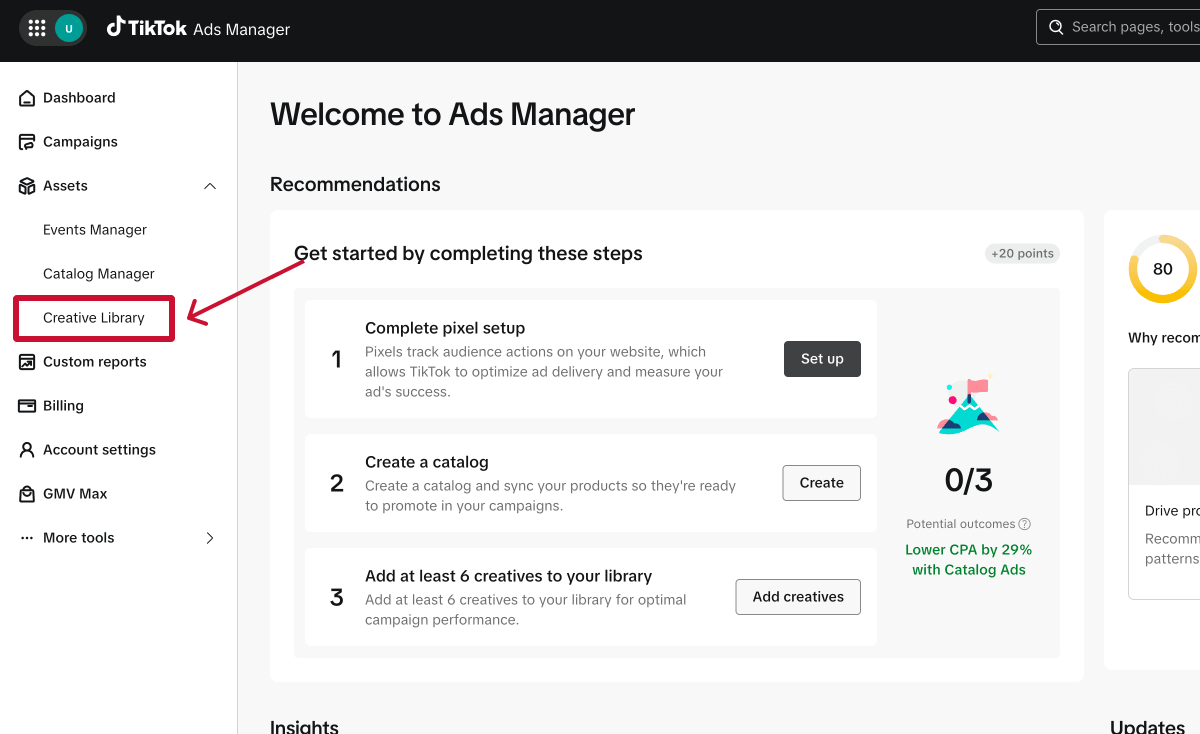
Step 1. Log in to TikTok Ads Manager @ https://ads.tiktok.com/
Step 2. In the left-hand sidebar, expand Assets, then click Creative Library.
Step 3. Click the Add code button next to Add authorized TikTok post.
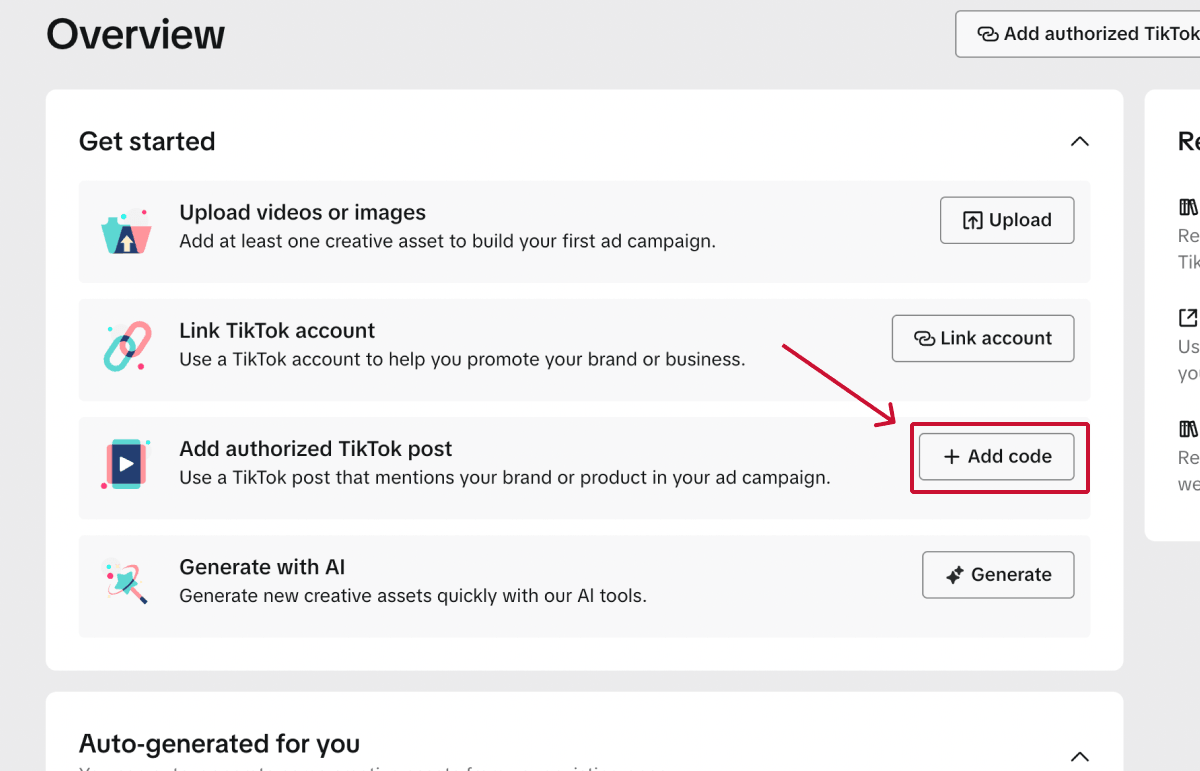
Step 4. Paste the creator’s video code into the search bar.
Before clicking Confirm, make sure:
Step 5. Review the post details and click Confirm.
Once confirmed, the authorized post can be selected when building a Spark Ads campaign.
❗ Note: If you want to test multiple creator posts, the creator will need to generate a separate authorization code for each video. TikTok also supports batch authorization for up to 20 video codes at a time, which can help agencies manage larger influencer campaigns more efficiently.
With this method, your agency requests access to a creator’s TikTok account through TikTok Business Center. Once the creator approves the request, you can link their TikTok account to your advertiser account and use it for Spark Ads without requesting a new authorization code for every campaign.
This method is best for:
Before linking a creator TikTok account to your advertiser account, make sure:
In TikTok Business Center [https://business.tiktok.com/], go to Accounts > TikTok accounts > Add a TikTok account.
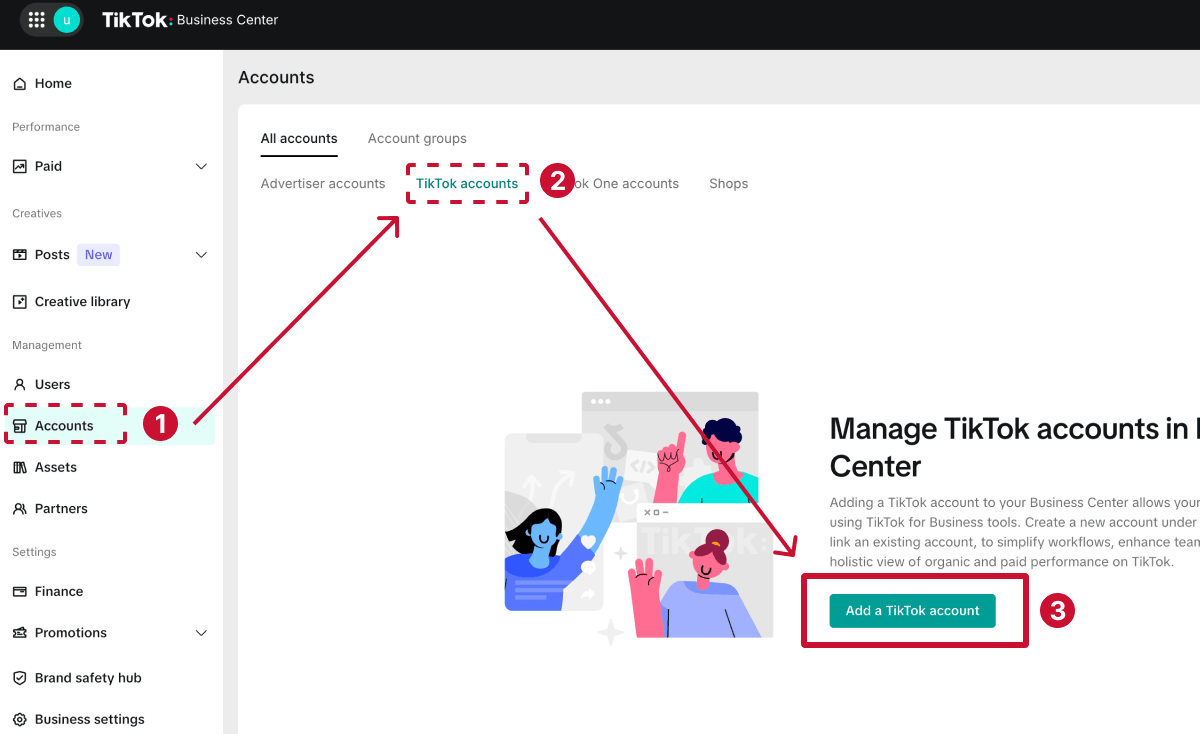
Then select Link an existing TikTok account.
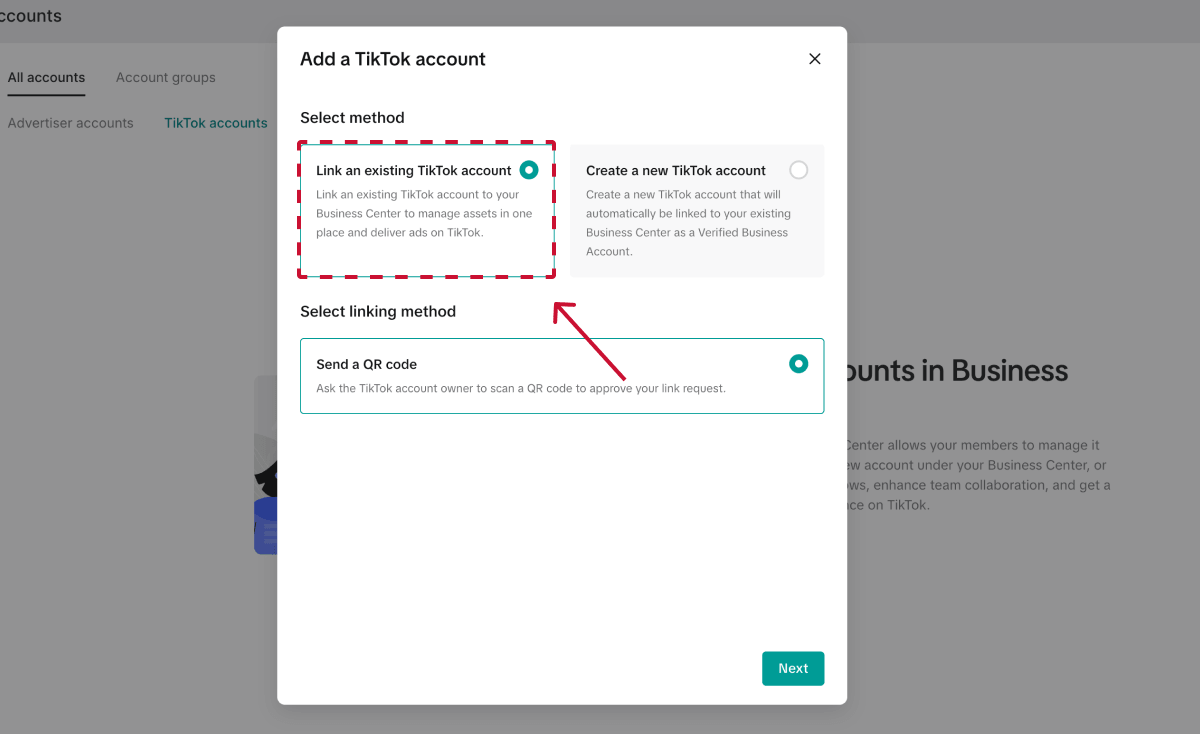
Select Deliver ads as your permission level. This option lets your agency use the creator’s TikTok account for advertising without granting broader account-management access.
Next, choose what your agency can do with the account. To use it for Spark Ads, turn on:
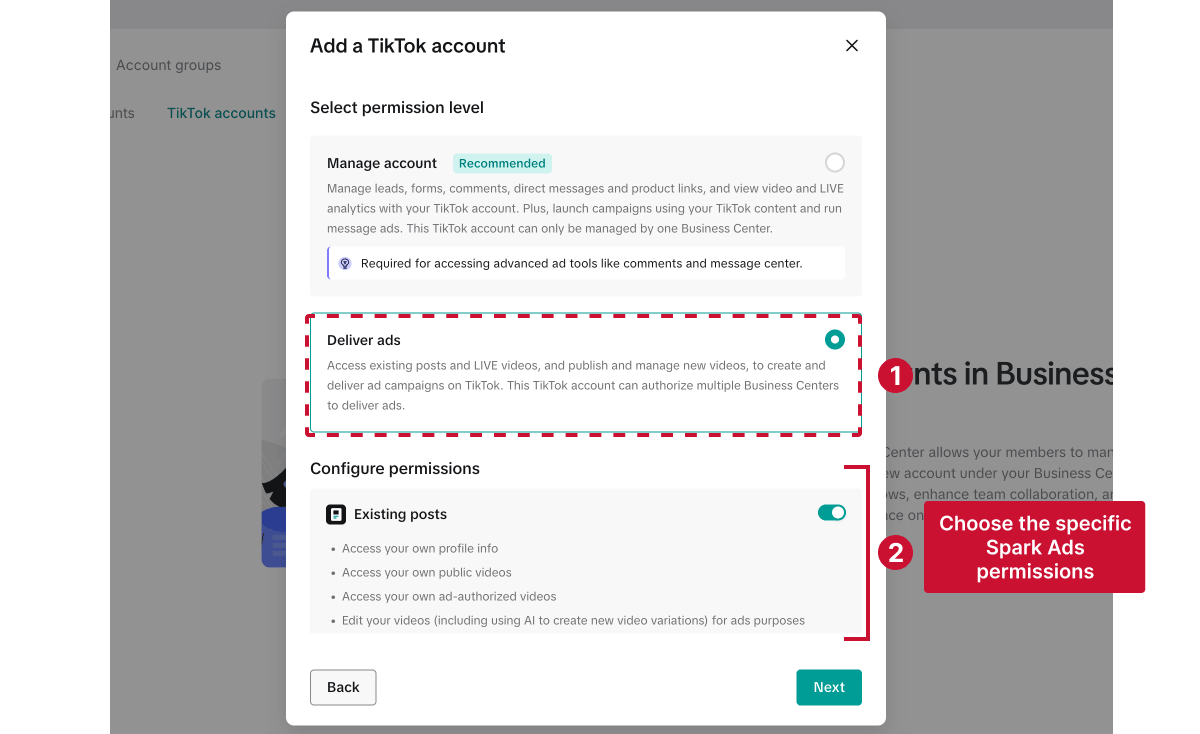
If you enable Publish and manage new videos, choose how that content can appear:
Other available permissions cover features LIVE videos, Showcase, Messaging Ads, Series and account insights, but they aren’t necessary for a standard Spark Ads campaign.
After selecting the appropriate permissions, click Next. TikTok will generate a QR code for the creator to scan.
TikTok won’t add the creator’s account immediately. The creator must authorize the connection by scanning the QR code while logged into the TikTok account you want to use for Spark Ads.
Download the QR code and send it to the creator, along with these instructions:
Once they approve the request, their account will appear under Accounts > TikTok accounts in your Business Center.
The creator’s approval adds their TikTok account to your Business Center, but it doesn’t automatically make the account available in TikTok Ads Manager. You now need to link it to the advertiser account that will run the Spark Ads.
1. From the left-hand menu in TikTok Business Center, go to Accounts > TikTok accounts. Find the creator’s account and click View in the Action column.

2. Open the Linked accounts tab and click Link accounts.

3. Select Advertiser accounts, then choose the account that should be allowed to use the creator’s TikTok account for Spark Ads. Anyone with access to those advertiser accounts will be able to use the linked TikTok account as a Spark Ads identity inside TikTok Ads Manager.
Once the account is linked, your agency will haveongoing access to use it for Spark Ads, based on the permissions the creator approved. You won’t need to request a new video authorization code for each campaign.
If a creator partnership ends, an agency changes, or a brand wants to remove Spark Ads permissions, TikTok accounts can be unlinked inside TikTok Business Center.
To do this:

Once removed:
Because of this, it’s a good idea to review or pause active campaigns before removing access.
Even though TikTok Spark Ads setup is fairly straightforward, agencies can still run into issues that can delay campaigns or prevent ads from launching altogether.
In most cases, Spark Ads errors happen because:
Here are the most common Spark Ads issues agencies deal with and how to fix them.
This error happens when a creator’s Spark Ads authorization period has ended.
For example, if a creator selected a 30-day authorization window and the campaign is still active after those 30 days, the ad can no longer run unless access is renewed.
Ask the creator to:
💡 Agency tip: To avoid campaign interruptions, many agencies request 60- or 365-day authorization upfront, especially for evergreen or scalable campaigns.
This error usually happens when:
❗ Note: Spark Ads codes are tied to specific TikTok posts, not the creator’s entire account. If you want to advertise multiple creator videos, you’ll need a separate authorization code for each post.
Spark Ads only work with public TikTok posts.
If a creator changes a post to private after authorizing it, the ad may stop working or fail during setup.
Ask the creator to:
💡 Agency tip: This issue is especially common with creators who are new to Spark Ads. Before launch, it’s worth confirming:
✔️ The post is public
✔️ The video will remain public during the campaign
✔️ The creator understands how Spark Ads authorization works
Some TikTok post formats currently do not support Spark Ads.
This can include:
Choose another TikTok post that supports Spark Ads.
💡 Agency tip: If you already know content will be used for paid promotion, it’s a good idea to confirm Spark Ads compatibility before creators publish the post. This can help avoid reshoots or campaign delays later.
Spark Ads are popular for influencer, creator, and UGC campaigns where authenticity and social proof matter.
Non-Spark Ads are often better for faster launches, creative testing, and campaigns that don’t rely on creator identities.
Once a post is authorized for Spark Ads, the caption cannot be edited inside Ads Manager.
Before the creator publishes, review the caption, disclosures, CTA, product claims, and music usage. This helps prevent issues with unclear messaging, missing disclosures, or content that performs well organically but causes problems in paid campaigns.
As campaigns scale, Spark Ads access can quickly become hard to manage.
Use a spreadsheet, CRM, or project management tool to track:
This makes it easier to avoid expired codes, missing permissions, and last-minute launch delays.
Many delays happen because creators don’t know how Spark Ads authorization works.
Give creators a short checklist, tutorial, or message template that explains:
The easier the process is for creators, the faster campaigns move.
A workflow that works for one campaign can get messy across dozens of creators and clients.
Create a repeatable process for requesting access, reviewing content, storing codes, checking permissions, monitoring expiration dates, and troubleshooting errors. This helps agencies launch faster and avoid preventable campaign interruptions.
💡 Bonus tip: If your agency regularly requests TikTok advertiser or Business Center access from clients, using a dedicated client onboarding tool like Leadsie can help simplify the process.

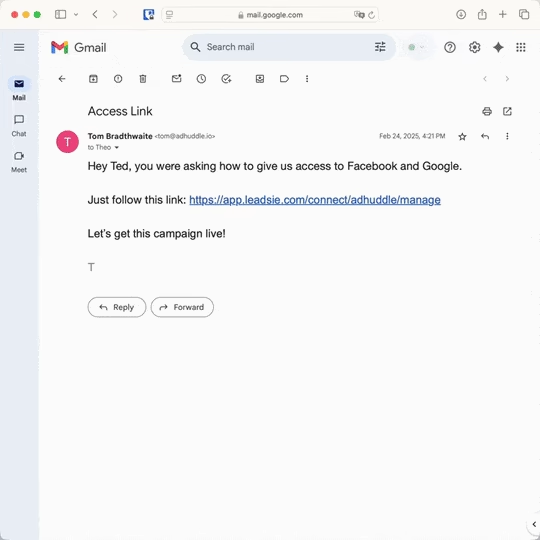
Instead of manually walking clients through TikTok Business Center setup, agencies can request TikTok Business Center and ad account access through a single approval link. The same link can also be used to request access to 14+ other client platforms, including Meta, Google Ads, LinkedIn, and Shopify.
Still sending onboarding emails, sharing PDFs, or jumping on calls just to get access to a client's accounts?
With Leadsie, one secure link handles the entire process. Clients can grant access to Meta, Google, LinkedIn, TikTok, Shopify, and 14+ marketing, advertising, and social media accounts without sharing passwords.
✅ Get access to client accounts in minutes, not days
✅ Replace hours of emails, admin work, and onboarding calls
✅ Scale client onboarding without adding operational overhead
✅ Reduce your agency's turnaround time by over 50%
✅ Start billable work and billing cycles sooner
✅ Create a professional onboarding experience that helps retain clients
✅ Keep access secure with 100% GDPR and CCPA-compliant workflows
💬 "I never want to do onboarding without Leadsie!" - Alyssa, Meta Ads Manager
🎁 Start your free 14-day trial today —no credit card required.
P.S. It's risk-free, and you get to keep your account connections after the trial ends. 🙌

Nina is an SEO content specialist with expertise in B2B SaaS. She helps businesses increase organic traffic with strategic, high-quality content. Outside of work, you’ll find her sailing somewhere in the Mediterranean.


Clients struggling to share access to their
TikTok Ads
accounts? Get the access you need in minutes with a free trial of Leadsie.
Approved by Meta, Google & Tiktok
Keep access to accounts if you cancel
Secure & 100% GDPR compliant
Delete your onboarding PDF. Cancel the video call. Just send one link, and get hassle-free access to 13+ platforms in minutes. Start free today.
Approved by Meta, Google & Tiktok
Keep access to clients' accounts if you cancel
Secure & 100% GDPR compliant
Creators can usually see when their content is being used in Spark Ads through TikTok’s ad authorization settings and analytics.
Yes. Many brands and agencies use Spark Ads alongside TikTok Shop campaigns to promote creator content, product videos, and UGC-style posts.
This is especially common for product launches, creator affiliate campaigns, TikTok Shop scaling campaigns, and boosting high-performing TikTok Shop videos.
Yes. A creator or brand can share Spark Ads permissions with multiple advertiser accounts through TikTok Business Center.
However, it’s important to carefully manage permissions to avoid overlapping campaigns, unauthorized ad usage, or confusion around account ownership and reporting.
Yes. Creators can revoke Spark Ads access at any time. Access may also be removed if:
If this happens, active Spark Ads campaigns using that content may stop delivering or stop running altogether.
Questions unanswered? Check out our help center or get in touch 🤠
© Leadsie Ltd 2024