Clients struggling to share access to their
TikTok Ads
accounts? Get the access you need in minutes with a free trial of Leadsie.
14 day unlimited free trial
Extend until you onboard a client
No credit card required
Keep access to clients if you cancel


With easy one-link access requests for 13+ platforms your campaigns can go live in minutes, not days. Start free today.
Approved by Meta, Google & Tiktok
Keep access to clients' accounts if you cancel
Secure & 100% GDPR compliant


To request access to a client’s TikTok advertising accounts, send a request through TikTok Business Center.
Depending on the work your agency handles, you can request access to their advertiser account for campaign management or their TikTok account for Spark Ads and account management. The client must approve each request and the permissions you select.
Alternatively, you can use a client onboarding tool like Leadsie to collect the access you need through a single link.
In this guide, we’ll cover both methods, explain which permissions to request, and show you how to avoid the usual back-and-forth over account IDs and approvals.
Related article: How to Give Access to Your TikTok Account
TikTok allows you to directly request access to:
TikTok One accounts and Shops use separate access workflows and are not covered in this guide.
Assets such as Pixels, catalogs and leads cannot be "requested," so the owner must give you access from their end.
If your agency needs to create, manage, or report on a client’s TikTok campaigns, request access to their advertiser account.
Make sure:
Log in to your TikTok Business Center account (https://business.tiktok.com/), and from the left-hand menu, select Accounts > Advertiser accounts.

Then select Add advertiser account, choose Request access, and click Next.
Enter the client’s 19-digit Advertiser Account ID. This is the unique number associated with their TikTok Ads Manager account.
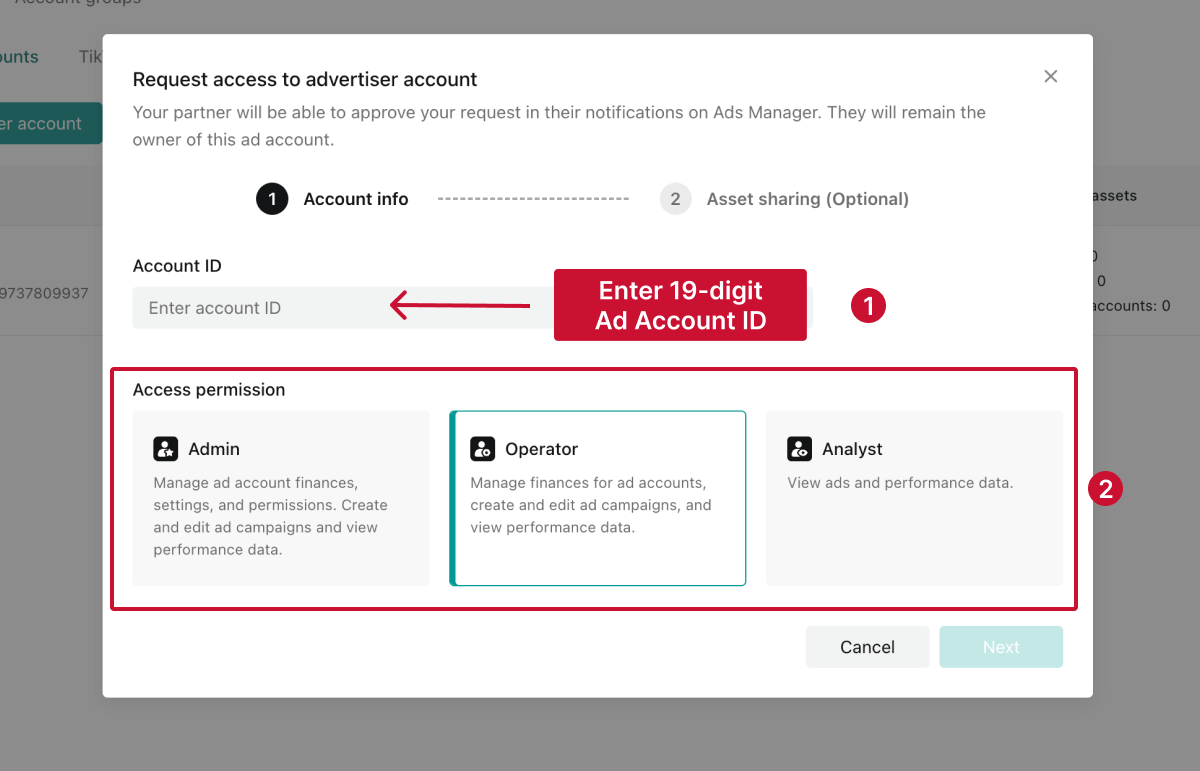
👉 Your client doesn’t know their Ad Account ID? Ask them to open Ads Manager, click their Account Name, and they’ll see the ID displayed right underneath. They can also find it in the URL when viewing their ad account.
TikTok offers three advertiser account permission levels:
💡 Tip: Request the lowest permission level your agency needs. For most campaign-management work, Operator access is the best fit.
These advertiser account permissions are separate from your role inside your agency’s Business Center. You must be a Business Center Admin to submit the request, but you can request Operator or Analyst access to the client’s advertiser account.
If you request Admin or Operator access, TikTok may ask whether your company is the client’s primary media agency.
Select Yes only if your agency is primarily responsible for the client’s media buying. TikTok will add a "Media Agency" label to the advertiser account, helping distinguish your role when multiple partners have access.
TikTok may also ask you to select additional assets or permissions associated with the advertiser account. Choose only the access your agency needs to complete its work.
Review the account ID, role, and requested permissions, then submit the request.
TikTok will notify the advertiser account owner through Ads Manager, but your agency will not receive access until an authorized account owner approves the request.
💡 Approval tip: If the client cannot find the request, ask them to check Notifications > Business Center.
If your agency wants to use a client’s organic posts in Spark Ads or create videos associated with their profile, you’ll need permission to access their TikTok account.
This is separate from advertiser account access. Advertiser account permissions let you manage campaigns, while TikTok account permissions let you use or publish content associated with the client’s TikTok profile.
Make sure:
Sign in to TikTok Business Center (https://business.tiktok.com/), and from the left-hand menu, select Accounts > TikTok accounts.

Click Add a TikTok account, and choose Link an existing TikTok account.
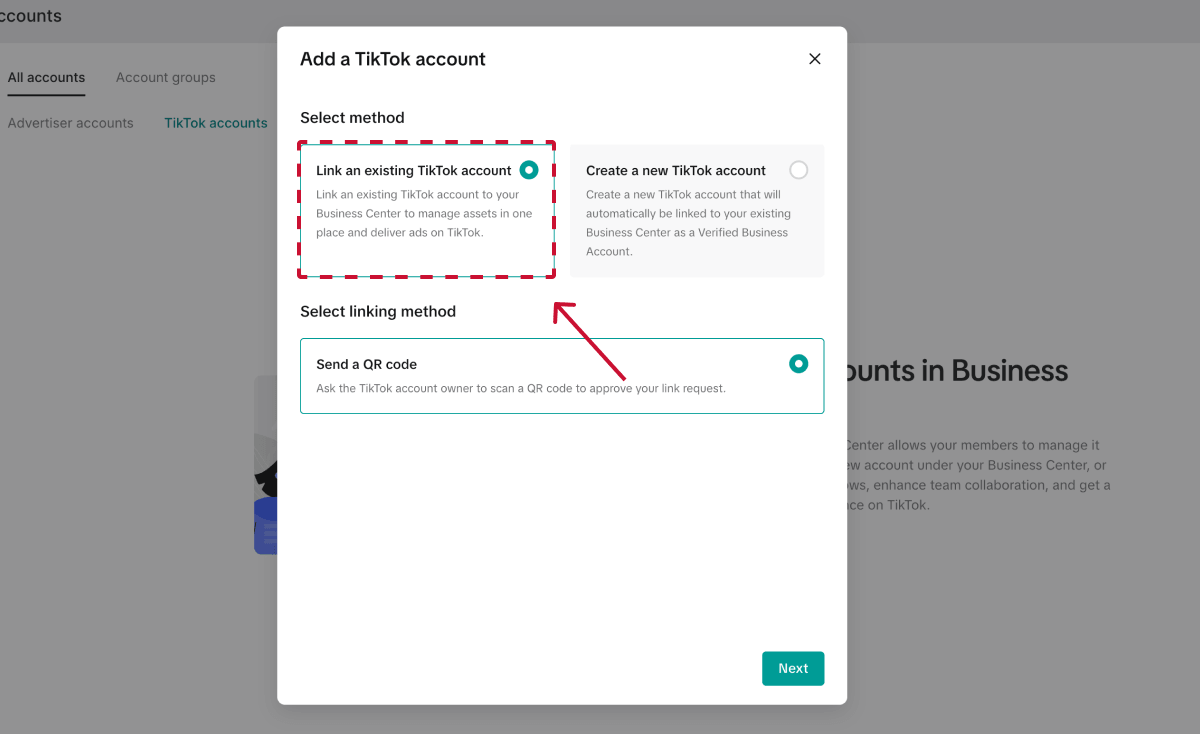
TikTok will ask you to choose a permission level:
For the Spark Ads workflow covered in this guide, select Deliver ads.
Next, choose what your agency should be allowed to do with the client’s content. For ongoing Spark Ads access, TikTok recommends enabling:
TikTok will also display permissions for features such as LIVE videos, GMV Max, Showcase, Messaging Ads and Series. Only select these if they’re relevant to the work your agency will be doing.
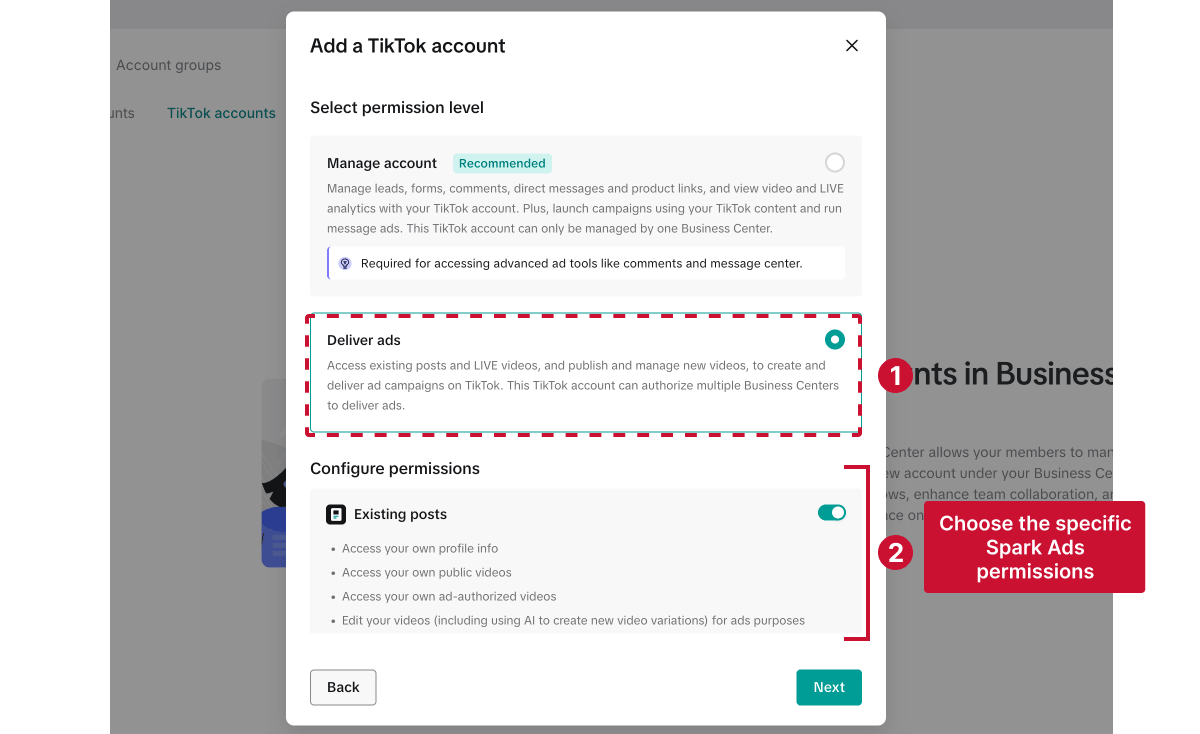
Review the permissions carefully before continuing. In particular, only request permission to publish videos on the client’s profile if they have agreed that your team can do so.
Once you’ve selected the permissions, click Next. TikTok will generate a QR code that you can download and send to the client.
The client must scan the code while logged into the TikTok account you want to connect. In the TikTok mobile app, they should:
Your agency won’t receive access until the client completes this step. If the QR code expires before they scan it, generate a new one in Business Center and send it again.
Once approved, the TikTok account will appear in your Business Center, and an Admin can then assign the appropriate account permissions to individual team members.
💡 Important: Connecting the account does not automatically give every member of your agency access. Assign it only to the team members who need it.
Once the creator approves the request and the TikTok account is in your Business Center, you need to connect their TikTok account to the Ads Manager account that will run the Spark Ads campaign. Follow our guide to linking a TikTok account for ongoing Spark Ads access.
Don’t want to walk every client through the approval process yourself? Send them our free TikTok access guide, which walks them through granting your team access to their TikTok account and advertiser account.
Choose the format that works best for your agency:
You can add the guide to your onboarding emails, client portal, or project-management templates and reuse it whenever you need TikTok access.
Agencies can also request TikTok ads access using Leadsie instead of guiding clients through TikTok Business Center manually.
Leadsie is a client onboarding tool that helps marketing agencies request access to their clients’ accounts through a single link.
This is particularly useful when clients are unfamiliar with Business Center, struggle to find account IDs, or need to connect several marketing platforms. The client still reviews and approves the permissions presented by TikTok, and they never need to share their password with your agency.
Here’s how it works:
Step 1. Send your client your Leadsie access link.
Step 2. The client opens the link, connects their TikTok account, and approves the requested permissions. They don’t need to share their password or find account IDs.
Step 3. Confirm that your agency has the required access, then assign permissions to the appropriate team members.
That’s it! You can use the same link to request access to Meta, Google Ads, and 14+ other social media and advertising platforms, so you don’t have to guide clients through a separate access process for every account.
The native TikTok Business Center method works well when both the agency and client already understand its account structure. Leadsie may be more convenient when:
✅ Bonus: Want to strengthen your credibility on the platform? Learn how to get verified on TikTok here.
Here are some common problems and what to check.
Confirm that you entered the correct Advertiser Account ID and that the person checking for the request is authorized to approve access.
Ask them to open TikTok Ads Manager and check Notifications > Business Center. If another Business Center owns the advertiser account, an Admin of that Business Center may need to approve the request.
TikTok separates advertiser account access from TikTok profile permissions:
If you selected the wrong option, cancel that request and create a new one for the correct account type.
First, generate a new QR code in Business Center. Ask the client to confirm that they are signed in to the correct TikTok profile in the mobile app before scanning it.
If TikTok continues to display an “Unknown error” or redirect error, try generating the request again. Persistent errors may require assistance from TikTok Business Support.
Ask the client to confirm that the approval was completed in the TikTok app, not merely that the QR code was scanned.
Then refresh Business Center, sign out and back in, and confirm that you’re viewing the correct Business Center. Account connections may occasionally take time to appear. Contact TikTok Business Support if the approved account still does not appear.
Connecting a TikTok account to Business Center does not automatically give every agency member access.
A Business Center Admin must assign the account and appropriate permissions to each team member who needs it. Check the member’s assigned assets before trying to reconnect the client’s account.
These assets aren’t included in the advertiser or TikTok account request. The asset owner must share them separately from their Business Center.
Ask a client-side Business Center Admin to select the relevant asset, share it with your agency’s Business Center, and grant the appropriate permissions.
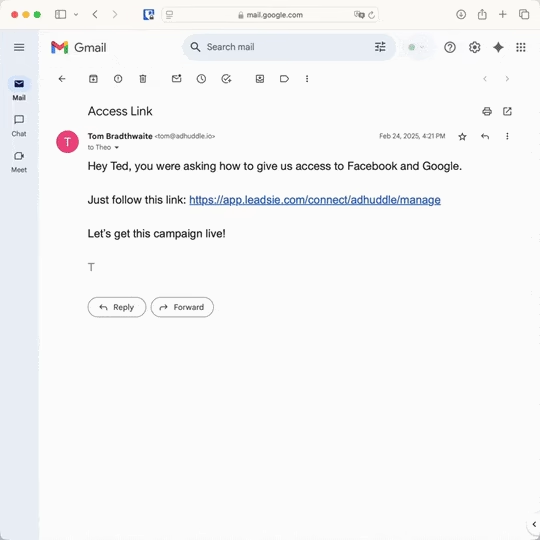
Still sending onboarding emails, sharing PDFs, or jumping on calls just to get access to a client's accounts?
With Leadsie, one secure link handles the entire process. Clients can grant access to Meta, Google, LinkedIn, TikTok, Shopify, and 14+ marketing, advertising, and social media accounts without sharing passwords.
✅ Get access to client accounts in minutes, not days
✅ Replace hours of emails, admin work, and onboarding calls
✅ Scale client onboarding without adding operational overhead
✅ Reduce your agency's turnaround time by over 50%
✅ Start billable work and billing cycles sooner
✅ Create a professional onboarding experience that helps retain clients
✅ Keep access secure with 100% GDPR and CCPA-compliant workflows
💬 "I never want to do onboarding without Leadsie!" - Alyssa, Meta Ads Manager
🎁 Start your free 14-day trial today —no credit card required.
P.S. It's risk-free, and you get to keep your account connections after the trial ends. 🙌

Sarah is a pro at writing articles that accelerate SaaS businesses' organic growth. When she’s not caught up in the thrill of content writing, you’ll find her surfing in the Atlantic Ocean and running her own yoga retreats.


Clients struggling to share access to their
TikTok Ads
accounts? Get the access you need in minutes with a free trial of Leadsie.
Approved by Meta, Google & Tiktok
Keep access to accounts if you cancel
Secure & 100% GDPR compliant
Delete your onboarding PDF. Cancel the video call. Just send one link, and get hassle-free access to 13+ platforms in minutes. Start free today.
Approved by Meta, Google & Tiktok
Keep access to clients' accounts if you cancel
Secure & 100% GDPR compliant
No. Granting your agency access does not transfer ownership of the TikTok profile or advertiser account. The client remains the owner and controls which permissions your agency receives.
Yes. A client can grant permissions to multiple agencies or connect their TikTok account to multiple advertiser accounts. However, the client should review access regularly to prevent overlapping campaigns or unintended content use.
Business Center access generally remains active until the account owner removes it or changes the permissions. However, authorization codes used for individual Spark Ads posts have expiration dates chosen by the creator.
Not necessarily. Ad delivery permissions are limited to the activities the client approves, such as using existing posts in Spark Ads or publishing authorized content. They do not automatically give the agency login access, ownership, private messages, or full control of the profile.
Remove the client’s assets from team members who no longer need them and ask the client to revoke or unlink your agency’s access. Review any active Spark Ads campaigns first, as removing access may interrupt campaigns that use the client’s TikTok identity or content.
Questions unanswered? Check out our help center or get in touch 🤠
© Leadsie Ltd 2024