
Clients struggling to share access to their
TikTok Ads
accounts? Get the access you need in minutes with a free trial of Leadsie.
14 day unlimited free trial
Extend until you onboard a client
No credit card required
Keep access to clients if you cancel


With easy one-link access requests for 13+ platforms your campaigns can go live in minutes, not days. Start free today.
Approved by Meta, Google & Tiktok
Keep access to clients' accounts if you cancel
Secure & 100% GDPR compliant


This article explains the requirements and steps to get your agency certified as a TikTok Marketing Partner within the agency, creative, measurement, and marketing technology categories.
Agencies with a $50,000 minimum in TikTok ad spend during the previous 90 days can apply directly @ https://partners.tiktok.com/sign-up/ and get an answer within 10 business days.
We’ll share what we know about who’s qualified to become a TikTok Marketing Partner, including advice for putting forward a strong application
A TikTok Agency Partner is an agency with a proven track record that has been vetted by TikTok through one of the official partner programs.
The term TikTok agency partner is often used interchangeably to refer to Badged Agency Partners, which include:
This article focuses on the application process for becoming a TikTok Marketing Partner AKA Badged Agency Partner.
Because the Agency Partner term is reserved for agencies who made it through the vetting process, the following situations do not automatically make one a TikTok Agency Partner:
Important: It is not necessary for an agency or marketer to be certified or a partner before they can offer TikTok media, shop, or creator services to clients. The Partner Program is an optional, add-on badge of recognition for agencies who meet the spending requirements.
Related article: What Is a TikTok Agency Account?
TikTok Marketing Partners are split into four categories, which include agencies, creative specialists, measurement providers, and technology companies that help brands advertise and grow on the platform.
Related article: How to Allowlist TikTok Creator Content for Spark Ads
Yes. If TikTok deems your organization to have the relevant capabilities and client experience in each area, it can list you as a partner under multiple categories.
Take Tinuiti, for example. The full-funnel performance marketing agency is listed under both Agency and Measurement partner categories.
They also narrowed down their expertise by including a specialty (Cross-Channel) and a focus area (Media Mix Modeling).
Think of these labels as three levels:

If you’ve looked into applying, you may have noticed that TikTok’s public website does not spell out the minimum ad spend, client numbers, or experience needed to qualify.
However, TikTok’s official partner materials name the following basic requirements as:
You don’t need to wait for an invitation to express your interest. Whether a TikTok representative encouraged you to apply or you found the program yourself, you can start with TikTok’s official Marketing Partner application form @ https://partners.tiktok.com/sign-up/
The first form is fairly short. It asks for:
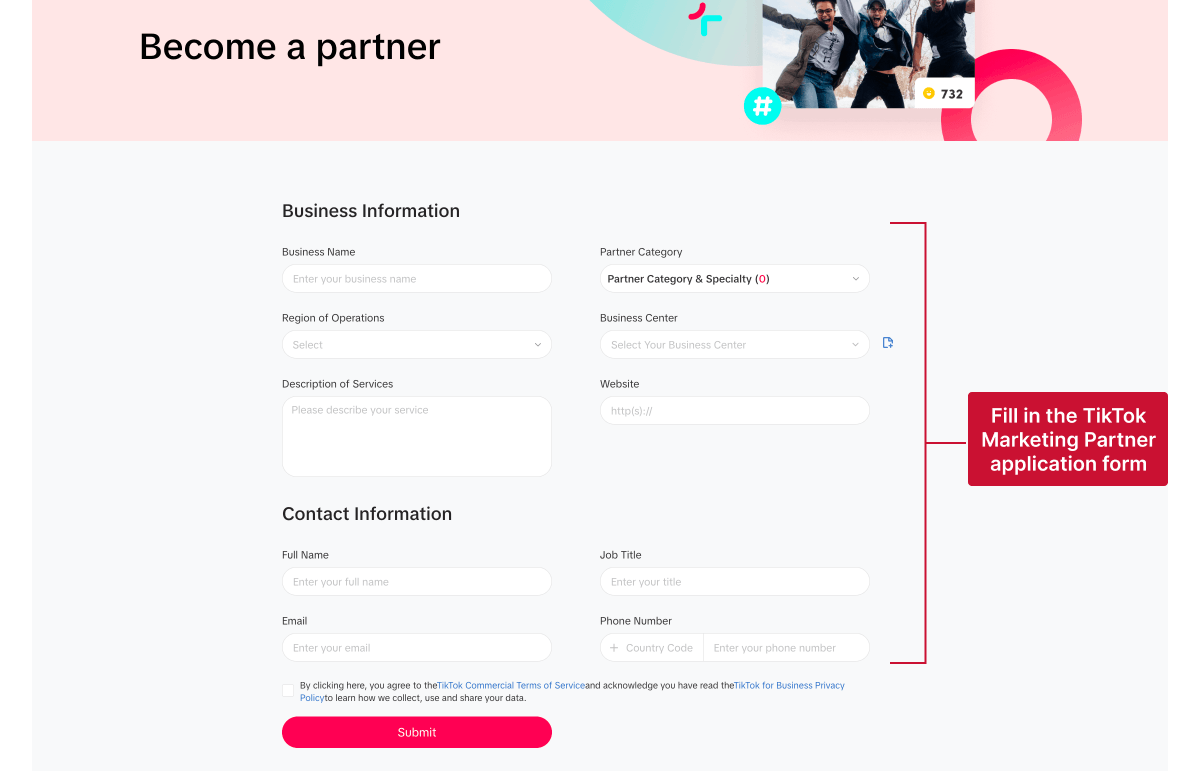
The initial form doesn’t ask you to upload a full set of supporting documents. However, TikTok may contact you for more information while reviewing your application.
Be ready to provide:
Preparing this evidence in advance will simply make it easier to respond if TikTok wants to take your application further.
TikTok admits only the most reputable, well-established TikTok agencies worldwide as partners, so earning a badge shows potential clients that TikTok has recognized your expertise and capabilities.
You can display your partner badge on your website (as long as you follow the badge guidelines TikTok provides during onboarding), and even use it as a credibility boost when pitching your TikTok services.

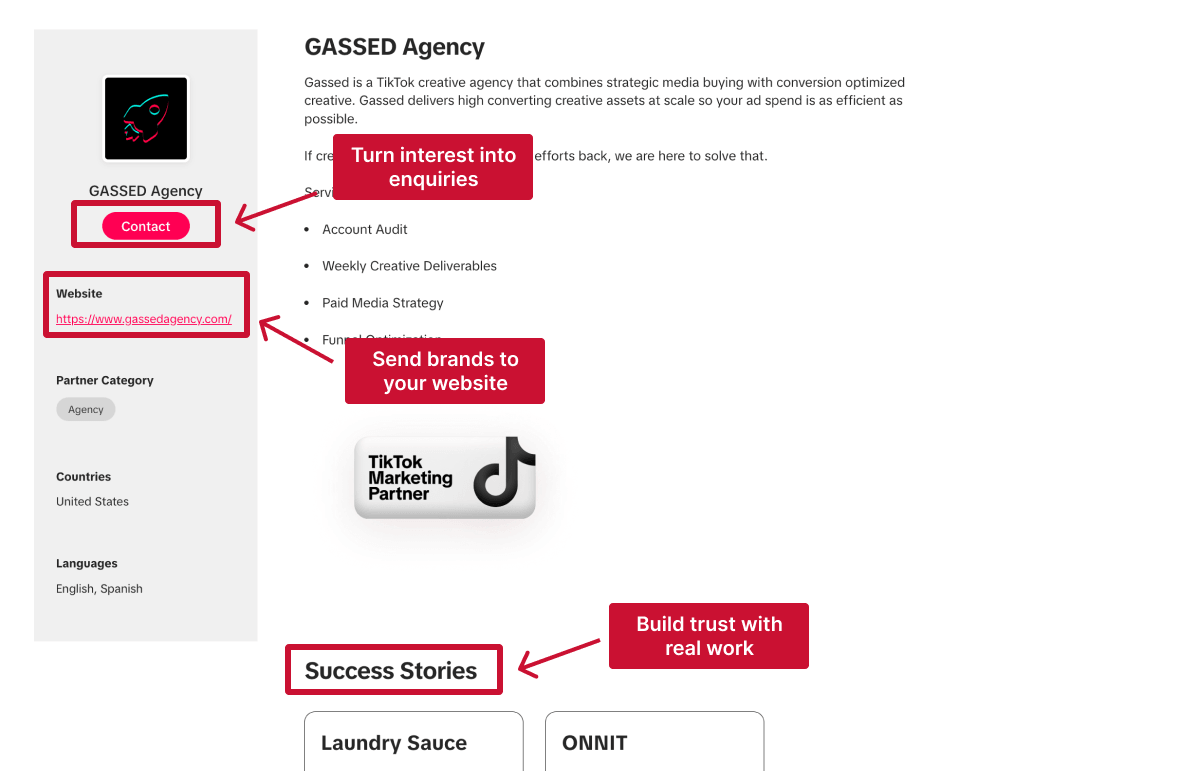
As a badged Agency Partner, you get your own page in TikTok’s Partner Directory, which gives brands and advertisers another way to discover your agency and get in touch.
Your profile gives them the opportunity to explore your services and see previous examples of your work. They can then contact your team directly using the dedicated contact button or visit your website, making the directory a potential source of leads.
Partner status gives your agency the opportunity to learn about the latest TikTok products and platform changes early on and, in some cases, even test them before the wider release.
TikTok specifically says that its partners receive current product knowledge to help them plan and improve campaigns. Some agencies also report receiving beta access. FABO, for example, says it takes part in beta tests, while RichClicks says it tests upcoming advertising tools and platform updates.
Partner status may help your agency resolve urgent issues faster, as well as access exclusive market insights and campaign resources.
RichClicks, for example, reports having a direct support channel with TikTok and access to advanced tools, reports, and market trends. FABO also says it receives priority support for urgent issues and early access to new reports and insights.
Your application will be reviewed within 10 business days, but might take longer if TikTok needs more information from you.
If your application is successful, TikTok will ask your agency to sign a Partner Agreement. This normally covers:
After the agreement is signed, TikTok will guide you through onboarding and explain how to use your new partner status.
Your agency will typically receive:
If your application is not approved, TikTok will send you detailed feedback on which criteria you didn’t meet, giving you a clearer idea of what to work on before re-applying.
Depending on the feedback, this might mean gaining more campaign experience, improving your case studies, completing relevant certifications, or strengthening your measurement and compliance processes.
Once you have made those improvements, you can reapply through the same application form after 90 days. There is no limit to the number of times you can reapply.
In the meantime, you can continue providing TikTok services to clients. Just be careful not to call your agency an official TikTok Partner or suggest that TikTok has endorsed it!
Related article: How to Request Access to TikTok Ads
Becoming a TikTok Agency Partner is not a one-time approval. Your status is granted for up to 12 months, but you must continue meeting TikTok’s requirements throughout that period.
To keep your badge, your agency is expected to:
TikTok reviews partner performance regularly, so your agency could lose its badge before the 12-month term ends if it stops meeting these requirements.
At the end of the year, your agency must go through TikTok’s rebadging process to keep its partner status for another term. Meeting the minimum requirements does not automatically guarantee renewal, so it’s important to keep your campaign results, certifications, and compliance records up to date.
Bonus: Agencies that consistently meet or exceed TikTok’s requirements may also become eligible for tier upgrades (such as Premier Partner status), incentives, co-marketing opportunities, and early access to new products or features.
Premier is a higher tier for selected TikTok Marketing Partners that continue to perform strongly and have completed TikTok One onboarding.
You cannot apply for the upgrade yourself. If TikTok’s regional team believes your agency is ready after its internal review, it will nominate you to TikTok’s HQ, which will make the final decision.
Premier Partners may get more opportunities to work directly with TikTok, including:
Every day spent waiting for account access is a day you're not launching campaigns, delivering results, or generating revenue.
Leadsie is a client onboarding software that helps agencies request and receive access to client marketing, advertising, and social media accounts with one secure link. Instead of managing endless emails, permission requests, and troubleshooting sessions, you send a link to your client, they approve the permissions you've requested, and you get access in minutes, not days.
Clients can grant access to Meta, Google, LinkedIn, TikTok, Shopify, and 14+ other marketing platforms without sharing passwords.
✅ Request, manage, and remove client access from one place
✅ Replace hours of emails, admin work, and onboarding calls
✅ Scale client onboarding without adding operational overhead
✅ Reduce your agency's turnaround time by over 50%
✅ Start billable work and billing cycles sooner
✅ Create a professional onboarding experience that helps retain clients
✅ Keep access secure with 100% GDPR and CCPA-compliant workflows
💬 "I never want to do onboarding without Leadsie!" - Alyssa, Meta Ads Manager
🎁 Start your free 14-day trial today —no credit card required.
P.S. It's risk-free, and you get to keep your account connections after the trial ends. 🙌

Nina is an SEO content specialist with expertise in B2B SaaS. She helps businesses increase organic traffic with strategic, high-quality content. Outside of work, you’ll find her sailing somewhere in the Mediterranean.


Clients struggling to share access to their
TikTok Ads
accounts? Get the access you need in minutes with a free trial of Leadsie.
Approved by Meta, Google & Tiktok
Keep access to accounts if you cancel
Secure & 100% GDPR compliant
Delete your onboarding PDF. Cancel the video call. Just send one link, and get hassle-free access to 13+ platforms in minutes. Start free today.
Approved by Meta, Google & Tiktok
Keep access to clients' accounts if you cancel
Secure & 100% GDPR compliant
No. TikTok does not charge a fee to apply to the Marketing Partners Program.
Yes. The application allows you to select multiple categories and specialties.
No. Although TikTok agency partner is sometimes used loosely as an umbrella term, TikTok Agency Partners and TikTok Shop Partners belong to different partner programs. Each has its own purpose, requirements and application process.
No. A Business Center simply helps agencies manage client accounts, permissions, and advertising assets.
TikTok Academy certifications show that individual team members understand the platform, but they do not give the agency official partner status.
Similarly, being connected to a client as its media-buying partner inside Business Center does not make your agency a badged TikTok Agency Partner.
No. Agencies that meet TikTok’s requirements can apply directly through the Marketing Partner application form. A TikTok representative may encourage an agency to apply, but an invitation is not required.
Questions unanswered? Check out our help center or get in touch 🤠


