
Clients struggling to share access to their
TikTok Ads
accounts? Get the access you need in minutes with a free trial of Leadsie.
14 day unlimited free trial
Extend until you onboard a client
No credit card required
Keep access to clients if you cancel


With easy one-link access requests for 13+ platforms your campaigns can go live in minutes, not days. Start free today.
Approved by Meta, Google & Tiktok
Keep access to clients' accounts if you cancel
Secure & 100% GDPR compliant


The safest way to give someone access to your TikTok business and advertising assets is through TikTok Business Center. Add an individual as a member or an agency as a partner, then choose the accounts, assets, and permissions they need.
This lets them do their work without you having to share your TikTok password.
In this guide, we’ll walk through both access methods step by step.
Related article: How to Request TikTok Ads and Spark Ads Access
To give someone TikTok access, sign in to TikTok Business Center, go to Users > Add Members, enter their email address, and assign their role, assets, and permissions.
Use this method to give an individual, such as an employee, freelancer, consultant, or social media manager, access to assets in your TikTok Business Center.
You must be a Business Center Admin to add new members.
Go to TikTok Business Center (https://business.tiktok.com/) and sign in.
If you don’t have a Business Center, create one using your TikTok for Business account before continuing.
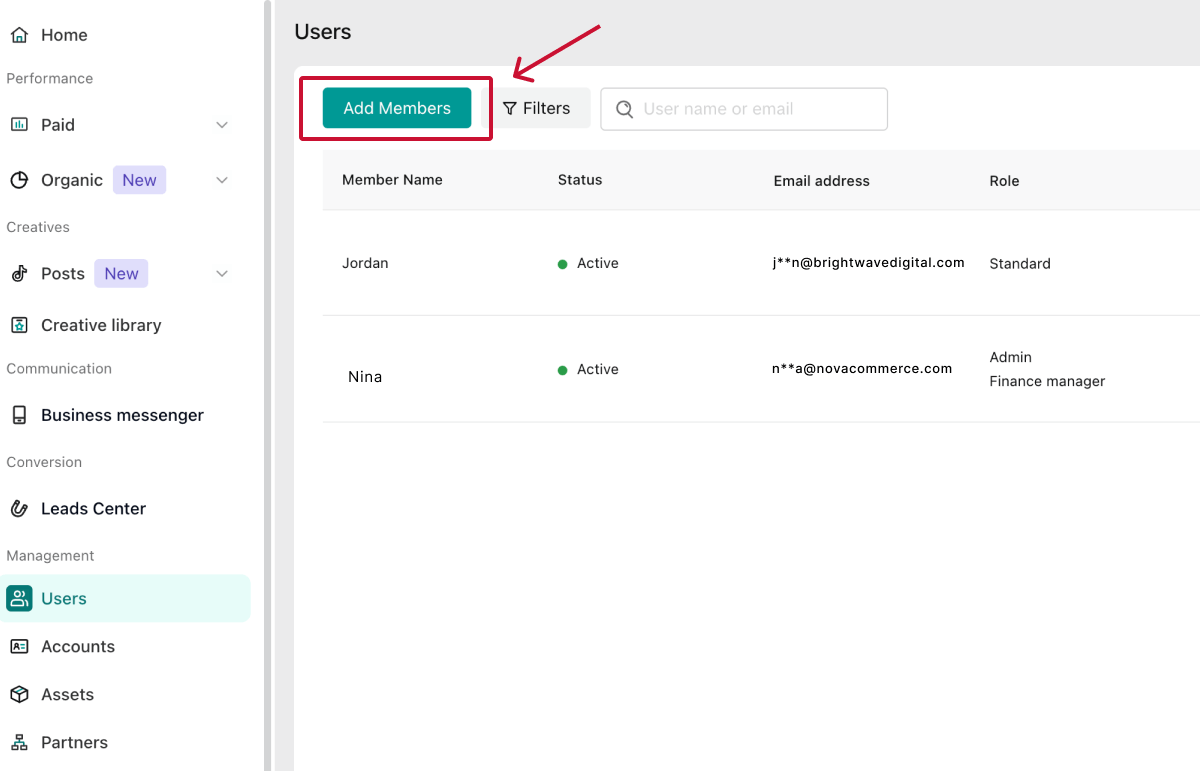
In the left-hand menu, click Users, followed by Add Members.
This opens the invitation window, where you can enter the person’s details and configure their access.
🔎 Note: You can add up to 4,000 members per Business Center.
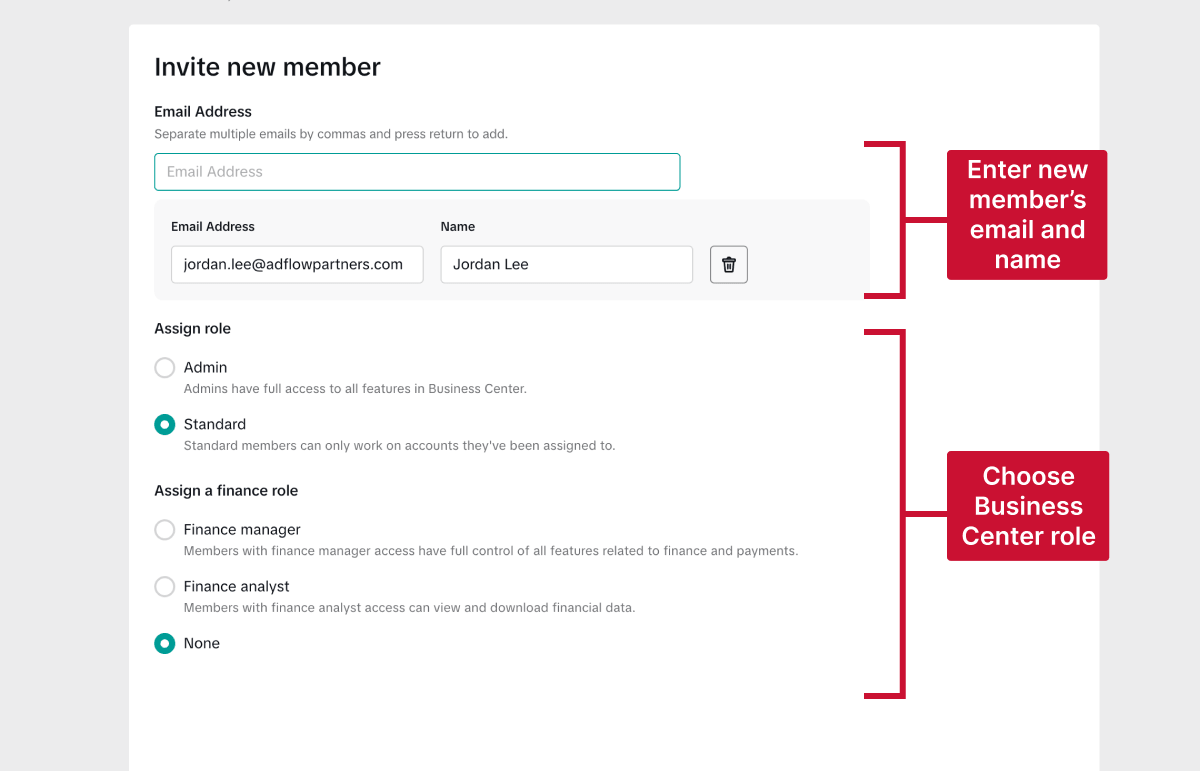
Enter the email address associated with the person’s TikTok for Business account. TikTok may ask you to confirm the name connected to it.
Check the address carefully, as TikTok will send the invitation there.
Tip: If the person doesn’t have a TikTok for Business account, they may need to create one before accepting the invitation.
Choose the member’s overall Business Center role:
For most employees, freelancers, consultants, and social media managers, Standard is the safer option. Only select Admin if the person needs to manage the Business Center or control other users’ access.
If required, you can also assign a finance role:
Only assign a finance role if the person handles billing, payments, budgets, or financial reporting.
Select the assets you want to share, such as your advertiser accounts or TikTok Shop, and then choose the appropriate permission level for each one. For a TikTok ad account, the permissions include:
Give the member the lowest permission level they need to do their work.

Click Save to finish. The user will receive an email invitation and must accept it before gaining access.
Tip: To resend the invitation, go to Users, find the pending member, and select Resend request.
To change or revoke someone’s access, open the Users section in TikTok Business Center and select the relevant member. You must be a Business Center Admin to manage another user’s access.
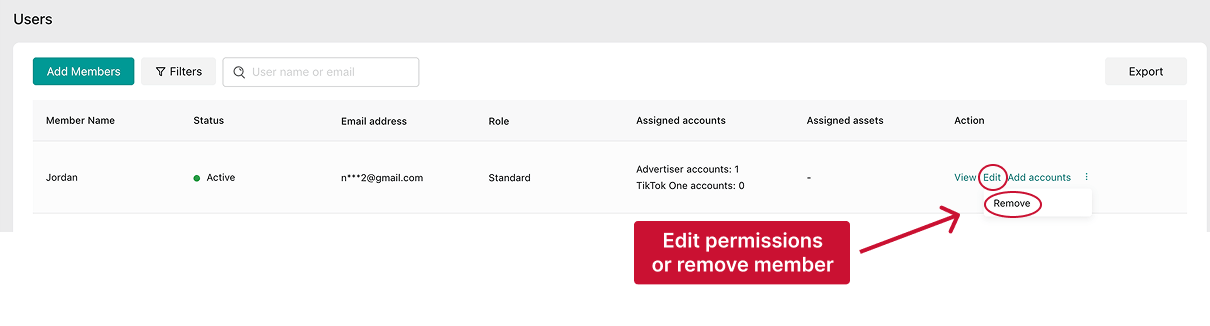
💡 Security tip: Regularly review your user list to prevent old collaborators from keeping access to sensitive accounts. A quick audit every few months is best practice for security.
TikTok Business Center uses two layers of access:
Most users should receive the Standard role. Only assign Admin access to someone who needs to manage the Business Center or control other users’ access.
Learn more about TikTok Business Center roles here.
Each asset type has its own set of permissions, so the available roles (and what those roles allow someone to do) depend on the asset you’re sharing.
For example, TikTok ad accounts use the following Ads Manager permission levels:
Learn more about TikTok asset-level permissions here.
To give an agency TikTok access, add its Business Center as a Partner, then choose the TikTok accounts, ad accounts, and other assets it can use.
Use this method when working with an agency, vendor, consultant team, or another company that has its own TikTok Business Center. Partner access lets the organization manage access for its team without you having to add every person individually.
Are you an agency that needs access to a client’s TikTok ad account? Follow our guide to requesting access to a client’s TikTok Ads and Spark Ads.
Make sure:
Go to TikTok Business Center ( https://business.tiktok.com/ ) and sign in to the Business Center that owns the assets you want to share.
Make sure you’re using the correct Business Center if you manage more than one organization or client.
From the left-hand menu, select Partners, then click Add a partner.
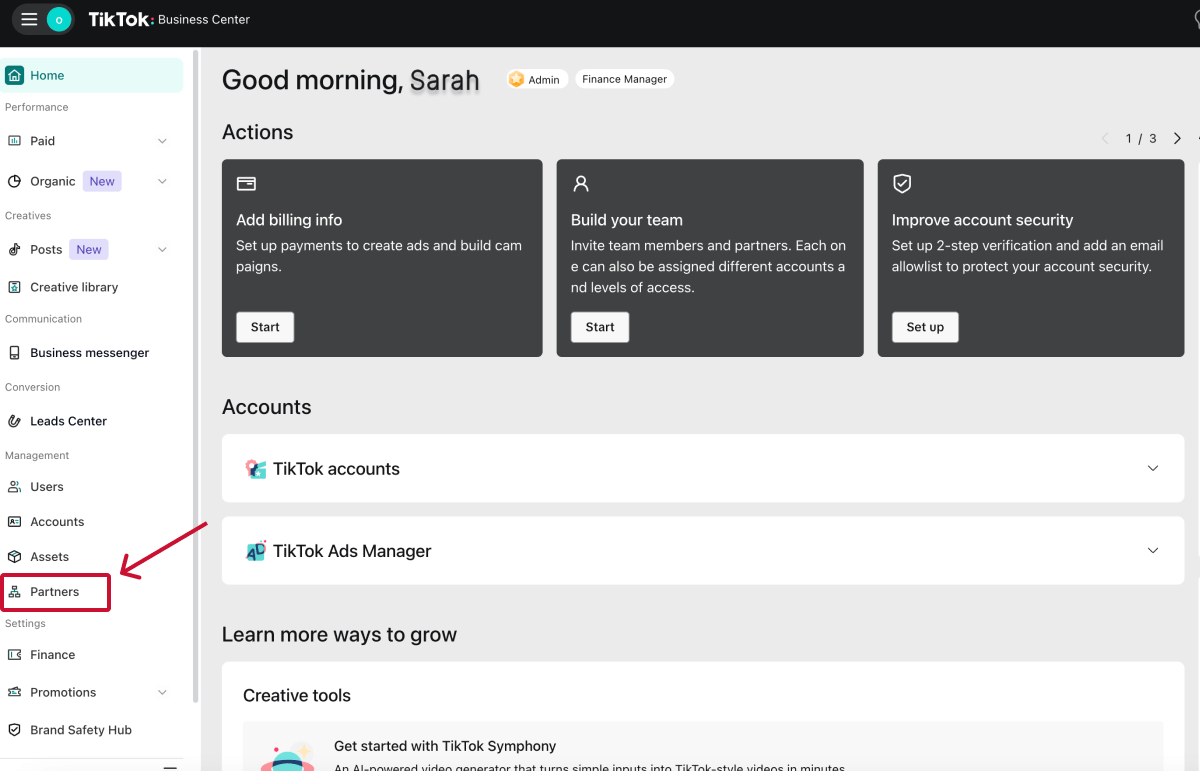
The Partners section manages relationships with agencies and other organizations rather than individual users.
Note: In an Enterprise Business Center, partner management may appear under Organization.
Enter the Business Center ID provided by the agency or partner, then click Next.
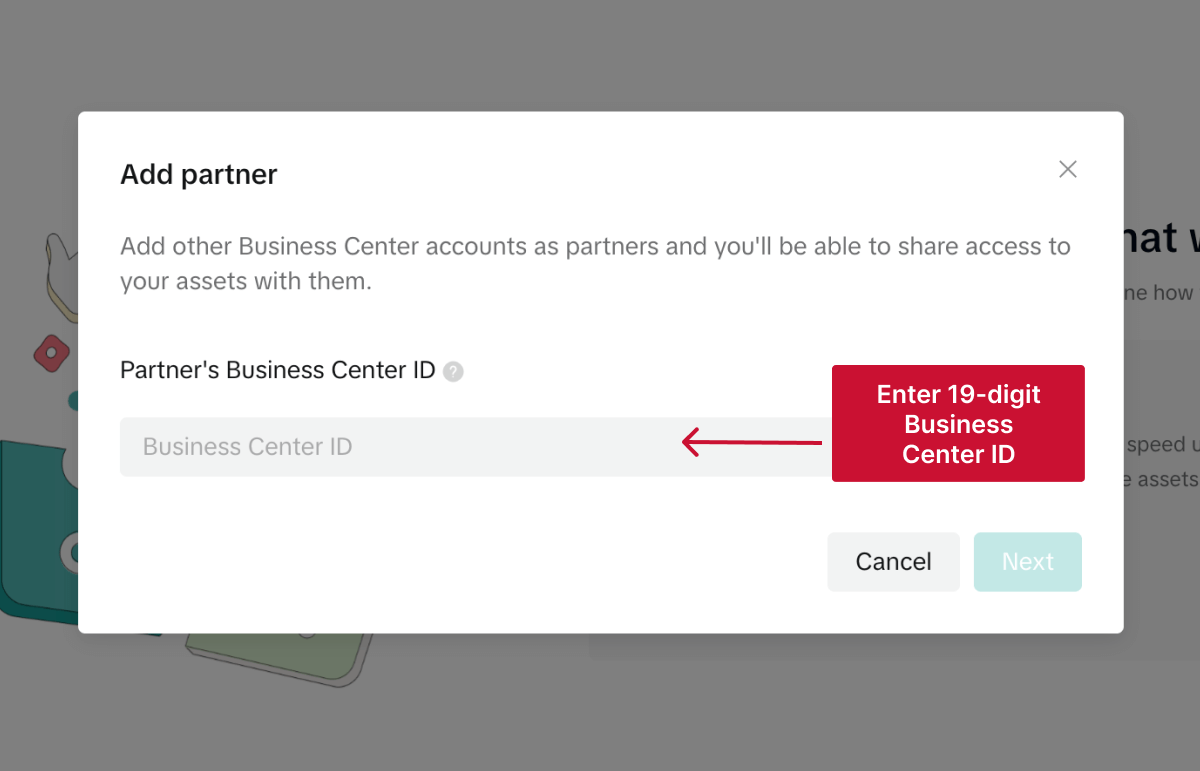
The 19-digit Business Center ID identifies the agency’s organization and ensures you share your assets with the correct partner.
If they’re not sure where to find it, they can look it up in Business Settings > Business Center information in their own Business Center. Their Business Center ID will appear directly under their account name.
TikTok may ask whether the partner buys media and manages ad campaigns for your business:
If both parties approve, selecting Yes adds a Media agency partnership label to the partner. It does not grant access automatically; you will choose the agency’s accounts, assets and permissions in the next step.
You can also select Share this Business Center’s verification with your partner if the agency needs to use your verified business information. Leave it unchecked unless the agency specifically asks you to share the verification.
Choose the TikTok assets you want to share with the agency, such as a TikTok account, ad account, pixel, audience, or catalog. Then select the appropriate permission level for each asset.
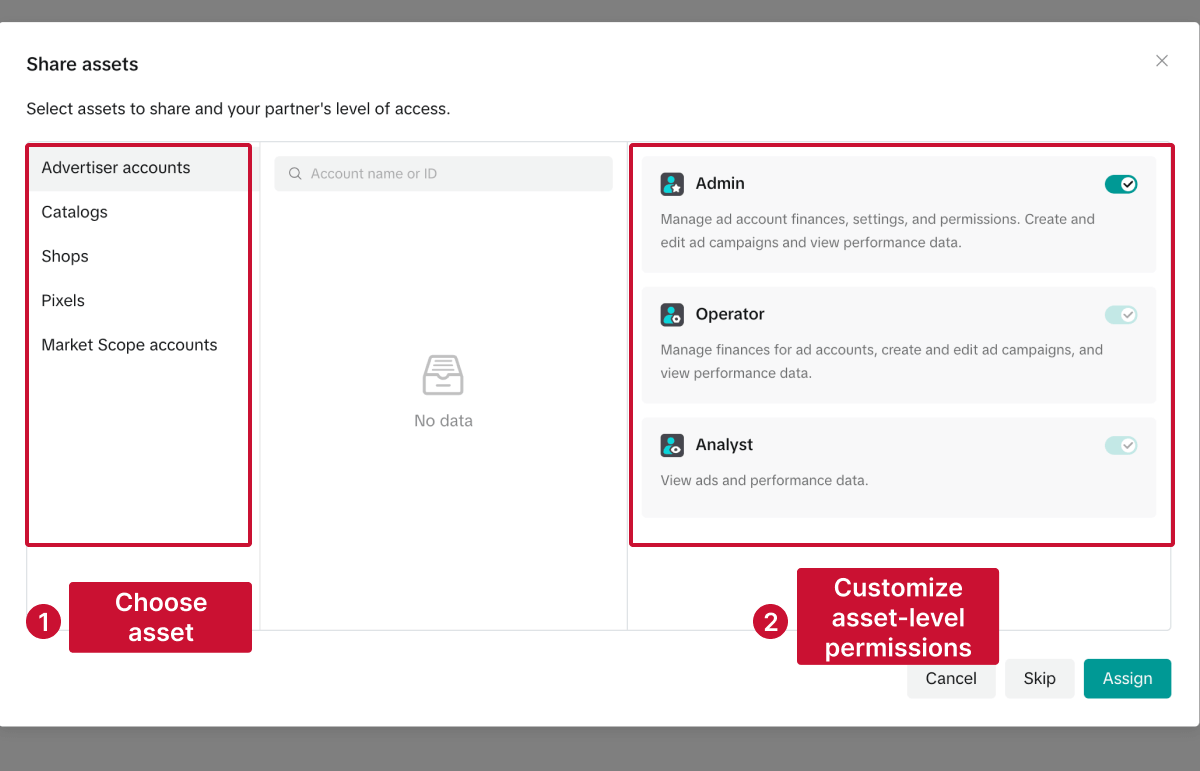
Only share the assets the agency needs to perform its work. For example, if it only manages advertising campaigns, it may not need access to billing information or unrelated ad accounts.
The agency will receive the partner request in its Business Center. Once accepted, its Admins can assign the shared assets to the relevant people on its team.
If your collaboration changes, you can easily remove or adjust a partner’s permissions.
Once removed, the partner will immediately lose all access. They won’t be able to view or manage any ad accounts or assets that were previously shared with them.
💡 Tip: Removing the partner is much cleaner than removing individual users. It cuts off access for everyone in the partner’s Business Center at once.
Your partner will now see the updated permissions in their Business Center, and the changes will take effect immediately.
❗ Note: Only your Business Center Admins can change partner permissions. Partner admins (people on their side) cannot change their own access.
Go to Users, select the member, and confirm that you assigned the correct account or asset. They should also check that they’re viewing the right Business Center.
Check their asset-level permission. An Analyst can only view ad account data, while an Operator can manage campaigns but may not have access to settings or finances.
Business Center access also doesn’t automatically provide access to every feature in the TikTok app, such as organic posting or messages.
Make sure the TikTok account and ad account are connected to the same Business Center. The member or partner must also have the required permissions for both assets.
Having Admin access to an ad account does not necessarily provide every Business Center or finance permission.
Check the person’s Business Center role, ad account permission, and finance role separately. If they need to manage billing, payments, or account balances, they may also require Finance Manager access.
Confirm that you used the email associated with their TikTok for Business account and ask them to check their spam folder. You can resend the invitation from the Users section.
Hiring a marketing agency, freelancer, or consultant? Giving them access to your marketing accounts shouldn't require endless emails, confusing permission settings, or sharing login credentials (too risky).
If your agency sent you a long PDF and asked you to navigate Meta Business settings and 5 other social platforms to grant them access, send them over to leadsie.com to automate this part of client onboarding for you.
With Leadsie, you can securely share access to Meta, Google, LinkedIn, TikTok, Shopify, and 14+ other marketing platforms via a secure link in just a few clicks.
✅ Approve only the permissions your agency actually needs
✅ No need to share passwords or sensitive login information
✅ Get campaigns, ads, and marketing projects started faster
✅ Keep account access secure with 100% GDPR and CCPA-compliant workflows
💬 "I never want to do onboarding without Leadsie!" - Alyssa, Meta Ads Manager
🎁 Start your free 14-day trial today —no credit card required.
P.S. It's risk-free, and you get to keep your account connections after the trial ends. 🙌

Nina is an SEO content specialist with expertise in B2B SaaS. She helps businesses increase organic traffic with strategic, high-quality content. Outside of work, you’ll find her sailing somewhere in the Mediterranean.


Clients struggling to share access to their
TikTok Ads
accounts? Get the access you need in minutes with a free trial of Leadsie.
Approved by Meta, Google & Tiktok
Keep access to accounts if you cancel
Secure & 100% GDPR compliant
Delete your onboarding PDF. Cancel the video call. Just send one link, and get hassle-free access to 13+ platforms in minutes. Start free today.
Approved by Meta, Google & Tiktok
Keep access to clients' accounts if you cancel
Secure & 100% GDPR compliant
Yes. You can link an existing TikTok account for ad delivery or account management, depending on what access your team needs. The account owner must authorize the connection before it can be used.
Yes. You can authorize an agency to use your TikTok identity and organic posts for Spark Ads without sharing your login details or giving it broader profile access. You can link the TikTok account for ad delivery or authorize an individual post with a video code.
No. A partner can only access the accounts and assets you specifically share with it. You must assign additional or newly created assets separately if the partner needs them.
Yes. You can assign the same ad account to multiple members or partners and give each one a different permission level based on their responsibilities.
No. Removing a member or partner revokes their access but does not delete the ad account, campaigns, or other Business Center assets. Any existing campaigns remain unless an authorized user pauses, changes, or deletes them separately.
A TikTok account is the profile used to publish content and interact on TikTok. TikTok Business Center is where you manage people, partners, business assets, and permissions, while TikTok Ads Manager is where authorized users create and manage advertising campaigns.
Although campaigns run through Ads Manager, access to the ad account is granted through Business Center.
Questions unanswered? Check out our help center or get in touch 🤠


