
Automate your onboarding now & join 1500+ agencies using Leadsie.
14 day unlimited free trial
Extend until you onboard a client
No credit card required
Keep access to clients if you cancel


Automate your onboarding now & join 1000+ agencies using Leadsie.
Approved by Meta, Google & Tiktok
Keep access to accounts if you cancel
Secure & 100% GDPR compliant


A new agency might have its strategy ready, the team lined up and a client who's excited to get started. Then someone tries to log into Google Ads, discovers they don't have the right permissions and the whole project slows down before it's even begun.
It's a frustratingly familiar start to a client relationship. Instead of getting to work, the agency spends its first few days figuring out who has access to an account nobody's touched in years, and whether that person still works for the company.
Nick Keeping, founder of UK clinic marketing agency Avaris Media, learned how quickly an access problem can become a relationship problem. His team took over PPC for a private clinic, while the previous web agency continued to manage the website.
The login arrived, but its permissions were too limited for the work Avaris needed to carry out.
Two weeks into the engagement, the clinic told Keeping it had already lost confidence in the new agency. The client was paying for a change of provider and still couldn't see the promised progress.
“About two weeks in, the client told us they'd already lost faith in us. That was the real cost of the handover. We were chasing permissions and answers. From the clinic's side, they'd hired a new agency and were still waiting.”
Keeping's team offered a credit against the next retainer. Once access was fixed, it worked through healthcare advertising certification requirements and got the campaigns live. The relationship survived… but the delay had already cost time and trust.
His experience raises a question worth asking before any agency transition: who can actually access the marketing accounts, and can they do the work they're being hired to do?
Giving an agency a login, linking a Google Ads manager account, and granting administrator permissions are different actions. The person responsible for approving one may not have the authority to complete the others. And then, an agency can receive access to reporting while remaining unable to change a campaign. Its media buyer may have working Google Ads permissions but no access to the Tag Manager container behind the conversion data.
Use the table as a guide rather than asking for full admin access to everything. Someone checking reports won't need the same permissions as someone managing users or changing conversion settings. The agency should get the access it needs to do the work, and the client should always be able to manage its own accounts.
The distinctions are documented by the platforms themselves.
That is why an access inventory needs to capture more than whether an invitation was accepted. It should show the actual account or container, the person's role and the work that role allows them to perform.
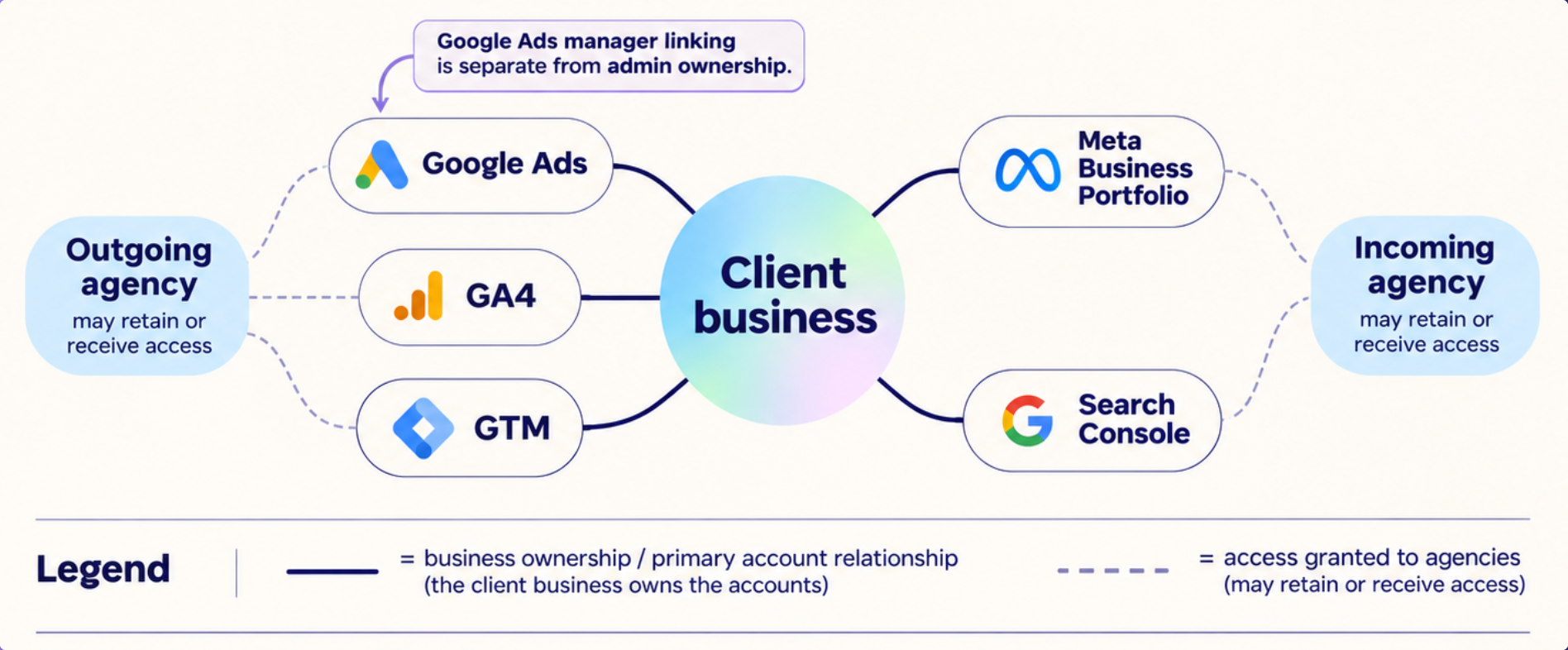
To understand how these distinctions affect real transitions, we looked at first-hand accounts from PPC agency founders and specialists. Their stories describe different points of failure: an access level that wasn't enough, an administrator who could shut everyone out and tracking that couldn't be trusted even after the new team logged in.
The clinic in Keeping's account had two suppliers working on different parts of its digital presence. His agency was responsible for the new PPC engagement; the existing web provider controlled the site, hosting and domain. That arrangement can work, but only if each supplier agrees who will approve the new team's requests.
According to Keeping, the first credentials provided let his team sign in without granting the administrative privileges it had requested. At the same time, the previous provider's attempt to run healthcare ads had never reached launch. Avaris needed to reconstruct what had been tried and how far the earlier team had progressed through the certification process.
“The other gap was campaign history. The web agency had tried to run healthcare ads for the clinic but had never got them live. We had to piece together what they'd already tried and how far they'd got with certification.”
An incoming agency should check early on whether any part of its work depends on a developer, someone on the client's team or a previous supplier who's still involved. Website access is a good example. Getting a CMS login doesn't necessarily mean the agency can make the changes it needs. Someone should test the permissions before work begins and agree on who handles anything the agency can't access.
A short handover checklist can save a lot of back-and-forth:
For Avaris, that might mean requesting administrator access from the client's web agency, testing the required changes and asking the client to confirm any restrictions.
Tools like Leadsie can simplify the process of requesting access to supported marketing accounts, but CMS permissions and third-party approvals still need to be handled separately. With those responsibilities agreed upfront, requests are less likely to get lost between inboxes while everyone assumes someone else is dealing with them.
Kristina Cutura, a Google Ads consultant at OnlineAdsCafe, described a more serious permissions failure. When her team took over an account, the departing account manager allegedly used administrator-level access to lock out the other users. Advertising was paused while the client and incoming agency tried to recover access.
“For two weeks, neither we nor our client were able to gain access and all campaigns remained paused, despite outreach to both the prior account manager and to Google.”
The precise motive is her interpretation of what happened; the operational consequence is clear in her account. A person with high-level access could prevent the people paying for the campaigns from managing them. Even an eventual recovery couldn't restore the advertising time lost during those two weeks.
Cutura's recommendation is to retain client-side administrative control and review users and linked manager accounts when agencies change. That review needs to happen while access still works. It’s much harder to plan an orderly departure after a dispute has started.
Google Ads distinguishes a manager's link to a client account from manager ownership. An agency joining through an MCC doesn't automatically become the account owner. When replacing an agency, the incoming team should confirm the account's existing customer ID and make sure an authorized client administrator can approve changes before anyone starts removing the old relationship.
Mihail Borisov, founder of Florida-based Fireline Marketing, came to a similar rule from the other side of an agency relationship. Before starting his own agency, he says he hired a provider that created the advertising account under its own control. When the contract ended, he couldn't take the account history with him.
“Years ago I hired an agency for one of my own businesses and made one mistake: the Google Ads account was set up under their account, not mine. When we parted ways, I lost everything. The campaigns, the history and the data all stayed with them, and I had to start again from zero.”
Boris's experience should not be confused with the standard behavior of unlinking an existing Google Ads account. Google's documentation says that when a client account is unlinked from a manager, its own campaign history remains. The bigger risk in his account was that the business did not retain independent access to the advertising account it had been using.
The distinction changes what an incoming agency should request. Ask for access to the existing account first, not a new account by default. If the client cannot demonstrate control of the account, investigate the available admin and recovery routes before promising that historical data will carry over.
A Google Ads login won't tell you everything you need to know about the account. Chris Coussons, founder of UK agency Visionary Marketing, described taking over an account for a B2B document shredding company. The client already controlled its Google Ads account, so there was no stand-off over login credentials.
The trouble was the configuration left behind. Dozens of campaigns had been paused, including campaigns containing what Coussons identified as an important historical keyword. Negative keywords had been split across six shared lists, making it difficult to tell which searches the active campaigns were excluding.
“Access was the easy part because the client held the account. The hard part was that campaign history only made sense if you read it as a whole. I judged every keyword on 12 months of data summed across all its copies, kept the 39 proven keyword and match-type combinations, and merged about 9,300 negatives into two master lists attached to every search campaign.
Without the full history, that clean-up would have been guesswork.”
These figures come from his own experience, so they shouldn't be treated as a benchmark for every account audit. What makes the example interesting is how much the incoming agency had to untangle. A keyword's performance could be spread across duplicated or paused campaigns, while several exclusion lists might be affecting which searches could trigger ads. Looking at either in isolation wouldn't give the team the full picture.
That's why a proper handover should cover what happened in the account before the new agency arrived. The outgoing provider should ideally explain why certain targeting decisions were made, which campaigns were paused and whether any restrictions still apply. Without those notes, the incoming team has to work backwards through the account history to understand what it's dealing with.
Clients should know that this takes time, particularly when an account has been running for years or has passed through several agencies. An initial audit is a reasonable part of the handover, and it's worth agreeing on that before the engagement begins. Having permission to make changes doesn't mean the agency has enough information to make the right ones.
Google Tag Manager is easy to overlook on an access request. It’s often installed before the current marketing agency arrives, sometimes by a developer who no longer works with the business. The Google Ads account may be available while the container that controls conversion tags remains inaccessible.
Ishant Sharma, founder of Hustle Marketers, says his team encountered this… at a driving school. The website was using an existing GTM container, but nobody at the school had access to administer it. The new team couldn't inspect the tags behind the conversions used in Google Ads bidding.
“The one I run into most is Google Tag Manager, because it's the account nobody thinks about until the conversion numbers stop making sense.”
The same handover exposed a separate Google Ads complication: the driving school and a related CDL training business had been running campaigns from one advertising account. Sharma's team limited its work to the driving school while recommending separate accounts for the two businesses, so changes wouldn't inadvertently affect the other operation.
“We didn't wait on the old container. Tracking is moving to a container the client controls, and the old one comes off the site. On Google Ads, our position is that the two businesses need separate accounts, and until that happens our work stays on the driving school campaigns only.
So the CDL side isn't touched by an agency that doesn't manage it.”
Moving tracking into a new container can be sensible when access cannot be recovered, but it should be treated as a controlled implementation. Before removing the old snippet, identify the conversions currently used for bidding, map the tags that must continue running, and test that the replacements fire correctly. An unplanned container change could interrupt measurement even if campaigns remain active.
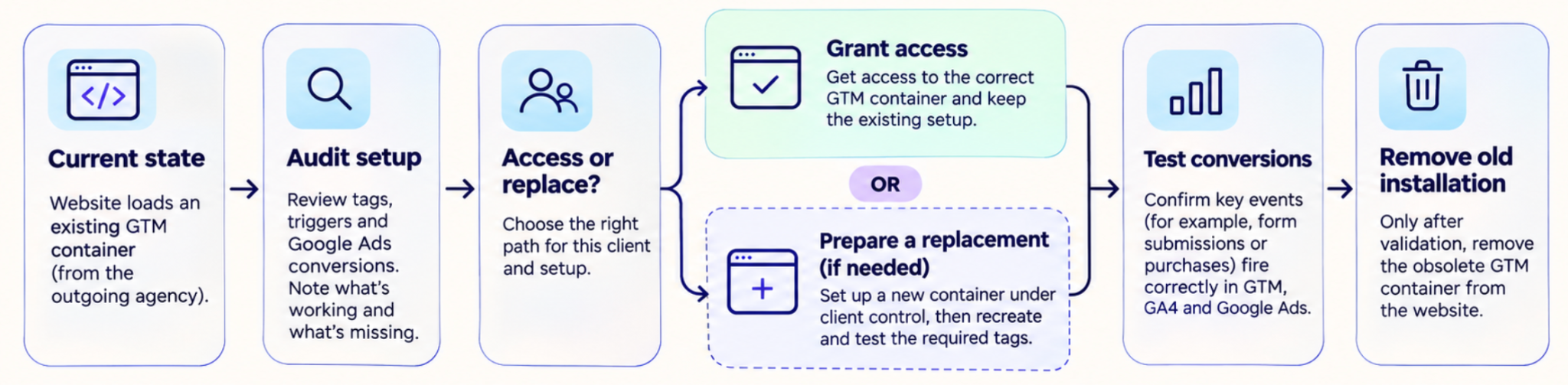
Google's Tag Manager documentation explains how account and container permissions differ. If a client needs help finding or granting the right access, Leadsie's step-by-step guide walks them through the process.
A clean handover doesn't end at permission checks. Matt Nowak, founder and group CEO of Niebieski Lis, described inheriting an analytics account where leadership could still see historical reporting, but the former provider retained key administration rights. Nobody on the client's team could explain how conversions had been configured.
“The main issue was not data loss but lost confidence in the reports. We checked reported results against original records, documented each event, and moved control to the client. This exposed outdated tracking rules that overstated an important conversion.”
That kind of problem can survive for months because dashboards continue to display figures. The new agency needs to establish whether a reported lead corresponds to the action the client actually values. If a campaign is bidding toward an event that fires too often, the first priority is to understand the measurement, not to react to the apparent improvement or decline in performance.
Google Analytics has separate Administrator and Editor roles, and its user-management guidance specifies who can add or change users. Granting the new agency the appropriate property access is necessary for an audit, but someone must also document which events count as key events and how those definitions were validated.
That’s why you should always:
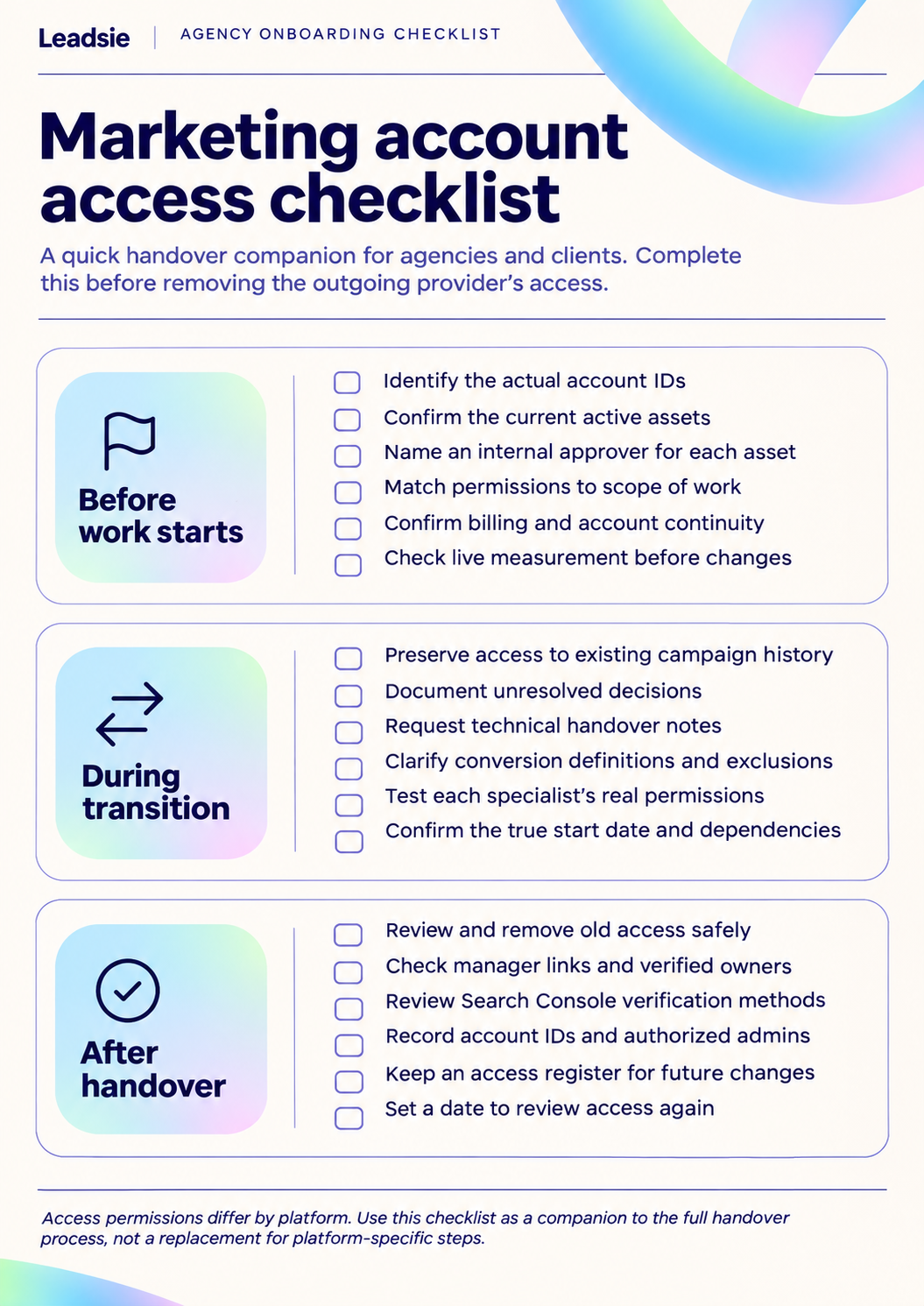
The failures above are different, but each could have been spotted earlier with a more precise handover. The checklist below is designed for the incoming agency and the client's internal owner to complete together, before the outgoing provider's access is removed.
The clinic in Nick Keeping's story eventually got its ads running – but it's easy to see how an incoming agency could end up taking the blame for delays that started long before anyone signed a contract..
Before promising a launch date, find out who can approve access to each account and check that your team has the permissions it needs. If an old supplier still controls the GTM container or nobody can grant access to Google Ads, the client should know how that affects the timeline.
A good handover should leave the agency ready to work and the client in control of its own accounts. Tools like Leadsie can make the access requests easier, especially when you're onboarding several clients at once. The conversations about ownership, permissions and outstanding problems still need to happen, though.
The sooner everyone knows who controls what, the sooner the agency can get on with the work the client is paying for.
Even with a good onboarding process, requesting access can take more time than anyone expects. One client needs instructions for Google Ads, another can't find the right permissions in GA4 and someone else has to contact their previous agency before they can approve anything. The incoming team ends up spending its first few days chasing invitations instead of getting familiar with the accounts.
Not quite ideal.
Leadsie makes that part easier.
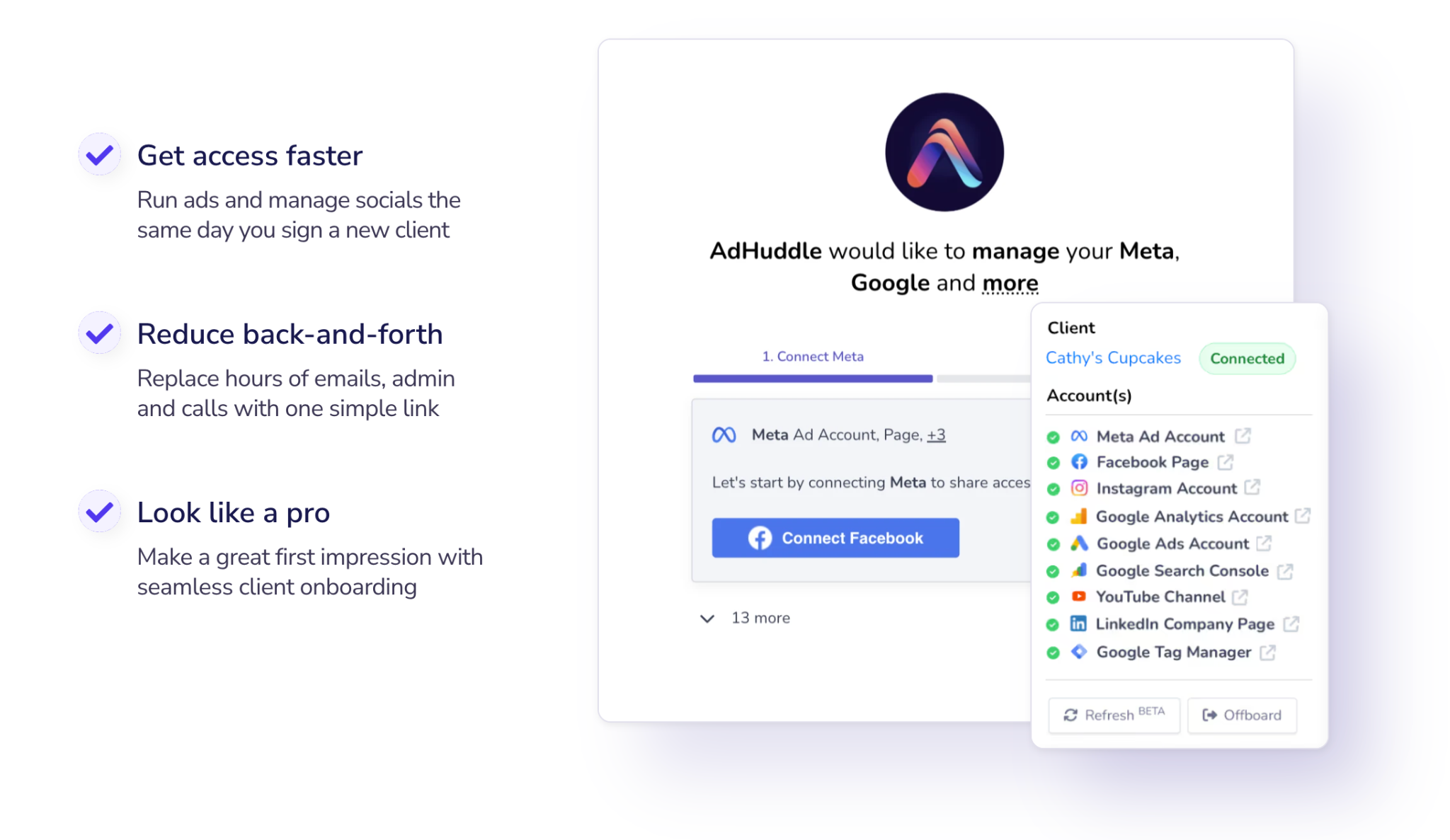
Instead of guiding every client through several platforms, agencies can use Leadsie to request access to Google Ads, GA4, Google Tag Manager and other supported accounts through a single link. Clients grant permissions without sharing passwords, while agencies can choose the access method that suits their setup.
The process is fairly straightforward. Agencies create a Leadsie link, select the accounts and permission levels they need, and send the link to the client. Leadsie also provides platform-specific instructions, including a Meta Business Portfolio access guide, if someone needs extra help.
Absolutely - Leadsie is an official partner with Meta, Google, and more and uses encrypted tokens. It is safer than sharing passwords, and your clients retain ownership of their accounts. Access is granted through the supported platforms' permission systems, with different permission levels available depending on the platform.
Some platforms still require manual or semi-manual steps. Leadsie also can't resolve disputes with outgoing suppliers or recover accounts when nobody has the authority to approve access.
The biggest advantage is a more consistent handover process, with fewer routine requests to chase. Agencies still need to check the permissions they receive and review the account setup before making changes.
Less expensive than whatever you'll need to calm your nerves after the hours spent on walking five clients through Google Ads permissions. Leadsie also offers a free 14-day trial with no credit card required, so you can test it with a real client before deciding whether it's worth paying for.
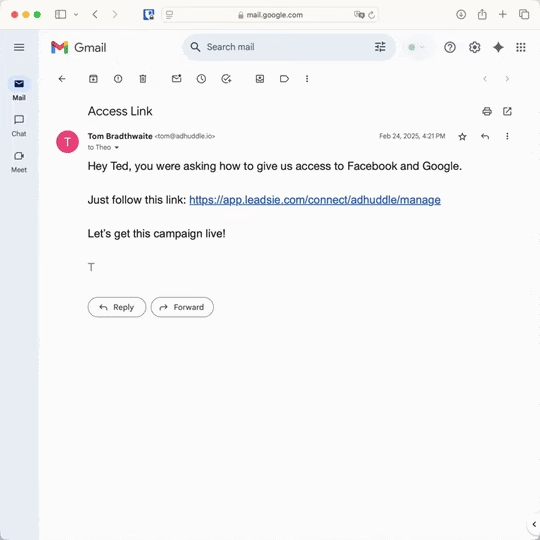
Still sending onboarding emails, sharing PDFs, or jumping on calls just to get access to a client's accounts?
With Leadsie, one secure link handles the entire process. Clients can grant access to Meta, Google, LinkedIn, TikTok, Shopify, and 14+ marketing, advertising, and social media accounts without sharing passwords.
✅ Get access to client accounts in minutes, not days
✅ Replace hours of emails, admin work, and onboarding calls
✅ Scale client onboarding without adding operational overhead
✅ Reduce your agency's turnaround time by over 50%
✅ Start billable work and billing cycles sooner
✅ Create a professional onboarding experience that helps retain clients
✅ Keep access secure with 100% GDPR and CCPA-compliant workflows
💬 "I never want to do onboarding without Leadsie!" - Alyssa, Meta Ads Manager
🎁 Start your free 14-day trial today —no credit card required.
P.S. It's risk-free, and you get to keep your account connections after the trial ends. 🙌

Kinga Edwards has spent the last 15 years working in marketing agencies, and somehow… still loves the industry. She runs Brainy Bees, where she helps B2B companies grow through content, SEO and all sorts of marketing experiments. She’s a big fan of trying new things, has more side projects than she probably needs and rarely runs out of ideas. When she’s not working, she’s usually somewhere around the world or planning where to go next!


Automate your onboarding now & join 1500+ agencies using Leadsie.
14 day unlimited trial
Extend until you onboard a client
No credit card required
Keep access to accounts if you cancel
Approved by Meta, Google & TikTok
Secure & 100% GDPR compliant
Automate your onboarding now & join 1000+ agencies using Leadsie.
Approved by Meta, Google & Tiktok
Keep access to accounts if you cancel
Secure & 100% GDPR compliant
Questions unanswered? Check out our help center or get in touch 🤠


