Clients struggling to share access to their
accounts? Get the access you need in minutes with a free trial of Leadsie.
14 day unlimited free trial
Extend until you onboard a client
No credit card required
Keep access to clients if you cancel


With easy one-link access requests for 13+ platforms your campaigns can go live in minutes, not days. Start free today.
Approved by Meta, Google & Tiktok
Keep access to clients' accounts if you cancel
Secure & 100% GDPR compliant


There are two ways to get verified on Instagram:
1) Subscribe to Meta Verified (from between $14.99 and $499.99 per month). This is a paid monthly subscription for eligible creators and businesses. You don’t need to be a celebrity or have extensive media coverage, but you must complete Meta’s identity and/or business-verification process.
2) Apply for free verification. This legacy route is intended for notable public figures, celebrities, brands, and organizations with significant independent media coverage.
Both methods give you the same blue check, and the badge doesn’t show whether an account is verified through a subscription or Instagram’s free notability-based process.
There’s also no minimum follower requirement.
Which route suits you will therefore depend on whether you meet Instagram’s notability requirements and whether you want the additional features included with a paid subscription.
Meta Verified has different eligibility requirements for individuals, creators and businesses.
Individuals and creators generally need to:
Businesses need an eligible professional (business) account and must be able to confirm their business details with relevant official business documents.
If you plan to subscribe through a business portfolio in Meta Business Suite, instead of the Instagram app, you’ll also need to:
Related article: How to Switch From a Personal to a Professional Instagram Account
In Instagram, open your profile, tap the menu in the top-right corner and look for Meta Verified under Subscriptions. If it isn’t listed, Meta Verified is probably not available for your account or region.
Businesses can also check through Meta Business Suite > Settings > Meta Verified. Depending on availability, you may see the option to subscribe or join a waitlist.
The traditional method of free verification is intended for notable people, brands and organizations.
To be eligible, your account must meet all four of Instagram’s criteria:
There's also no minimum follower count. For example, a smaller account may still qualify if the person or business is genuinely notable.
The blue check means Instagram has confirmed the account is who it says it is: either because the person or brand is notable, or because they've paid for Meta Verified and passed an ID check. It doesn't mean Instagram endorses the account or considers its owner an authority or expert.

The primary benefit of a verified badge is trust. It helps your followers, customers and potential partners identify your genuine account and distinguish it from impersonators.
Meta Verified subscriptions include additional benefits (on top of the verified badge), which vary by account type, subscription plan and country. These may include:
If Instagram approves you for the free, notability badge, you can still choose to subscribe to Meta Verified for additional benefits. This is optional and it won't affect or change your blue check.
Meta Verified is a paid monthly subscription that lets eligible creators and businesses get a blue check without demonstrating public notability or independent press coverage.
Important: Meta Verified is beginning to transition to Meta One, a new subscription service, which will change the plans, prices and features available through Meta Verified. If the change applies to your account, Meta will provide instructions during the transition.
To subscribe to Meta Verified through Instagram:
Open your Instagram profile and tap the menu (☰) in the top-right corner, then select Meta Verified.
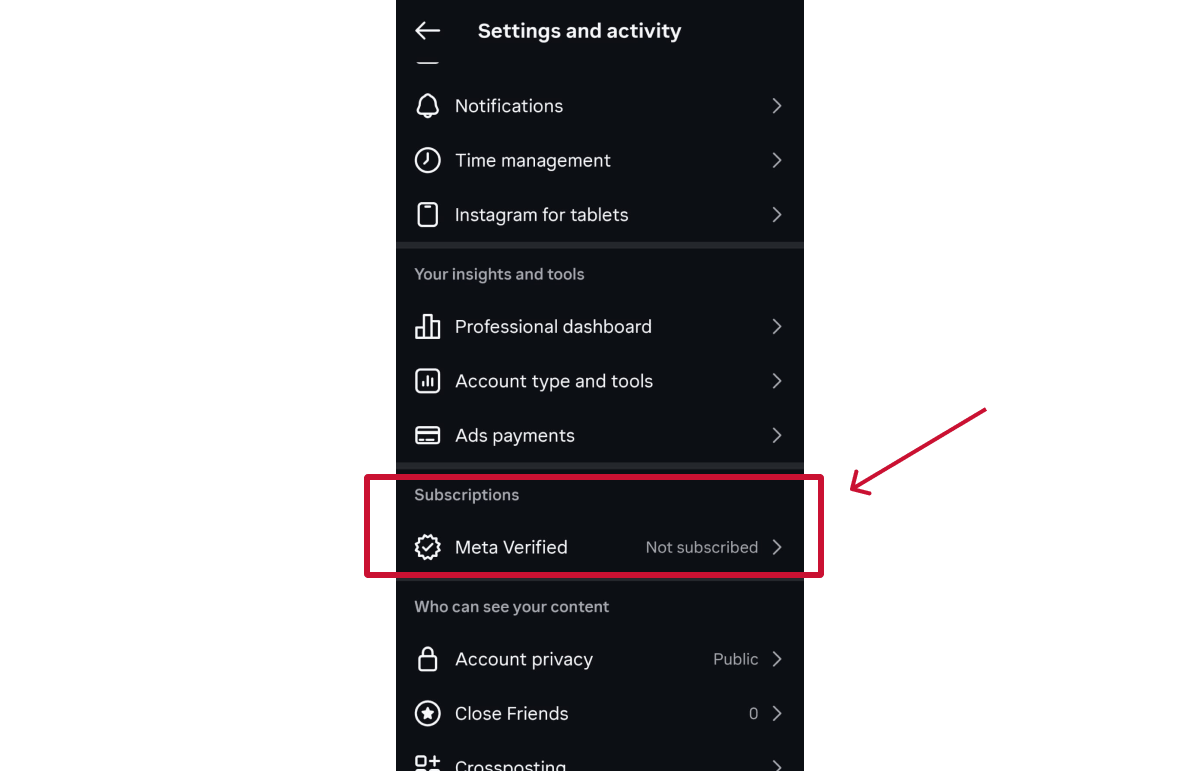
If you don’t see it, go to the Accounts Center and find Meta Verified.
Select the Instagram account you want to verify, then review the plans, prices and benefits available for that account.
If you also have an eligible Facebook profile in the same Accounts Center, you may be offered a discounted subscription covering both profiles.
Meta will show the verification methods available for your account:
Complete the payment if prompted, submit the requested information, and wait for Meta to review your application..
Note: Businesses can also subscribe through Meta Business Suite. This may be more convenient if you already use it to manage multiple Meta assets. See our complete guide to Meta Verified for that step-by-step process.
Meta will review your account and the identity or business information you submitted and you should receive a notification with its decision within 48 hours.
If your application is approved, the blue check will appear on your profile and your subscription benefits will become available.
Otherwise, If Meta needs more information before making a decision, it will prompt you to complete an additional verification step.
Instagram’s free verification route is for notable public figures, creators, brands and organizations. There’s no subscription fee, but you must apply through the Instagram mobile app and provide evidence of your identity and public notability.
Open your Instagram profile and tap the menu (☰) in the top-right corner. Select Professional dashboard, tap the settings icon, then choose Request verification.

Don’t see this option? Look for Account type and tools instead. Depending on your account, it may appear as Creator tools and controls or Business tools and controls.
Enter your full legal name and upload an accepted form of identification, such as a passport, driving licence or national identity card.
If you’re applying for a business, you can provide official documents such as articles of incorporation, a tax filing or a recent utility bill.

Select the category that best describes you or your organization, followed by your country or region. You can also add information about your audience, although this is optional.

Add links to independent news coverage that demonstrates public interest in you or your organization. We recommend you focus on established publications that discuss you in meaningful detail.
Keep in mind that paid articles, sponsored content, press releases and content you published yourself don’t count as independent coverage.
Once you’ve added your strongest evidence, review the application and tap Submit.
Instagram will review your request and send its decision to the Activity section of the app, usually within 30 days. While you’re waiting, don’t submit another application, as applying again before Instagram has made a decision may cancel your existing request.
If Instagram rejects your application, you can apply again after 30 days. Use that time to check that your profile information is complete and consistent, and strengthen your application with better independent evidence of notability.
However, if you simply don’t meet Instagram’s notability requirements, submitting the same application again is unlikely to change the outcome. In that case, Meta Verified may be a more suitable alternative, provided it’s available for your account and you meet its eligibility requirements.
Yes. Instagram may remove your verified badge, or take further action against the account, if you:
Remember: Meta Verified is the only legitimate way to pay for Instagram verification. Be wary of anyone who guarantees approval, sells badges or asks for your password, as using an unauthorized service could put both your badge and account at risk.
If you want Instagram to see you as notable, give people a genuine reason to talk about you. Podcast appearances, expert commentary and industry or community events can raise your profile and lead to independent media coverage. Keep your website and official profiles up to date too, so Instagram can easily connect that coverage to you.
Use a consistent name, profile photo and description across Instagram, your website and other official profiles. Linking to Instagram from your official website and connecting it to your business Facebook Page can also make the relationship easier to confirm.
Related article: How to Link Instagram to a Facebook Page
If your business has a common name, use your bio, website and location details to make it clear which organization the account represents. Instagram shouldn’t have to choose between several unrelated businesses with nearly identical profiles.
There’s no minimum follower count, and a large audience alone won’t secure verification. However, authentic followers, original content and genuine engagement can help demonstrate real public interest.
Hiring a marketing agency, freelancer, or consultant? Giving them access to your marketing accounts shouldn't require endless emails, confusing permission settings, or sharing login credentials (too risky).
If your agency sent you a long PDF and asked you to navigate Meta Business settings and 5 other social platforms to grant them access, send them over to leadsie.com to automate this part of client onboarding for you.
With Leadsie, you can securely share access to Meta, Google, LinkedIn, TikTok, Shopify, and 14+ other marketing platforms via a secure link in just a few clicks.
✅ Approve only the permissions your agency actually needs
✅ No need to share passwords or sensitive login information
✅ Get campaigns, ads, and marketing projects started faster
✅ Keep account access secure with 100% GDPR and CCPA-compliant workflows
💬 "I never want to do onboarding without Leadsie!" - Alyssa, Meta Ads Manager
🎁 Start your free 14-day trial today —no credit card required.
P.S. It's risk-free, and you get to keep your account connections after the trial ends. 🙌

Dov is a freelance writer who prides himself on offering insightful content that will engage your audience and solve their problems. In his free time, he's often found wandering through the Himalayas, sometimes with a hiking pole, but almost definitely with a book.


Clients struggling to share access to their
accounts? Get the access you need in minutes with a free trial of Leadsie.
Approved by Meta, Google & Tiktok
Keep access to accounts if you cancel
Secure & 100% GDPR compliant
Delete your onboarding PDF. Cancel the video call. Just send one link, and get hassle-free access to 13+ platforms in minutes. Start free today.
Approved by Meta, Google & Tiktok
Keep access to clients' accounts if you cancel
Secure & 100% GDPR compliant
Yes. Meta Verified renews monthly until you cancel it. After cancellation, your badge and subscription benefits will normally remain active until the end of your current billing period.
A social media manager can prepare the profile, collect supporting evidence and guide the client through the application. However, the account owner or an authorized business representative will need to provide the required identity or business documents. For Meta Verified, the client is also responsible for the subscription.
Meta Verified may be unavailable because of your country, age, account type, account history or recent profile changes. Availability can also vary by account and subscription rollout.
No. If Instagram verified you through its free, notability-based process, you don’t need a Meta Verified subscription to keep your blue check. You can still subscribe to Meta Verified, but you’ll pay the normal monthly price.
Since you already have a blue check, the reason to subscribe would be for benefits such as enhanced account support, impersonation protection or plan-specific business tools (not for the badge itself).
Questions unanswered? Check out our help center or get in touch 🤠