Clients struggling to share access to their
Mailchimp
accounts? Get the access you need in minutes with a free trial of Leadsie.
14 day unlimited free trial
Extend until you onboard a client
No credit card required
Keep access to clients if you cancel


With easy one-link access requests for 13+ platforms your campaigns can go live in minutes, not days. Start free today.
Approved by Meta, Google & Tiktok
Keep access to clients' accounts if you cancel
Secure & 100% GDPR compliant


Whether you’re a freelancer taking on a new client or a business owner working with a marketing agency, getting (or giving) access to a MailChimp account shouldn't involve sharing passwords. MailChimp is a popular email marketing tool with a free plan of up to 250 contacts, perfect for small businesses and entrepreneurs to test it out before committing.
In this guide, we’ll show you the right way to:
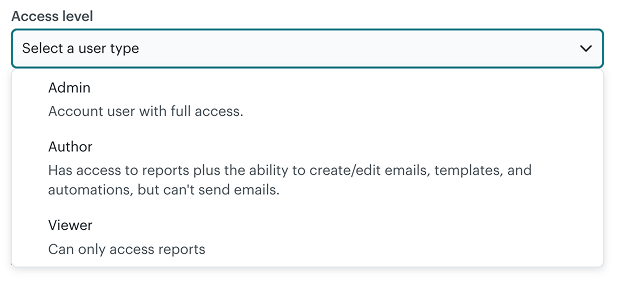
There are five types of users, but the number you may see (or be able to assign) is limited by your MailChimp plan.
Summary of the five user roles in MailChimp:
*The Manager role is the most useful if you work with agencies and freelancers, but it is only available on the Premium plan.
💡Pro tip: Assign users just enough access to do their work, to minimize risk to your account and billing.
Before we start: If you have received a request to access your account via email, you don’t have to follow the steps below. All you have to do is log in to your MailChimp account, select the correct level of permissions (see User types above), and click ‘Grant Access.’
Owners and Admins of a MailChimp account can add new users from their dashboard.
Step 1: Click the people icon near your profile image in the top right corner, or go to 🔗 https://admin.mailchimp.com/settings/users/invite/
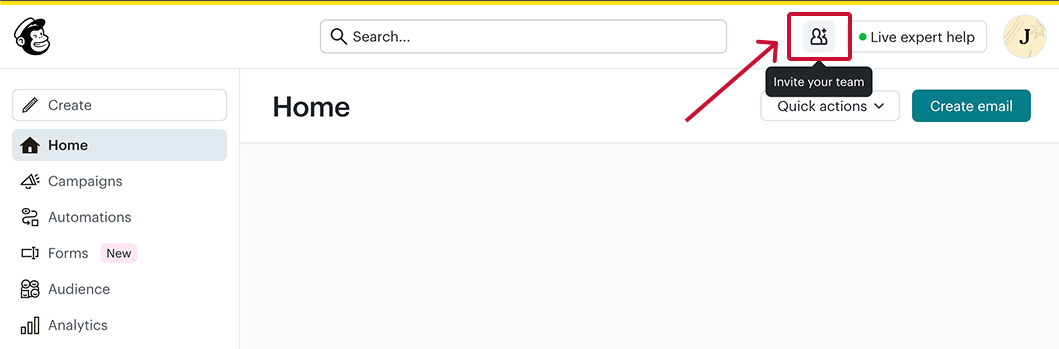
Step 2: Enter the email address and an optional message to the person you want to invite.

Step 3: Select an appropriate level of access for the new user from the dropdown list.
Step 4: Click ‘Invite’
Step 5: Ask the invitee to check their inbox for the invitation email. They will appear in your Users list once they accept.
Before we start: If you’re an email marketer, freelance designer, growth or marketing agency, we suggest you convert to a MailChimp & Co account to unlock extra features and benefits.
Here are the two easiest ways to get access to your client’s MailChimp account:
Becoming a part of the MailChimp & Co program means getting quick access to multiple accounts, no matter what plan you’re on. The best part? It doesn’t count towards
Firstly, join the MailChimp & Co program if you haven’t done so:
Secondly, you’ll need to enable client account access and know the email address of the Owner or Admin of your client's Mailchimp account to request access.
Step 1: Click on your profile picture in the top right corner.
Step 2: Select ‘Add a client’
%20in%20MailChimp%20via%20MailChimp%20and%20Co.png)
Step 3: Enter your client’s email address and a message. We recommend that you state the user role you want them to assign you.

💡Pro tip: To invite multiple clients at once, please add a comma (,) between the email addresses.
Step 3: Click ‘Send’
Step 4: Have your client check their inbox and go through the steps to give you access.
Leadsie is the easiest way to get MailChimp access when onboarding new clients. Save time by avoiding the usual email loops. You won’t have to waste hours fixing the wrong permission levels assigned by cautious clients.
Instead, you can request the right level of access to MailChimp and 31+ marketing, social media, and advertising platforms (including Facebook and Instagram) at once.
%20540px.gif)
Here’s how Leadsie makes the onboarding process simple for your new clients:
Curious to try Leadsie for your agency or freelance business?
Get Leadsie free for 14 days – no credit card needed.
P.S. You get to keep all account connections made during the free trial 🙌
Still sending onboarding emails, sharing PDFs, or jumping on calls just to get access to a client's accounts?
With Leadsie, one secure link handles the entire process. Clients can grant access to Meta, Google, LinkedIn, TikTok, Shopify, and 14+ marketing, advertising, and social media accounts without sharing passwords.
✅ Get access to client accounts in minutes, not days
✅ Replace hours of emails, admin work, and onboarding calls
✅ Scale client onboarding without adding operational overhead
✅ Reduce your agency's turnaround time by over 50%
✅ Start billable work and billing cycles sooner
✅ Create a professional onboarding experience that helps retain clients
✅ Keep access secure with 100% GDPR and CCPA-compliant workflows
💬 "I never want to do onboarding without Leadsie!" - Alyssa, Meta Ads Manager
🎁 Start your free 14-day trial today —no credit card required.
P.S. It's risk-free, and you get to keep your account connections after the trial ends. 🙌

Sarah is a pro at writing articles that accelerate SaaS businesses' organic growth. When she’s not caught up in the thrill of content writing, you’ll find her surfing in the Atlantic Ocean and running her own yoga retreats.


Clients struggling to share access to their
Mailchimp
accounts? Get the access you need in minutes with a free trial of Leadsie.
Approved by Meta, Google & Tiktok
Keep access to accounts if you cancel
Secure & 100% GDPR compliant
Delete your onboarding PDF. Cancel the video call. Just send one link, and get hassle-free access to 13+ platforms in minutes. Start free today.
Approved by Meta, Google & Tiktok
Keep access to clients' accounts if you cancel
Secure & 100% GDPR compliant
It depends on your plan limits. However, if a freelancer or agency with a MailChimp & Co account had connected to yours through their dashboard, these users don’t count towards your maximum user seat.
Owners and Admins can transfer ownership by following these steps:
Requests will expire after 7 days. You can resend a request by clicking the three vertical dots next to the client account name and choosing ‘Resend’
Questions unanswered? Check out our help center or get in touch 🤠