
Automate your onboarding now & join 1500+ agencies using Leadsie.
14 day unlimited free trial
Extend until you onboard a client
No credit card required
Keep access to clients if you cancel


Automate your onboarding now & join 1000+ agencies using Leadsie.
Approved by Meta, Google & Tiktok
Keep access to accounts if you cancel
Secure & 100% GDPR compliant


The standard way to grant Amazon Ads access is to open Administration > Account access and settings > Users, select Invite users, and enter the recipient’s email address. You can then choose their permission level and marketplaces.
Use a different route if your Sponsored Ads account is managed through Seller Central or if an agency wants to connect through its Manager Account. This guide covers all three methods.
But whichever method you use, never share your Amazon username, password, or two-step verification code. Each person should use their own login or an approved Manager Account connection.
This method applies to eligible Sponsored Ads, Amazon DSP, and Advertiser Accounts.
Here’s how to do it step by step:
Sign in at Amazon Advertising @ https://advertising.amazon.com/ and check the account currently selected in the console.
This matters if you manage more than one advertiser, brand, or marketplace. Access is connected to the selected account, so confirm that you can see the expected campaigns before continuing.
From the navigation menu, open Administration, then select Account access and settings.
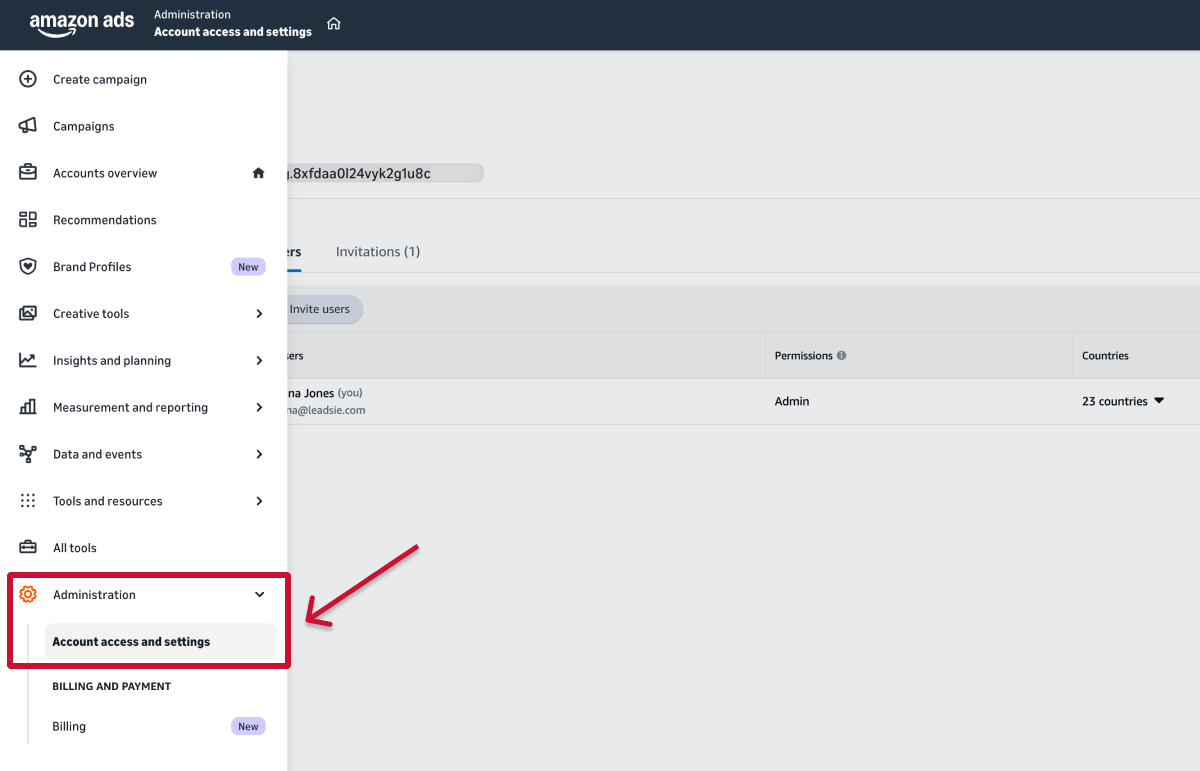
Choose the Users tab to see everyone who currently has access to the account, their permission levels, and any outstanding invitations.
Select Invite users and enter the person’s email address.

Use the email address they will use to sign in to Amazon Ads. Ask the recipient to confirm it beforehand, particularly if they have separate personal, company, or agency Amazon accounts.
Assign the user one of the available permission levels:
Apply the principle of least privilege: give the person the lowest level of access that allows them to do their job. For example, campaign managers will generally need Editor access, but they do not usually need to be account administrators.
If Amazon displays country or marketplace controls, select only the markets the person needs to access. Someone managing campaigns in the United States, for example, may not need access to your United Kingdom or European advertising activity.
Review the email address, permission level, account, and selected marketplaces. When everything is correct, select Invite users to send the invitation.

The recipient must accept the email invitation within 14 days to access the account.
If they cannot find it, go to Account access and settings > Invitations, open Actions beside their name, and select Resend invite.
After they accept, ask them to confirm that they can see the correct advertiser account and campaigns. An administrator can later change or remove their access from the Users tab.
An account administrator can change or remove a user’s permissions at any time.
If the user is the account’s only administrator, assign Admin access to another trusted user before removing or downgrading them. The account must retain at least one administrator.
If you advertise through an Amazon seller account and have Admin access, you can also invite users from the User Permissions page in Seller Central.
Avoid granting unrelated permissions for orders, inventory, payments, or account administration unless they are required for the person’s role.
Note: If Seller Central displays separate options, select Authorized Partner for an external agency or Employee for an internal team member.
A Manager Account lets an agency manage multiple clients’ Amazon Ads accounts from one place. If your agency uses one, you do not need to invite its team members individually; the agency can request to link your advertiser account instead.
Here’s how it works:
1. Find your Account ID under Administration > Account access and settings. Also note the marketplace displayed above the Account ID. This is the country or region where your advertising campaigns run, such as United States or United Kingdom.
.png)
2. Send the ID and marketplace (country) to the agency.
3. The agency submits an access request from its Manager Account.
4. An administrator of your advertiser account reviews the request and selects the appropriate access level.
5. After approval, confirm that the agency can access the correct account and campaigns.
Linking an account gives the agency access through its Manager Account, and does not require you to share your Amazon login details.
Unlinking removes the Manager Account’s access to your advertiser account. If someone from the agency was also invited separately as an individual user, remove that user from the Users tab as well.
Most Amazon Ads access problems involve the wrong account, marketplace, login email, or permission level. Here’s what to check.
Confirm that the user signed in with the same email address that received the invitation. If they use multiple Amazon logins, they may have opened the wrong advertising profile. They should also check the account selector for the shared advertiser account.
Check that you granted access to the correct advertiser account and marketplaces. Campaigns associated with another brand, country, or advertising profile will not appear.
If the user has Seller Central or partner access, confirm that they were also granted the necessary advertising permissions. General account access does not always include access to the Advertising Console.
Check their permission level under Account access and settings > Users. A Viewer can inspect campaigns and reports but cannot make changes.
Assign Editor access if the user needs to manage campaigns. If they have Custom access, confirm that Campaign Manager is included in their permissions.
Confirm that the agency requested access to the correct Account or Advertiser ID and marketplace. The agency should also check that it has selected your advertiser account, not only its parent Manager Account, before opening Campaign Manager.
If the account is linked correctly but remains inaccessible, review the agency’s assigned access level.
Sign out and back in, try a private browsing window, and clear the browser’s cache and cookies. Temporarily disabling a VPN or trying another browser may also resolve session-related problems.
If the account and permissions are correct but access still fails, contact Amazon Ads Support and provide the affected email address, advertiser account ID, marketplace, and a screenshot of the error.
Hiring a marketing agency, freelancer, or consultant? Giving them access to your marketing accounts shouldn't require endless emails, confusing permission settings, or sharing login credentials (too risky).
If your agency sent you a long PDF and asked you to navigate Meta Business settings and 5 other social platforms to grant them access, send them over to leadsie.com to automate this part of client onboarding for you.
With Leadsie, you can securely share access to Meta, Google, LinkedIn, TikTok, Shopify, and 14+ other marketing platforms via a secure link in just a few clicks.
✅ Approve only the permissions your agency actually needs
✅ No need to share passwords or sensitive login information
✅ Get campaigns, ads, and marketing projects started faster
✅ Keep account access secure with 100% GDPR and CCPA-compliant workflows
💬 "I never want to do onboarding without Leadsie!" - Alyssa, Meta Ads Manager
🎁 Start your free 14-day trial today —no credit card required.
P.S. It's risk-free, and you get to keep your account connections after the trial ends. 🙌

Nina is an SEO content specialist with expertise in B2B SaaS. She helps businesses increase organic traffic with strategic, high-quality content. Outside of work, you’ll find her sailing somewhere in the Mediterranean.


Automate your onboarding now & join 1500+ agencies using Leadsie.
14 day unlimited trial
Extend until you onboard a client
No credit card required
Keep access to accounts if you cancel
Approved by Meta, Google & TikTok
Secure & 100% GDPR compliant
Automate your onboarding now & join 1000+ agencies using Leadsie.
Approved by Meta, Google & Tiktok
Keep access to accounts if you cancel
Secure & 100% GDPR compliant
Yes. Editor access generally allows someone to create and manage campaigns without changing payment settings or managing users. For Sponsored Ads accounts, Editors may still be able to view billing history.
Editor access is usually sufficient for an agency managing campaigns. Only grant Admin access if the agency also needs to manage users, account links, payment settings, or other account-level controls.
Invite an individual user if only one person needs access. If the agency manages clients through an Amazon Ads Manager Account, linking your advertiser account is generally more convenient because the agency can manage its own team access.
Not for a standard Manager Account access request. The agency normally needs your Account or Advertiser ID and marketplace. A merchant token is used to connect an Amazon seller account to an Advertiser Account and is not a substitute for your advertising account ID.
Questions unanswered? Check out our help center or get in touch 🤠


